
BrowserScan vs BrowserLeaks: Which Privacy Tool Wins in 2026?
BrowserScan vs BrowserLeaks: Which Privacy Tool Wins in 2026?
When you search for a way to test your online privacy, two names keep appearing: BrowserScan and BrowserLeaks. One promises a full-featured security dashboard; the other dives deep into the raw data your browser leaks. But which tool actually fits your needs? In this detailed comparison, we’ll examine their feature sets, depth of analysis, ease of use, and ideal use cases—so you can stop guessing and start protecting your digital footprint with confidence.
What is BrowserScan?
BrowserScan vs BrowserLeaks: Which Privacy Tool Wins in 2026? product interface and feature overview.
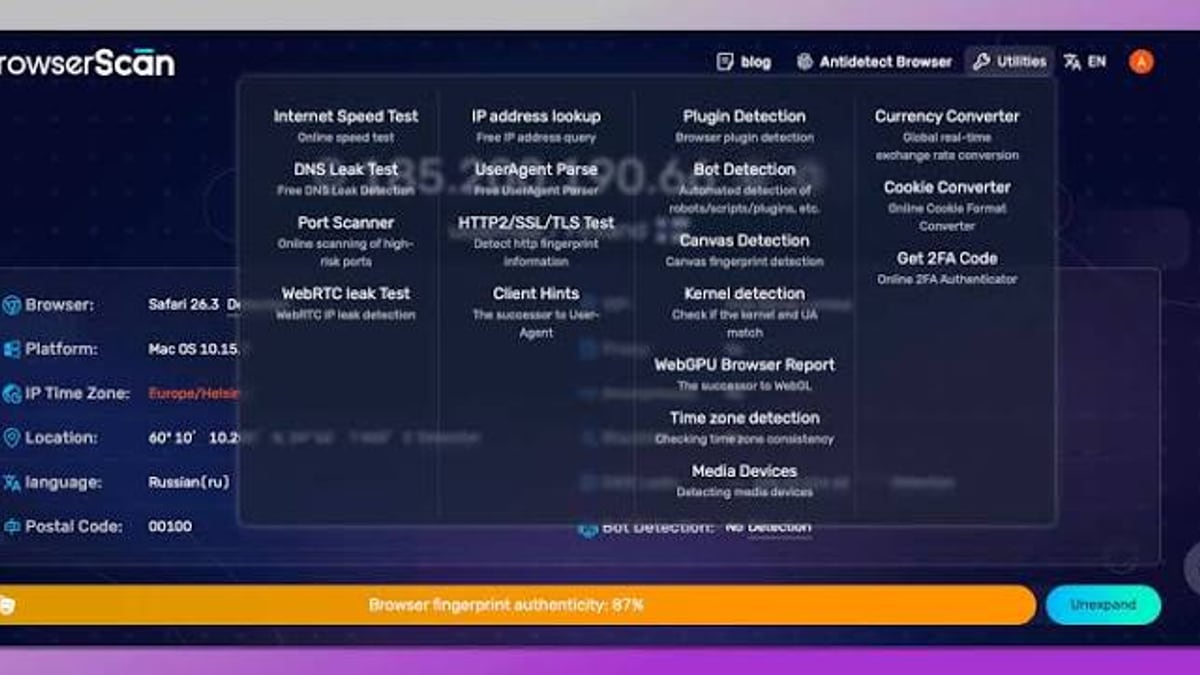
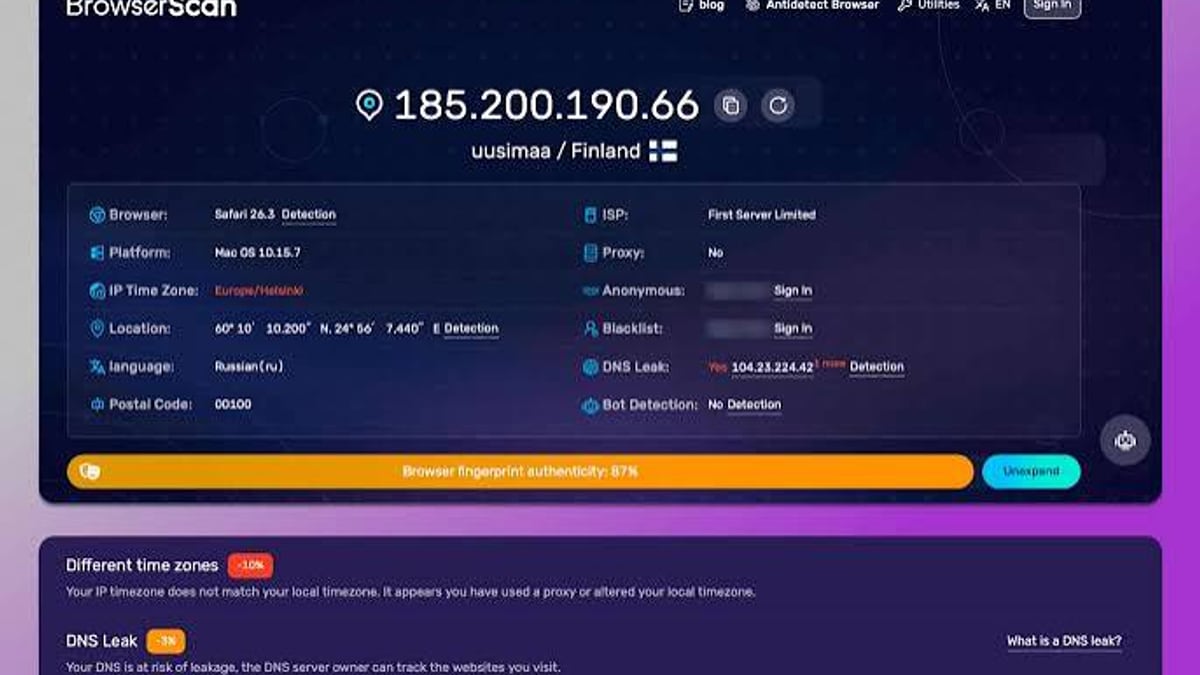
BrowserScan is a comprehensive online privacy and security suite built for users who want to detect and prevent browser fingerprinting, IP exposure, DNS leaks, WebRTC leaks, and more—all from a single interface. No plugins, no complicated setup. It’s designed for privacy-conscious individuals, VPN users, security researchers, and IT professionals who need an all-in-one privacy checker that delivers clear, actionable results.
Core features include:
- Browser fingerprint detection with an authenticity score that shows how real your browser profile looks.
- DNS leak test and WebRTC leak test (using multiple STUN servers for reliable detection).
- IP address lookup that pulls geolocation and blacklist status from multiple data sources (ip-api, IPinfo, IP2Location, db-ip, IPQuery).
- Port scanner (powered by nmap) to uncover open high-risk ports.
- Internet speed test, user agent parser, and bot detection.
- Additional utilities like a cookie converter, 2FA code generator, and currency converter.
BrowserScan positions itself as the go-to tool for anyone who wants to see exactly what websites see—and whether their privacy setup holds up—without needing a degree in network engineering.
What is BrowserLeaks?
BrowserScan vs BrowserLeaks: Which Privacy Tool Wins in 2026? - supporting product research image 2.
BrowserLeaks is an established suite of tools that evaluates browser security and privacy through a technical lens. Originally built for developers and security specialists, it exposes every detail a website can extract—IP, canvas fingerprint, WebGL report, font fingerprint, TLS handshake signatures (JA3/JA4), client hints, and much more.
Unlike many checkers, BrowserLeaks doesn’t wrap its output in a friendly score. It shows you exactly what the server sees, down to entropy values, codec capabilities, and W3C specification references. This approach has made it a go-to reference for deep forensic audits of browser identity.
In an in-depth 2026 review, BrowserLeaks was described as “the gold standard” for technical users precisely because it refuses to oversimplify. It captures everything—canvas rendering variations, audio stack behavior, even TCP/IP fingerprinting—giving you a realistic, unpolished view of your privacy leaks.
Head-to-Head Feature Comparison
Both tools overlap on core leak tests, but their philosophies diverge sharply when it comes to scope, depth, and extra capabilities. Here’s a direct side-by-side look:
| Feature | BrowserScan | BrowserLeaks |
|---|---|---|
| Browser Fingerprint | Yes, with authenticity score & visual breakdown | Yes, raw data for canvas, WebGL, audio, font, etc. |
| DNS / WebRTC Leak Test | Yes, multiple STUN servers for reliability | Yes, standard WebRTC test |
| IP Lookup & Geolocation | Yes, multiple IP data providers + blacklist check | Yes, IP display, reverse DNS, whois, timezone |
| Port Scanner | Yes (nmap-powered) | No |
| Internet Speed Test | Yes | No |
| User Agent Parser | Yes | No (manual headers inspection) |
| Bot Detection | Yes (automated bot/script detection) | No |
| TLS / JA3 / JA4 Fingerprint | Available (HTTP2/SSL/TLS test) | Yes, dedicated TLS Client test with extended details |
| Client Hints Analysis | Yes | Yes |
| Extra Utilities | Cookie converter, 2FA code generator, currency converter, gyroscope visualizer | None |
| Ease of Use | Beginner-friendly, instant readability | Requires technical expertise to interpret raw results |
Feature comparison: BrowserScan packs more everyday privacy utilities into one dashboard, while BrowserLeaks excels at raw technical depth.
Ease of Use and User Experience
BrowserScan’s interface is built for immediacy. After a single page load, you see your IP, hardware fingerprint authenticity score, and a clear breakdown of any detected leaks. The authenticity score—a single percentage—gives you an at-a-glance understanding of whether your browser profile appears real or suspicious. For users managing multiple anti-detect browser profiles or simply verifying a VPN, that simplicity is a massive time-saver.
BrowserLeaks, by contrast, expects you to know what you’re looking for. Its tools are spread across multiple pages, and the output comes in dense tables, hex values, and statistical distributions. For a security researcher who wants to examine canvas entropy or JA4 fingerprints in granular detail, that’s perfect. For someone who just wants to know if their WebRTC is leaking their real IP, it can feel overwhelming.
Accuracy and Depth of Detection
BrowserLeaks’ strength is its refusal to filter or summarize. In the canvas fingerprint test, you’ll see the exact rendered image and its hash; in the WebGL report, the unmasked vendor and renderer strings; in the audio context test, the raw float values returned by your sound hardware. This makes it unparalleled for detecting subtle inconsistencies that a scoring algorithm might smooth over.
BrowserScan takes a different approach: it integrates detection into a holistic view. Its WebRTC leak test polls multiple STUN servers, reducing the chance of a false negative when a single server is unreachable. Its IP lookup cross-references several geolocation databases, giving you a more resilient picture of where the internet thinks you are. While it may not expose the same raw canvas entropy values as BrowserLeaks, it does catch the same fundamental leaks and adds bot detection that BrowserLeaks simply doesn’t offer. For the vast majority of users, BrowserScan’s detection is both powerful and significantly more digestible.
To improve IP intelligence even further, you can consult our guide to the top 10 IP geolocation APIs and combine them with BrowserScan’s built-in multi-source approach.
Privacy and Data Handling
Both platforms take user privacy seriously. BrowserScan does not collect personal data or store fingerprints. BrowserLeaks’ privacy policy explicitly states it does not collect personal data, store user fingerprints, or set non-essential cookies—tests run locally in your browser. You can safely use either without adding to your digital footprint.
When to Choose BrowserScan
BrowserScan vs BrowserLeaks: Which Privacy Tool Wins in 2026? - supporting product research image 3.
- You need a fast, single-dashboard health check for your browser’s privacy.
- Bot detection is critical for multi-accounting or automated testing.
- You prefer a clear authenticity score that tells you instantly whether your fingerprint passes as a real device.
- You want extra tools like port scanning, 2FA generation, or cookie conversion without leaving the platform.
- You’re new to online privacy testing and want actionable insights without a steep learning curve.
BrowserScan also shines in head-to-head comparisons where bot detection and fingerprint scoring matter—explore our detailed BrowserScan vs Pixelscan comparison to see how it stacks up.
When to Choose BrowserLeaks
BrowserScan vs BrowserLeaks: Which Privacy Tool Wins in 2026? - supporting product research image 4.
- You are a security researcher, penetration tester, or developer who needs to dissect every layer of a browser’s fingerprinting surface.
- You must audit canvas/WebGL/audio fingerprints, JA3/JA4 TLS fingerprints, and client‑side entropy without any abstraction.
- You prefer tools aligned with W3C specifications and academic research for formal security assessments.
- You enjoy manually correlating IP headers, HTTP/2 frames, and system time offsets to find subtle leaks.
Related reading
- Pixelscan Review 2026: Fingerprint & Leak Test Analysis - Honest review of Pixelscan: see how it detects browser fingerprints, IP leaks, DNS & WebRTC issues. Learn setup, ideal users, limitations, and alternatives.
- Top 10 IP Geolocation APIs in 2026: Expert Reviews & Comparison - Discover the 10 best IP geolocation APIs for 2026. Compare features, pricing, accuracy, and use cases to find the right API for content personalization, fraud prevention, and compliance.
- How to Combine BrowserScan & IP-Lookup.net for Total Privacy - Master the combined power of BrowserScan and IP-Lookup.net for leak testing and IP intelligence. Step-by-step guide with real-world examples.
Sources and further reading
- Browserleaks Review 2026: The Ultimate Guide to Testing Your Digital Privacy - Master BrowserLeaks to audit your digital fingerprint! 🛡️ Test for IP leaks, WebRTC, and browser identity. Secure your online presence now! 🚀
FAQ
Is BrowserScan better than BrowserLeaks for everyday privacy checks?
Yes. BrowserScan consolidates all common leak tests into one interface and gives you an immediate authenticity score. For daily VPN verification or a quick browser audit, it’s far more practical than navigating multiple BrowserLeaks pages.
Can BrowserLeaks detect more fingerprints than BrowserScan?
BrowserLeaks provides deeper technical detail on certain fingerprints—like canvas entropy and audio context data—that BrowserScan summarizes into a score. BrowserScan covers the same broad categories, so the detection of a leak is comparable, but BrowserLeaks reveals more raw material for forensic analysis.
Are both tools safe to use?
Absolutely. Testing is performed client-side, and neither service stores fingerprints or personal data. Always check the tool’s privacy policy if you have concerns, but both are widely trusted in the privacy community.
Conclusion: Which One Should You Use?
BrowserScan and BrowserLeaks aren’t enemies; they’re two sides of the same privacy coin. BrowserScan is the practical, everyday companion that bundles 17+ privacy utilities into one intuitive, beginner-friendly dashboard. It tells you in seconds whether your VPN is leaking, your fingerprint looks real, and your ports are exposed. BrowserLeaks is the laboratory-grade instrument for those who need to strip away every abstraction and see the raw technical truth.
If you value speed, actionable clarity, and a toolkit that goes far beyond fingerprints, BrowserScan is the clear winner. It’s the tool we recommend at BrowserScan for most users—and the one we reach for when testing new configurations. But if you live in the data and love tracing how a browser constructs its identity byte by byte, keep BrowserLeaks in your arsenal. For the deepest fingerprint comparisons, also check our side-by-side breakdown of BrowserScan vs Pixelscan to understand where each tool excels.