
Cloud VPN Explained: How It Works & How to Verify It
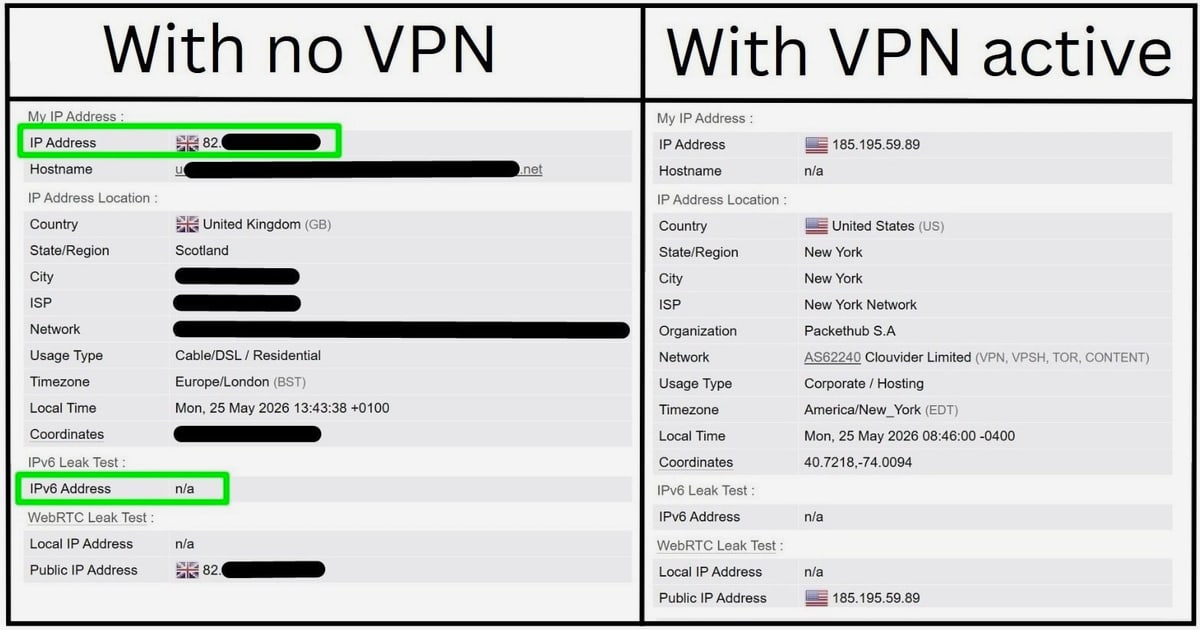
Cloud VPN Explained: How It Works and How to Verify It
A cloud VPN moves the VPN gateway out of your office closet and into a provider's infrastructure. Instead of maintaining a physical appliance, you connect users, devices, and branch networks to a service that handles authentication, routing, and policy in the cloud. That shift changes how you deploy, scale, and — importantly — how you verify that the tunnel is actually protecting what it claims to protect.
This article explains what a cloud VPN is, how it compares with traditional VPN setups, where it fits in a Zero Trust model, and how to test your own connection for leaks using free browser-based tools.
What Is a Cloud VPN?
A cloud VPN is a VPN service delivered from cloud infrastructure rather than from on-premises hardware. The provider hosts the gateways, manages the control plane, and often bundles identity-aware access policies, logging, and threat filtering. You typically connect through a lightweight client or a site-to-site tunnel.
Two common flavors exist:
- Remote-access cloud VPN — individual users install a client (for example, OpenVPN Connect or the Cloudflare One Client) and authenticate to reach private apps or the public internet through the provider's network.
- Site-to-site cloud VPN — routers, virtual machines, or cloud connectors join your networks to the provider's fabric using IPsec or OpenVPN, so branch offices and cloud VPCs communicate without dedicated hardware.
Vendors describe this category in different ways. OpenVPN's CloudConnexa markets itself as a Zero Trust cloud VPN service with no hardware and no complex setup, while Cloudflare One Client (formerly WARP) is distributed as a downloadable client that connects devices to Cloudflare's Zero Trust network. Both illustrate the same core idea: the tunnel endpoint lives in someone else's cloud, and you consume it as a service.
How a Cloud VPN Differs From a Traditional VPN
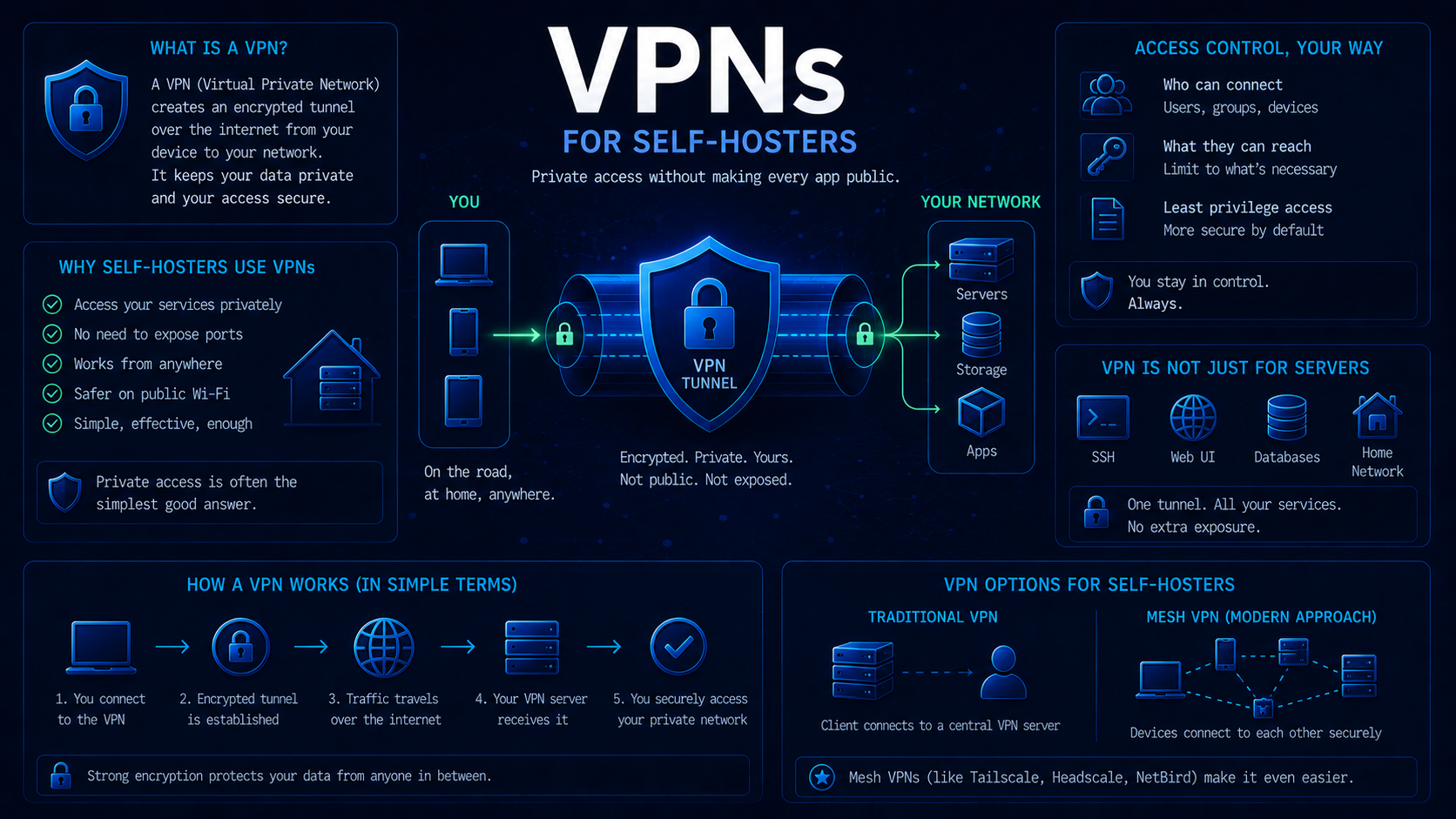
Cloud VPN Explained: How It Works & How to Verify It - How a Cloud VPN Differs From a Traditional VPN.
| Dimension | Traditional VPN | Cloud VPN |
|---|---|---|
| Gateway location | On-prem appliance or self-hosted server | Provider cloud infrastructure |
| Deployment time | Days to weeks (hardware, licensing, config) | Minutes to hours |
| Scaling | Buy and rack more hardware | Add users or connectors on demand |
| Policy model | Often network-centric (IP/subnet rules) | Frequently identity- and device-aware |
| Maintenance | Your team patches and monitors | Provider handles uptime and updates |
| Visibility | Depends on your own logging stack | Usually built-in dashboards and log streaming |
Traditional VPNs still make sense when you need full control over the endpoint, have strict data-residency rules, or already own the hardware. Cloud VPNs tend to win when you have a distributed workforce, fast-changing access needs, or limited IT staff.
Cloud VPN in a Zero Trust Model
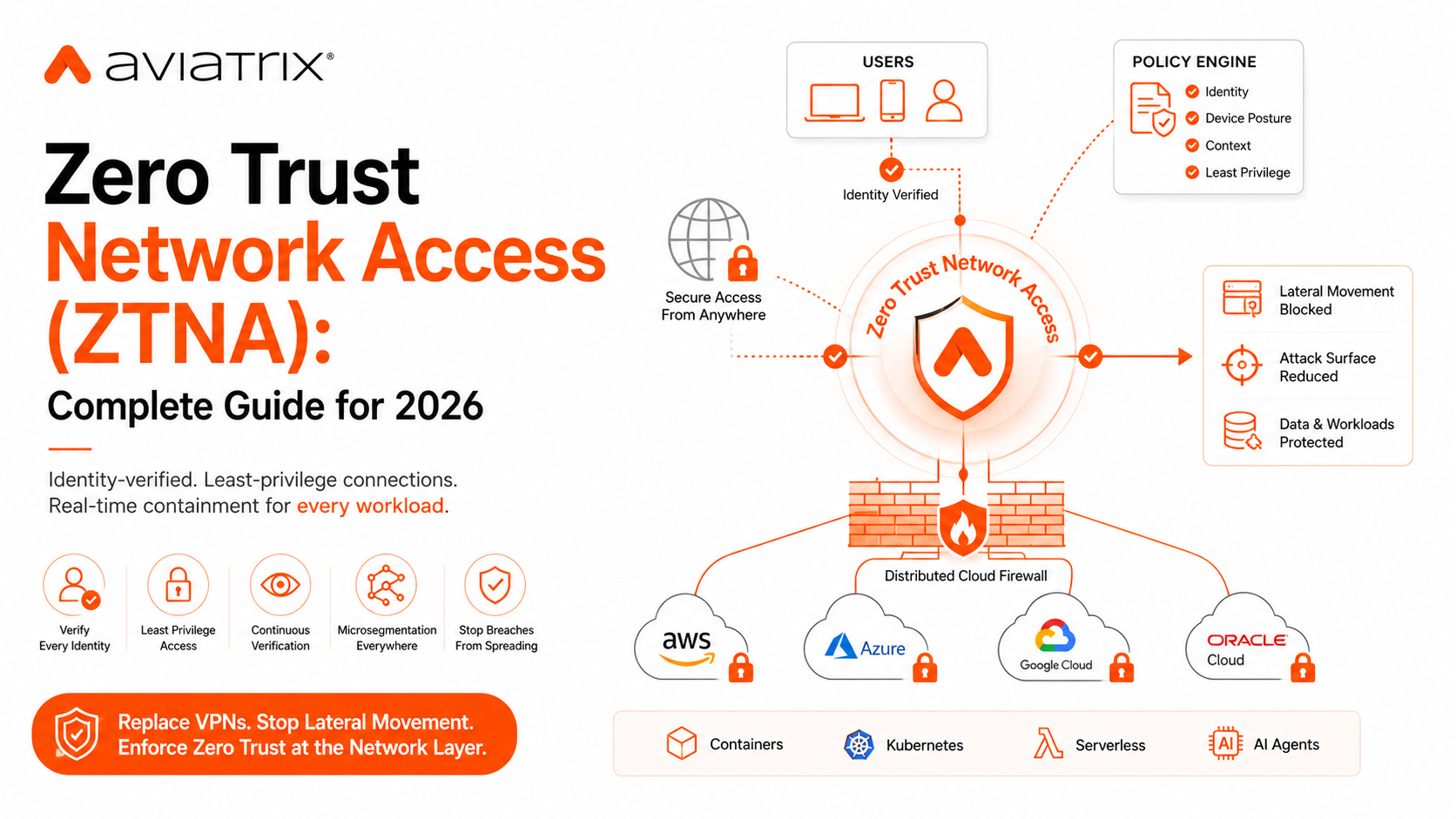
Cloud VPN Explained: How It Works & How to Verify It - Cloud VPN in a Zero Trust Model.
Many cloud VPN products now sit inside a Zero Trust framework. Instead of granting broad network access once a user authenticates, Zero Trust evaluates identity, device posture, and context for every request. OpenVPN's CloudConnexa, for instance, advertises device posture checks, micro-segmentation to isolate apps, and concealment of internal routes, plus web filtering and intrusion detection. Cloudflare's Zero Trust documentation describes similar capabilities, including device posture checks, mandatory authentication, and dashboard-managed client versions.
For users, the practical difference is that access decisions happen continuously rather than only at login. For administrators, it means policy lives in a dashboard instead of a firewall rule set.
Where Cloud VPNs Fall Short
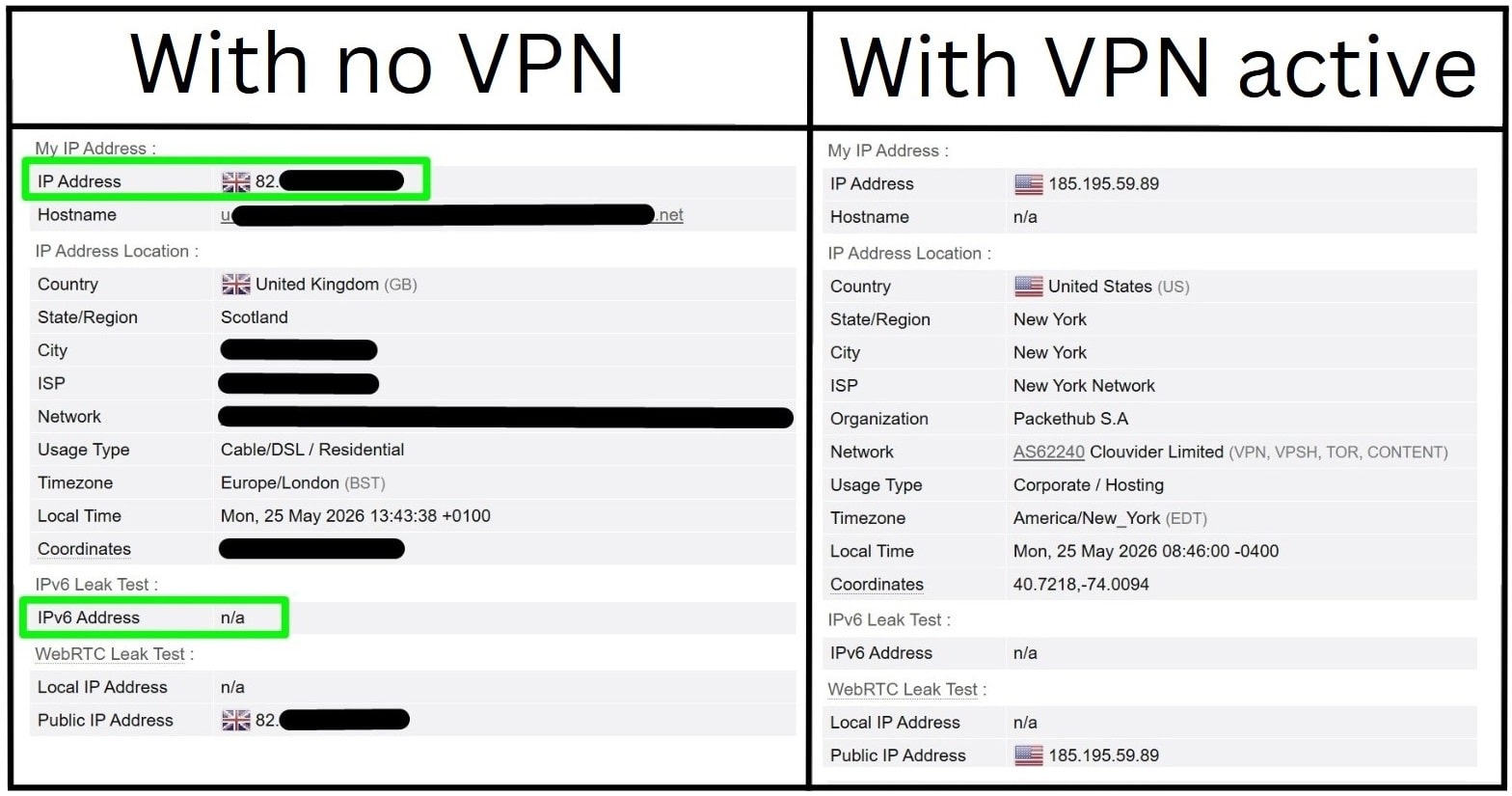
Cloud VPN Explained: How It Works & How to Verify It - Where Cloud VPNs Fall Short.
A cloud VPN is not automatically private or leak-free. Common issues include:
- DNS leaks — queries resolve through your ISP instead of the tunnel, revealing browsing destinations.
- WebRTC leaks — browsers can expose local or public IP addresses through WebRTC APIs even when a VPN is active.
- Split tunneling mistakes — traffic that should be tunneled bypasses the VPN entirely.
- Client misconfiguration — outdated clients, broken reauthentication, or failed posture checks can silently drop protection.
- Fingerprint exposure — even with a hidden IP, browser fingerprints can still identify you.
These are exactly the gaps that a quick verification pass can catch.
How to Verify Your Cloud VPN Connection
You do not need enterprise tooling to check the basics. Browser-based diagnostics cover most of the common failure modes.
1. Confirm your visible IP and location
Run an IP address lookup to see the IP your traffic actually exits from, along with geolocation, ISP, and any proxy or hosting flags. If the result shows your home ISP instead of your VPN provider, the tunnel is not routing your traffic. Understanding why results vary by address family helps too — see IPv4 vs IPv6 geolocation for how each is resolved and why accuracy differs.
2. Test for DNS and WebRTC leaks
A DNS leak test shows which resolvers are answering your queries. A WebRTC leak test reveals whether your browser is exposing a real or local IP through peer-connection APIs. Both are standard checks for anyone relying on a VPN for privacy, and both are available as free browser tools on BrowserScan.
3. Check your browser fingerprint
Hiding an IP does not hide a browser. Fingerprint analysis looks at canvas rendering, user agent strings, client hints, and other signals that can single you out. BrowserScan's fingerprint detection and canvas fingerprint checker help you see how identifiable your browser is, and its user agent parser helps developers debug mismatched or spoofed strings.
4. Scan for exposed services
If you run your own gateway or connector, an Nmap-powered port scanner can reveal services you did not intend to expose. This matters more with cloud VPNs because connectors often sit on public-facing VMs.
5. Re-test after every change
Client updates, policy edits, and network changes can all reintroduce leaks. Cloudflare's release notes, for example, document fixes for DNS query failures, reconnect issues after sleep, and registration problems — all of which could affect connectivity and, indirectly, whether traffic is protected. Re-run your checks after any update. If you automate gateways or fleets, the workflow in VPN automation and leak tests covers how to keep verification continuous.
Cloud VPN vs Self-Hosted VPN: Which Should You Choose?
Choose a cloud VPN if:
- You support remote workers across many locations.
- You want identity- and device-aware access without building it yourself.
- You prefer operational overhead to sit with a vendor.
- You need fast onboarding and elastic scaling.
Choose a self-hosted VPN if:
- You must control every byte of the endpoint and its logs.
- You have regulatory constraints on where traffic terminates.
- You already run the infrastructure and have the staff to maintain it.
- You need deep customization that managed services do not allow.
Many organizations end up with a hybrid: a cloud VPN for the general workforce and a self-managed tunnel for a small set of sensitive systems.
Common Cloud VPN Mistakes to Avoid
- Assuming the VPN is working because the client says "connected." Verify with an independent IP and DNS check.
- Ignoring IPv6. If your VPN only tunnels IPv4, IPv6 traffic may bypass it entirely.
- Skipping fingerprint hygiene. A consistent, common browser profile is less identifying than a unique one.
- Forgetting mobile and IoT devices. Phones, tablets, and connected devices often run separate clients with separate policies.
- Never reviewing logs. Access and DNS logs are where misconfigurations surface first.
Related reading
- Location API Explained: Geolocation, IP Lookup & Privacy - Learn how location APIs work: browser geolocation vs IP geolocation, code examples, accuracy limits, privacy risks, and how to verify what your IP reveals.
- IPWHOIS.io Review: Free IP Geolocation API Explained - IPWHOIS.io is a free IP geolocation and lookup API. Learn endpoints, rate limits, pricing tiers, and how to verify the data it returns.
Sources and further reading
- Cloud VPN Services | CloudConnexa | OpenVPN - CloudConnexa is a cloud VPN service that brings Zero Trust security to your business network — easy to deploy, with no hardware and no complex setup.
- Download Cloudflare One Client stable releases · Cloudflare One docs - Reference information for Download Cloudflare One Client stable releases in Zero Trust.
FAQ
Is a cloud VPN the same as a consumer VPN? No. Consumer VPNs primarily hide your IP from websites. Cloud VPNs are business-oriented services that connect users and networks to private resources, usually with identity, device, and policy controls.
Does a cloud VPN hide my IP address? It depends on configuration. Remote-access clients typically route traffic through the provider's gateways, so websites see the provider's IP. Split tunneling or misconfigured routes can expose your real IP.
How do I know if my cloud VPN is leaking? Run an IP lookup, a DNS leak test, and a WebRTC leak test. If any of them shows your ISP, your home IP, or an unexpected resolver, you have a leak to fix.
Can a cloud VPN replace a firewall? Not usually. Many cloud VPNs include filtering and intrusion detection, but most organizations still keep a firewall for perimeter and internal segmentation.
Do I need a client installed for a cloud VPN? For remote access, yes — clients like OpenVPN Connect or the Cloudflare One Client are standard. Site-to-site connections may instead use routers, VMs, or connectors.
How often should I test my VPN setup? After every client update, policy change, or network change, and periodically as a baseline. Automated checks are ideal for fleets.
Conclusion
A cloud VPN replaces hardware with a service, which makes deployment faster and scaling easier — but it does not remove the need to verify that the tunnel is doing its job. Confirm your exit IP, test for DNS and WebRTC leaks, review your browser fingerprint, and re-check after every change. Free browser-based tools make that verification quick enough to do routinely, and routine verification is what turns a "connected" status into actual protection.