
IT Security Operations: SecOps Guide, Tools & Best Practices
IT Security Operations: How SecOps Detects, Responds, and Prevents Threats
IT security operations is the discipline that keeps an organization's defenses running every hour of every day. It combines the people, processes, and technology that continuously monitor systems, hunt for threats, contain incidents, and harden the environment before the next attack lands. This guide explains how modern security operations works, what a security operations center (SOC) actually does, which tools matter, and how to verify your own exposure with free browser-based checks.
What Is IT Security Operations?
IT Security Operations: SecOps Guide, Tools & Best Practices - What Is IT Security Operations?.
Security operations, often shortened to SecOps, is the complete set of capabilities an organization uses to protect its assets from cyber threats and maintain cyber resilience. It goes beyond perimeter firewalls and antivirus. SecOps spans on-premises data centers, endpoints, cloud environments, identity systems, and user activity, with the goal of detecting and stopping threats faster and more consistently.
The term also describes a cultural shift: security and IT operations teams stop working in silos and share visibility, workflows, and goals. Instead of security being a gate at the end of a project, it becomes embedded in daily operations.
SecOps vs. traditional IT operations
Traditional IT operations focuses on uptime, performance, and service delivery. Security operations adds a threat lens to those same systems. The two overlap heavily because a misconfigured server is both an availability risk and a security risk. When the teams share telemetry, an unusual login or an unexpected outbound connection can be investigated before it becomes an outage or a breach.
Why the distinction matters
Attackers move quickly and often operate during off-hours to maximize dwell time. A unified SecOps approach shortens the window between compromise and containment, which directly reduces downtime, data loss, and regulatory consequences.
The Three Pillars: People, Process, and Technology
IT Security Operations: SecOps Guide, Tools & Best Practices - The Three Pillars: People, Process, and Technology.
An effective security operation is built on the people, process, and technology model. Tools alone do not stop attacks; trained analysts following repeatable procedures do.
People: the SOC team
The security operations center is the team that executes the strategy. Typical roles include:
- Tier 1 analysts who triage alerts, confirm true positives, and classify severity.
- Tier 2 and Tier 3 analysts who perform deep investigation, root cause analysis, and eradication.
- Threat hunters who proactively search for stealthy signs of compromise that automated tools miss.
- Incident responders who contain, recover, and document events.
- SOC leads who keep the team trained, equipped, and focused on high-value work instead of repetitive manual tasks.
Process: frameworks that create consistency
Processes turn heroics into repeatable operations. Two frameworks are especially common:
- The NIST Cybersecurity Framework provides a continuous cycle: Identify, Protect, Detect, Respond, Recover. It is the backbone of most SOC workflows.
- The OPSEC process adds a proactive, intelligence-driven layer: identify critical information, analyze threats, analyze vulnerabilities, assess risk, and apply countermeasures.
Combining a proactive risk assessment with a continuous operational cycle gives coverage before, during, and after an incident.
Technology: the SOC tool stack
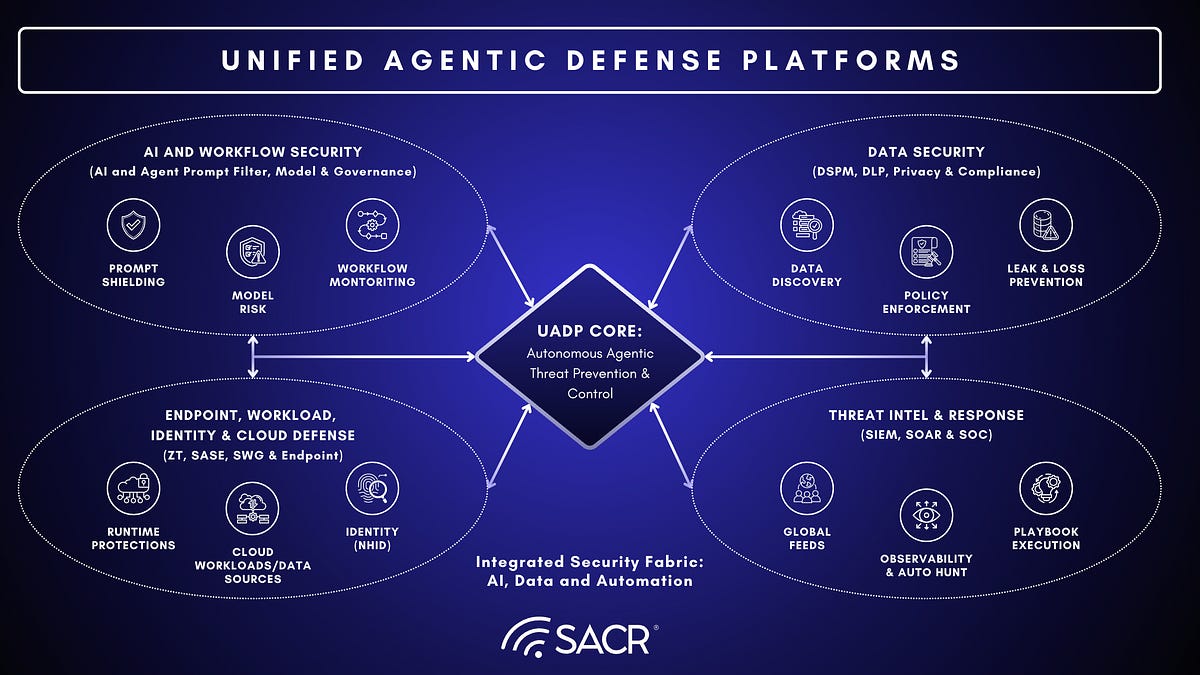
Technology provides the visibility and automation needed to handle modern scale. Core categories include:
| Tool category | Primary function |
|---|---|
| SIEM | Centralizes logs and correlates alerts across the environment |
| EDR | Monitors endpoints for malicious activity and enables containment |
| XDR | Unifies endpoint, network, cloud, and identity telemetry |
| SOAR | Automates repetitive tasks and orchestrates response actions |
| AI/ML analytics | Detects behavioral anomalies and reduces false positives |
| Vulnerability scanners | Identifies weaknesses that attackers could exploit |
A Realistic Incident Response Workflow

IT Security Operations: SecOps Guide, Tools & Best Practices - A Realistic Incident Response Workflow.
Consider a high-severity alert: a suspicious file executed on a finance server, followed by an abnormal outbound connection. Here is how a mature SOC handles it.
1. Detect and triage
A SIEM or XDR platform raises the alert. A Tier 1 analyst confirms it is a true positive and classifies severity using threat intelligence feeds.
2. Investigate and analyze
The analyst correlates the file execution with recent user activity, firewall logs, and global threat intelligence. The file turns out to be a known ransomware variant, which triggers the incident response playbook.
3. Contain
Using SOAR automation, the team isolates the affected server and endpoint, terminates the malicious process, and blocks the suspicious outbound IP at the firewall. The goal is to stop lateral movement and shorten mean time to respond.
4. Eradicate and recover
A senior analyst removes all traces of the malware, patches the exploited vulnerability, and restores the system from a clean backup.
5. Learn and harden
The team documents the incident, updates awareness training if phishing was the entry point, and creates a new detection rule so the same pattern is caught automatically next time.
Proactive Security Operations: Beyond Waiting for Alerts
IT Security Operations: SecOps Guide, Tools & Best Practices - Proactive Security Operations: Beyond Waiting for Alerts.
A strong SOC does not only react. Several activities reduce the attack surface before incidents occur.
Threat hunting
Analysts search the environment for subtle indicators, such as a newly reported registry key associated with a specific threat actor, rather than waiting for a signature to fire.
Vulnerability and patch management
Teams continuously scan for weaknesses, prioritize them by risk, and deploy patches. If you want to understand how open vulnerability assessment works, see this explanation of the OpenVAS Scanner and how the Greenbone feed powers scans.
Compliance monitoring
SecOps implements and monitors controls for frameworks such as ISO, NIST, and GDPR, and automates evidence collection so audits are less painful.
Security architecture review
The team works with IT and development to review new network segments or cloud deployments before they go live, shifting security left.
Where Browser and Network Verification Fits
Security operations is not only about servers and endpoints. The browser is where many users spend their day, and it is also a common source of exposure. Misconfigured VPNs, WebRTC leaks, and inconsistent browser fingerprints can undermine an otherwise solid security posture.
Practical, low-friction verification helps both IT teams and privacy-conscious users:
- DNS and WebRTC leak tests confirm that a VPN is not exposing a real IP address. This matters when remote workers rely on VPNs for access to internal systems. For a deeper look at how IP detection works, see IP Address Detection: How It Works and How to Verify It.
- Browser fingerprint analysis reveals whether a browser profile looks authentic or is leaking identifying signals. Teams that run isolated profiles can validate their setup with a fingerprint check.
- Port scanning identifies open services that should not be reachable. A quick external scan is a useful sanity check before a full vulnerability assessment.
- IP lookup with geolocation, ISP, and proxy detection helps analysts triage suspicious logins and confirm whether traffic is coming from a VPN, proxy, or residential connection.
BrowserScan provides these checks as free, browser-based tools, so you can run a DNS leak test, inspect your browser fingerprint, or scan for open ports without installing anything. It is a practical complement to a full SecOps stack, especially for quick verification during incident triage or remote-work troubleshooting.
If your team uses API-based IP intelligence, the IPWHOIS.io setup guide for the REST API and Python library shows how to integrate lookups into your own workflows.
Building a Resilient Security Operations Strategy
A resilient strategy balances prevention, detection, and response. Key practices include:
- Centralize visibility across cloud, on-premises, and hybrid environments.
- Automate the repetitive work so analysts focus on investigation and hunting.
- Define and rehearse playbooks for common scenarios such as ransomware, phishing, and credential theft.
- Measure what matters: mean time to detect, mean time to respond, alert fidelity, and patch coverage.
- Verify the human layer: browser configuration, VPN behavior, and device hygiene are part of the attack surface.
For organizations that support remote workers, pairing VPN verification with browser checks is a low-cost way to catch configuration drift. A guide like What Is Mozilla VPN? Features, Privacy, and How to Verify It illustrates how VPN verification fits into a broader privacy and security routine.
Related reading
- BigDataCloud Download: SDKs, Clients & Setup Guide - BigDataCloud download options explained: official SDKs for Node, Python, .NET, Go, mobile clients, MCP setup, and how to verify your IP data safely.
- How to Use Chameleon Mode: Real Browser Profiles Guide - Learn how to use Chameleon Mode to run isolated real browser profiles, avoid fingerprint spoofing, and verify your setup with free privacy tests.
- Phone Verification: How It Works and How to Check It - Learn how phone verification works, why codes fail, and how to validate numbers, check line type, and protect your privacy with free browser-based tools.
Sources and further reading
- What Is Security Operations (SecOps)? Comprehensive Guide - Discover how SecOps integrates IT operations and security to effectively detect, respond to, and mitigate cyber threats, enhancing your organization's defense.
- What Is Security Operations (SecOps)? | Microsoft Security - Learn what security operations (SecOps) is, how it supports cyberthreat detection, investigation, and response, and how to build a resilient security strategy.
- What is Security Operations (SecOps)? - ServiceNow - What is security operations (SecOps)?. Security operations, or SecOps, refers to the collaboration between security and IT operations teams to enhance network ...
Frequently Asked Questions
What does IT security operations do?
IT security operations monitors, detects, investigates, and responds to security threats across an organization's systems. It also handles vulnerability management, compliance monitoring, and proactive threat hunting.
What is the difference between SecOps and a SOC?
A SOC is the team and facility that executes security operations. SecOps is the broader discipline, including the processes, technology, and collaboration between security and IT operations teams.
Which tools are essential for security operations?
Most SOCs rely on a SIEM for log correlation, EDR or XDR for endpoint and cross-domain visibility, SOAR for automation, and vulnerability scanners for exposure management. Free browser-based tools can supplement these for quick verification tasks.
How can I check if my VPN is leaking my real IP?
Run a DNS leak test and a WebRTC leak test from your browser. These checks show whether DNS queries or WebRTC traffic are bypassing the VPN tunnel and exposing your real IP address.
Why does browser fingerprinting matter for security operations?
Inconsistent or spoofed browser fingerprints can trigger fraud controls, break authentication flows, or indicate a compromised or automated session. Verifying fingerprint consistency helps analysts distinguish legitimate users from suspicious activity.
How often should vulnerability scans run?
High-value systems are often scanned continuously or weekly, while lower-risk assets may be scanned monthly. The right cadence depends on your risk profile, compliance requirements, and change rate.
Conclusion
IT security operations is the engine that keeps an organization's defenses running. By combining skilled people, repeatable processes, and the right technology, SecOps teams detect threats faster, contain incidents sooner, and reduce the blast radius of attacks. Just as important, security operations extends to the browser and network layer, where a quick DNS leak test, fingerprint check, or port scan can reveal exposure that a full stack might miss. Whether you are building a SOC or simply verifying your own connection, start with visibility, then act on what you find.