
Network Security Tools: 15 Essential Types & How to Use Them

Network Security Tools: A Practical Guide to Monitoring, Scanning, and Defending Your Systems
Network security tools are the software utilities, platforms, and services that help you identify vulnerabilities, monitor traffic, detect intrusions, and verify that your privacy controls actually work. Whether you run a small business, manage a home lab, or just want to confirm your VPN isn't leaking your real IP address, the right toolkit makes the difference between guessing and knowing.
This guide breaks down the major categories of network security tools, explains what each one actually does, and shows you how to combine them into a practical workflow. You'll also learn how browser-based testing platforms fit into the picture—especially when you need quick answers without installing anything.
What Are Network Security Tools?
Network Security Tools: 15 Essential Types & How to Use Them - What Are Network Security Tools?.
Network security tools cover a broad spectrum of software that protects, analyzes, or tests computer networks. They fall into several distinct categories, each addressing a different layer of your security posture:
- Traffic analyzers capture and inspect packets moving across a network.
- Vulnerability scanners probe systems for known weaknesses and misconfigurations.
- Intrusion detection and prevention systems (IDS/IPS) monitor for suspicious behavior and can block it automatically.
- Port scanners map open services on a host to reveal potential attack surfaces.
- Privacy and leak testing tools verify that VPNs, proxies, and browser settings aren't exposing sensitive data.
- Password and authentication tools test credential strength and recovery mechanisms.
A well-rounded approach uses tools from several of these categories rather than relying on a single "silver bullet" application.
Core Categories of Network Security Tools

Network Security Tools: 15 Essential Types & How to Use Them - Core Categories of Network Security Tools.
1. Packet Analyzers and Protocol Inspectors
Packet analyzers capture raw network traffic and decode it into human-readable protocol information. They're essential for diagnosing connectivity problems, spotting malicious payloads, and understanding exactly what your devices are sending.
Wireshark remains the most widely used open-source packet analyzer. It supports hundreds of protocols, offers a powerful display filter language, and can reconstruct entire TCP sessions from captured packets. The command-line companion, tshark, is ideal for scripting and remote capture scenarios. tcpdump serves a similar purpose with a lighter footprint, making it a favorite for servers and embedded systems.
These tools require administrative access to capture traffic in promiscuous mode, and they generate large amounts of data. Start with a targeted capture filter—such as traffic to a single host or port—rather than capturing everything on a busy network.
2. Vulnerability Scanners
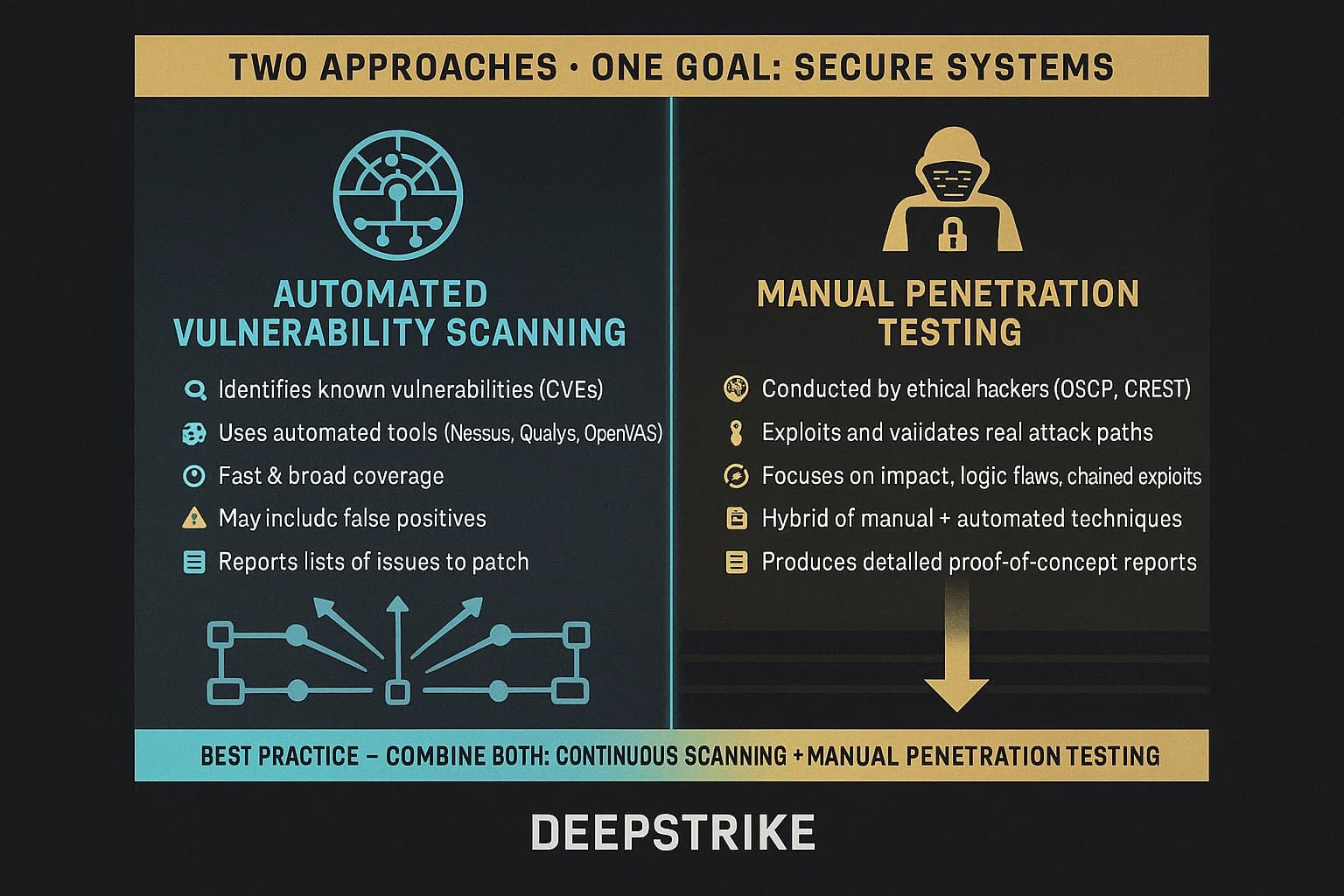
Vulnerability scanners automate the process of finding known security flaws. They compare your systems against databases of CVEs (Common Vulnerabilities and Exposures) and configuration best practices.
Nessus is one of the most popular commercial options, with a plugin library exceeding 70,000 checks. It supports both unauthenticated remote scans and authenticated local scans that dig deeper into system configuration. OpenVAS provides a capable open-source alternative, while Nmap with its scripting engine (NSE) can perform targeted vulnerability checks alongside its core port-scanning functions.
For organizations with limited budgets, the Cybersecurity and Infrastructure Security Agency (CISA) maintains a curated database of no-cost cybersecurity services and tools, including vulnerability scanning services that can help smaller teams prioritize high-impact fixes.
3. Intrusion Detection and Prevention Systems
IDS/IPS tools monitor network traffic for patterns that indicate attacks—port scans, exploit attempts, malware callbacks, and other suspicious behavior.
Snort is the classic open-source network intrusion detection system. It uses a rule-based language to describe traffic that should be logged, alerted on, or blocked. With thousands of community and commercial rules available, Snort can detect a wide range of threats. Suricata offers similar capabilities with multi-threading for higher throughput and built-in support for protocol parsing.
These tools work best when placed at network choke points where they can see traffic entering and leaving your environment. Tuning is essential—an untuned IDS generates so many false positives that real alerts get lost in the noise.
4. Port Scanners and Network Mappers
Port scanners identify which services are running on a host and which ports are open. This information is foundational for both attackers and defenders: you can't secure what you don't know is exposed.
Nmap is the reference standard here. It can perform everything from simple TCP connect scans to stealth SYN scans, OS fingerprinting, service version detection, and scripted vulnerability checks. The SecTools.org rankings have consistently placed Nmap and related tools among the community's most trusted utilities for more than a decade.
Browser-based port scanners offer a faster alternative when you need a quick check without installing anything. These tools run Nmap-powered scans from a remote server, showing you which ports are visible from outside your network—exactly what an attacker would see.
5. Privacy and Leak Testing Tools
This category is often overlooked in traditional network security discussions, but it's critical for anyone using a VPN, proxy, or privacy-focused browser configuration. Leak testing tools verify that your privacy controls are actually working.
The most important tests include:
- DNS leak tests confirm that DNS queries route through your VPN tunnel rather than your ISP's resolver.
- WebRTC leak tests detect whether your browser is exposing your real IP address through WebRTC APIs, even when a VPN is active.
- Browser fingerprint checks analyze how uniquely identifiable your browser configuration is.
- IP address lookups reveal what geolocation, ISP, and proxy status external services see when you connect.
BrowserScan consolidates these checks into a single web-based platform. Instead of visiting multiple sites, you can run a browser fingerprint analysis, DNS and WebRTC leak tests, and an IP lookup with proxy detection from one dashboard. The platform also includes an Nmap-powered port scanner, an internet speed test, and a user agent parser—all without requiring installation. This makes it particularly useful for quick, repeatable privacy assessments.
6. Exploitation Frameworks and Penetration Testing Suites
Penetration testing tools simulate real attacks to validate whether your defenses actually hold up under pressure. They're essential for red team exercises and authorized security assessments.
Metasploit is the most widely used exploitation framework. It ships with hundreds of exploit modules, payload generators, and auxiliary scanners, making it possible to test everything from web application vulnerabilities to Active Directory misconfigurations. Kali Linux packages Metasploit alongside hundreds of other security tools in a bootable distribution designed specifically for penetration testing.
These tools require explicit authorization before use. Running them against systems you don't own or have written permission to test is illegal in most jurisdictions.
How to Choose the Right Network Security Tools

Network Security Tools: 15 Essential Types & How to Use Them - How to Choose the Right Network Security Tools.
Match Tools to Your Threat Model
Start by defining what you're protecting and from whom. A home user checking VPN leaks has very different needs than a security team defending a corporate network.
| Use Case | Recommended Tools |
|---|---|
| Home user verifying VPN privacy | Browser-based leak tests, IP lookup tools |
| Small business baseline security | Vulnerability scanner, port scanner, CISA free services |
| Security team monitoring traffic | Packet analyzer, IDS/IPS, SIEM integration |
| Penetration testing | Exploitation framework, Kali Linux, custom scripts |
| Developer debugging network issues | Packet analyzer, user agent parser, connectivity tests |
Consider Deployment Model
Network security tools come in three deployment models:
- On-premises software gives you full control but requires installation, maintenance, and updates.
- Cloud-based or hosted tools eliminate setup overhead but may route your data through third-party infrastructure.
- Browser-based tools offer the fastest path to answers for specific checks, though they're limited to what browser APIs and remote servers can observe.
Many teams use a hybrid approach: heavy-duty on-premises tools for continuous monitoring, supplemented by browser-based tools for quick diagnostics and verification.
Evaluate Cost and Support
Open-source tools like Wireshark, Nmap, and Snort are free but require in-house expertise to deploy effectively. Commercial tools like Nessus add polished interfaces, regular plugin updates, and vendor support—at a price. CISA's no-cost cybersecurity services database is an excellent starting point for organizations that need professional-grade capabilities without the budget.
Building a Practical Network Security Workflow
Network Security Tools: 15 Essential Types & How to Use Them - Building a Practical Network Security Workflow.
A useful approach combines tools from multiple categories into a repeatable process:
Map your attack surface. Run a port scan to identify exposed services. Use an IP lookup tool to understand what external parties see about your connection, including geolocation and proxy status.
Scan for known vulnerabilities. Use a vulnerability scanner to check identified services against CVE databases. Prioritize fixes based on severity and exploitability.
Monitor ongoing traffic. Deploy an IDS/IPS at your network perimeter and a packet analyzer for deep-dive investigations when alerts fire.
Verify privacy controls. If you use a VPN or proxy, run DNS and WebRTC leak tests regularly. Check your browser fingerprint to understand how trackable you are. BrowserScan's combined dashboard makes this step quick enough to perform routinely.
Test your defenses. For higher-security environments, conduct periodic penetration tests using frameworks like Metasploit to validate that your controls actually stop attacks.
Document and repeat. Security is not a one-time project. Schedule regular scans, keep tools updated, and review your toolset as your network evolves.
The Role of Browser-Based Testing in Network Security
Traditional network security tools require installation, administrative access, and often significant configuration. Browser-based testing platforms fill a different niche: they provide immediate, accessible diagnostics for privacy and exposure checks.
BrowserScan exemplifies this approach. Its suite includes:
- Browser fingerprint analysis that evaluates how unique and trackable your browser configuration is.
- DNS and WebRTC leak tests that verify your VPN isn't silently exposing your real IP address.
- IP address lookup with geolocation, ISP identification, and proxy detection.
- Nmap-powered port scanning that reveals open vulnerabilities from an external perspective.
- Additional utilities like a 2FA code generator, canvas fingerprint checker, and client hints analyzer.
These tools don't replace full-scale vulnerability scanners or IDS/IPS deployments. Instead, they serve as a fast, accessible first line of verification—especially useful for VPN users, remote workers, and developers who need to confirm their security posture without spinning up a full testing environment. For deeper guidance on privacy testing, see our complete guide to using BrowserLeaks and our proxy detection explainer.
Related reading
- Algo VPN Tutorial: Deploy a Personal WireGuard & IPsec VPN - Step-by-step Algo VPN tutorial covering cloud deployment, client setup, user management, and leak testing to verify your personal VPN works.
- HackerTarget Login: Access Scanners, API & Account - Learn how HackerTarget login works, what free vs paid accounts unlock, how to access the API, and how to verify your setup with privacy tools.
- Proxy Detection: How It Works, Methods & Free Tools - Learn how proxy detection works, the main techniques and signals used, common use cases, accuracy limits, and free tools to check any IP address.
Sources and further reading
- Security Tool List : r/cybersecurity - Reddit - Aug 15, 2024 ... Red team/Pentesting · WiFi Scanning. Wifite (wireless network auditor). Aircrack-ng · SQL Scanning. SQLMap. Active Directory Scanning.
Frequently Asked Questions
What is the best free network security tool?
There's no single best tool—it depends on what you need to accomplish. Wireshark is excellent for packet analysis, Nmap for port scanning and network mapping, Snort for intrusion detection, and browser-based platforms like BrowserScan for privacy and leak testing. Most security professionals use a combination of several free tools.
Do I need network security tools if I'm just a home user?
Yes, though your needs are simpler. At minimum, you should verify that your VPN is working correctly (no DNS or WebRTC leaks), understand what your IP address reveals about you, and occasionally check which ports are exposed on your home network. Browser-based tools make these checks accessible without technical expertise.
How do I test if my VPN is leaking my real IP address?
Run a DNS leak test and a WebRTC leak test while your VPN is connected. The DNS test confirms that your DNS queries route through the VPN tunnel, while the WebRTC test checks whether your browser is exposing your real IP through WebRTC APIs. BrowserScan offers both tests in a single dashboard, along with an IP lookup to verify what external services actually see.
What's the difference between a vulnerability scanner and a port scanner?
A port scanner identifies which network ports are open on a host and what services are listening. A vulnerability scanner goes further, probing those services for known security flaws and misconfigurations. Port scanning is usually the first step—you can't assess vulnerabilities in services you don't know exist.
Are open-source security tools as good as commercial ones?
In many cases, yes. Wireshark, Nmap, Snort, and Metasploit are all open-source tools that are widely used in professional security operations. The main advantages of commercial tools are polished interfaces, vendor support, and regular curated updates. Open-source tools require more in-house expertise but offer transparency and flexibility that commercial products often can't match.
How often should I run network security scans?
For most organizations, vulnerability scans should run at least monthly, with more frequent scans after significant infrastructure changes. Privacy and leak tests should run whenever you change VPN providers, update your browser, or notice unusual connection behavior. Continuous monitoring tools like IDS/IPS run 24/7 by design.
Conclusion
Network security tools span a wide range—from heavyweight packet analyzers and vulnerability scanners to lightweight browser-based privacy checks. The key is matching the right tool to the right job and combining them into a workflow that covers your actual risks.
For deep traffic analysis, Wireshark and tcpdump remain indispensable. For vulnerability discovery, Nessus, OpenVAS, and Nmap's scripting engine do the heavy lifting. For intrusion detection, Snort and Suricata provide continuous monitoring. And for the privacy layer that's increasingly critical in remote and hybrid work environments, browser-based platforms like BrowserScan offer fast, accessible verification that your VPN, proxy, and browser configuration aren't leaking data.
Start with a clear understanding of your threat model, build a toolkit that addresses those specific risks, and make testing a regular habit rather than a one-time project. The tools are available—often for free—and the cost of not using them is far higher than the effort required to deploy them.