
BrowserScan Login: No Account Needed – Test Your Privacy Now
BrowserScan Login: Do You Need an Account to Use BrowserScan?
If you typed “BrowserScan login” into your search bar, you’re not alone. Many users expect a sign‑in page because privacy tools often gate their features behind accounts. The good news? BrowserScan doesn’t require a login at all. It’s a fully web‑based, free tool that starts working the moment you open the site. This article clears up the login confusion, walks through what BrowserScan actually is, and shows you exactly how to use its privacy tests without ever creating a password.
What Is BrowserScan and Why Do People Look for a Login?
BrowserScan is a suite of online privacy and security tests that run directly in your browser. It analyzes your digital fingerprint, checks for VPN leaks, scans your network ports, and parses user‑agent strings—all without installing software. Because many cybersecurity platforms demand registration, newcomers often assume there must be a “BrowserScan login” to get started. In reality, the tool is accessible at browserscan.net with zero barriers.
The design is intentionally frictionless. You land on the homepage and immediately see your browser fingerprint authenticity score, IP information, and a dashboard of available tests. No email, no trial period, no credit card. It’s built for quick privacy check‑ups, whether you’re troubleshooting a VPN, evaluating an anti‑detect browser setup, or just curious about what websites can see.
How to Access BrowserScan Directly (No Login Required)
Getting started is simpler than most tools:
- Visit browserscan.net in any modern browser.
- Wait a few seconds while the automatic fingerprint scan completes.
- Review your fingerprint authenticity score—a percentage that shows how unique or generic your browser profile looks.
- Scroll to the tool tiles to run individual tests like DNS leak detection, port scanning, and IP lookups.
- Each test opens in a new tab with a dedicated interface; return to the main dashboard anytime for an overview.
Because no account is involved, there’s no history stored server‑side. Every scan happens live, using only your current browser session. If you need to compare results after changing settings, simply open a new tab and retest. This instant‑access model makes BrowserScan a favorite in the BrowserScan network tools guide, which highlights diagnostics that respect your privacy without demanding logins.
Core Privacy Tests You Can Run Without an Account
Once you bypass the mistaken “BrowserScan login” search, you’ll find a full toolkit. Here are the most useful sections and what they reveal.
Browser Fingerprint & Hardware Analysis
The heart of BrowserScan is its fingerprint detector. It evaluates how identifiable your browser is by collecting:
- Browser type, version, and rendering engine
- Operating system, language, and time zone
- Screen resolution, color depth, and touch support
- Canvas, WebGL, WebGPU, and AudioContext fingerprints
- Installed plugins, fonts, and media devices
The fingerprint authenticity score tells you if your profile looks like a real, generic device or something suspicious—crucial for users of proxies and anti‑detect browsers. A low score can flag inconsistencies (e.g., a Windows browser claiming a macOS time zone) that could lead to account bans on strict platforms.
VPN Leak Tests: DNS and WebRTC
Even with a VPN active, your real IP can leak through DNS queries or WebRTC requests. BrowserScan includes dedicated tools that detect those leaks immediately.
- DNS Leak Test: Shows which DNS servers actually resolve your queries. If they belong to your ISP rather than your VPN, you’re exposed.
- WebRTC Leak Test: Checks for STUN requests that reveal your local and public IP addresses, circumventing your VPN tunnel.
Both tests take seconds. No account means you can hop between VPN servers and rerun the checks as often as needed—ideal for validating a WireGuard or OpenVPN setup.
Network & IP Diagnostics
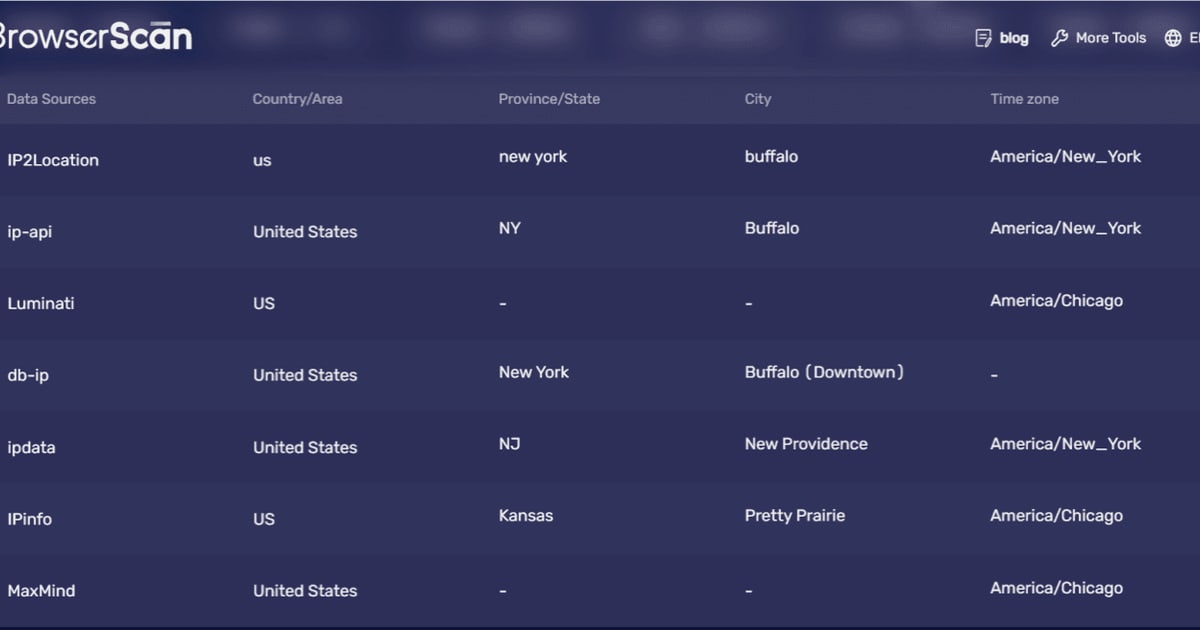
BrowserScan’s IP address lookup fetches geolocation, ISP, proxy detection, and blacklist status. The port scanner (powered by Nmap) examines high‑risk ports like 22 (SSH), 80 (HTTP), and 3389 (RDP) for unwanted exposure. An internet speed test and a user‑agent parser round out the diagnostic pack, all free and login‑free.
For a deeper dive into how such tools compare, the top 10 privacy testing tools for 2026 ranks BrowserScan at the top for its no‑login fingerprint analysis and leak detection accuracy.
BrowserScan vs. Other Privacy Testing Tools: Do Any Require Login?
Not all browser fingerprint services demand an account, but some limit features behind registration. Here’s how BrowserScan stacks up:
| Tool | Login Required? | Fingerprint Analysis | DNS/WebRTC Leak Test | Port Scanner |
|---|---|---|---|---|
| BrowserScan | No | Yes, with authenticity score | Yes | Yes |
| IPhey | No for basic, optional for history | Yes | Yes | No |
| Cover Your Tracks (EFF) | No | Yes, simplified | No | No |
| Whoer.net | No for quick check, extended reports after free sign‑up | Yes | Yes | No |
BrowserScan distinguishes itself by keeping every tool open without a paywall or login. IPhey offers a similar fingerprint check but doesn’t bundle a port scanner, and storing historical scans requires creating a free account. BrowserScan’s full suite is always accessible directly, which makes it a frequent recommendation in privacy‑focused roundups like the Proxidize partnership blog.
Related reading
- Network Tools Guide: Online Diagnostics & Privacy Testing - A comprehensive guide to network tools for diagnostics, management, and security. Learn about online DNS tools, port scanners, IP geolocation, and BrowserScan's privacy testing suite.
- Top 10 Online Privacy & Security Testing Tools 2026: Test Your Digital Footprint - Discover the 10 best online privacy and security testing tools for 2026, ranked by accuracy, features, and ease of use. See why BrowserScan leads in leak tests, fingerprint analysis, and more.
- What Is IPhey? Browser Fingerprint Checker Explained - Discover what IPhey is, how its fingerprint and leak tests work, and how to use it to check your online privacy. See how it compares to BrowserScan and alternatives.
Sources and further reading
- BrowserScan - Fingerprint Detection Free Tool - Check with Browserscan tool to see if your browser has a unique fingerprint by which you can be identified online. ⚡️Try for free!
FAQ
Do I need to create a BrowserScan account?
No. All features—fingerprint detection, leak tests, port scanner, IP lookup—are available without registration. There is no “BrowserScan login” page because an account isn’t part of the service.
Is my data stored if I don’t log in?
BrowserScan performs real‑time analysis in your browser. It does not persist scan results to a server‑side account unless you choose to share a report or use a future premium service (if any). Always review the privacy policy on the official website for the most current data handling practices.
Can I use BrowserScan on mobile?
Yes, the tools work in any modern mobile browser. You’ll get a fingerprint score and can run DNS/WebRTC leak tests, though hardware details like CPU cores and graphics specs may differ from desktop. The port scanner still checks your network-facing IP.
What if I can’t access BrowserScan?
Some networks or anti‑detect browser configurations may block the fingerprinting scripts that BrowserScan uses. Try a different browser, disable strict content blockers temporarily, or test from a clean residential IP.
Does BrowserScan replace a VPN or antivirus?
No. It’s a diagnostic tool, not a protective service. Use it to verify your VPN is working, check your browser’s fingerprint consistency, and spot open ports—but pair it with a trusted VPN and security suite for ongoing protection.
Conclusion
The “BrowserScan login” search is a common misunderstanding. BrowserScan remains one of the most accessible privacy testing platforms precisely because it demands no account. From its instant fingerprint authenticity score to its DNS/WebRTC leak tests and port scanner, everything is available in a few clicks. Next time you want to harden your digital footprint or debug a proxy chain, skip the sign‑up pages and head straight to browserscan.net—you’ll have your answers before other tools finish asking for an email address. For a broader look at online diagnostic tools that respect your time and privacy, the BrowserScan network tools guide is a solid next step.