
What Is Network Intelligence? A Practical Guide

What Is Network Intelligence? A Practical Guide
Network intelligence (NI) is the practice of examining IP data packets crossing a network in real time, identifying the protocols they use, and extracting packet content and metadata to understand data relationships and communication patterns. It builds on deep packet inspection (DPI), packet capture, and business intelligence concepts, but goes further by creating an information layer that feeds multiple applications at once.
For enterprises, network intelligence powers bandwidth management, threat detection, billing, and compliance. For individuals, the same underlying ideas—visibility into traffic, metadata, and endpoints—translate into practical privacy and security checks you can run from a browser. This guide explains how network intelligence works, where it is used, and how you can apply its principles to your own setup.
Network Intelligence vs. Deep Packet Inspection
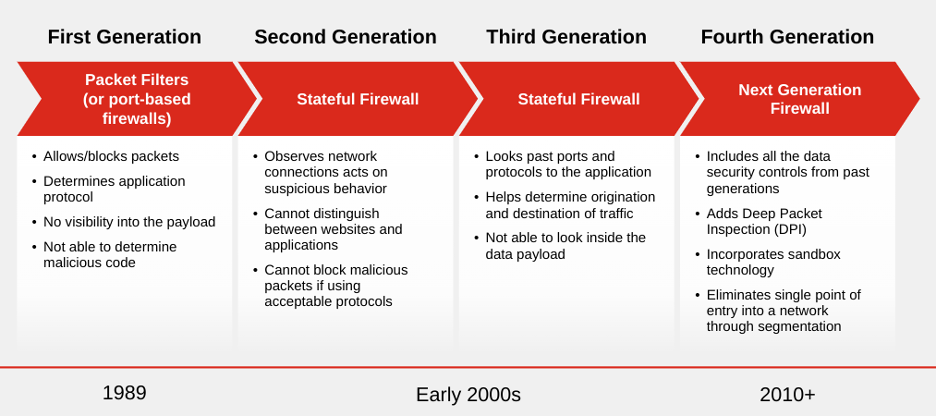
What Is Network Intelligence? A Practical Guide - Network Intelligence vs. Deep Packet Inspection.
Deep packet inspection and network intelligence are often mentioned together, but they are not the same thing.
DPI focuses on recognizing types of IP traffic. It answers questions like: Is this a video stream, a file transfer, or a VoIP call? DPI tools were historically built for specific infrastructure tasks such as bandwidth management, performance optimization, and quality of service (QoS).
Network intelligence goes beyond protocol recognition. It extracts a wide range of metadata from IP traffic—who contacts whom, when, where, and how—and correlates that data across layers 2 through 7 of the OSI model. That metadata can then feed multiple applications simultaneously: security monitoring, usage-based billing, audience measurement, fraud detection, and regulatory compliance.
Think of DPI as identifying the type of vehicle on a highway. Network intelligence is reading the license plate, recording the route, timing the journey, and cross-referencing that data with other trips to spot patterns.
How Network Intelligence Works
What Is Network Intelligence? A Practical Guide - How Network Intelligence Works.
At its core, network intelligence operates in three stages:
- Capture — IP packets are intercepted as they cross the network, whether on a physical link, a virtual switch, or a cloud environment.
- Extraction — Protocols are identified and metadata is pulled from the packet content. This includes source and destination addresses, ports, application types, session timing, and payload characteristics.
- Correlation — The extracted data is combined across sessions and layers to build a coherent picture of network activity. This is where relationships emerge: a single user communicating through FTP, webmail, VoIP, and social media from multiple devices can be linked into one behavioral profile.
This correlation capability is what separates network intelligence from simple traffic logging. The same person may appear as five different IP addresses across a day. Network intelligence connects those dots.
Key Use Cases for Network Intelligence

What Is Network Intelligence? A Practical Guide - Key Use Cases for Network Intelligence.
Telecommunications and ISPs
Telecom operators, ISPs, and mobile network operators use network intelligence to move from "dumb pipe" models to "smart pipe" strategies. By understanding exactly what traffic flows across their networks, they can:
- Build audience measurement and user behavior analytics
- Segment customers for personalized services
- Implement content- and application-aware billing
- Monitor VoIP fraud in real time
- Enforce regulatory compliance
Cloud Computing
Cloud adoption has accelerated, but concerns about information security, e-discovery, and auditing remain. Network intelligence gives Infrastructure as a Service (IaaS), Platform as a Service (PaaS), and Software as a Service (SaaS) providers real-time situational awareness of network activity. Vendors can demonstrate hardened security against data leakage and maintain an audit trail of all network transactions tied to a customer account.
Cybersecurity and Threat Detection
Security teams use network intelligence to complement post-attack forensics with real-time prevention. By capturing and analyzing traffic as it happens, analysts can take preventive measures before an attack fully unfolds. This is especially valuable for database security, database auditing, and network protection.
Modern managed security providers have pushed this further with AI-driven platforms. For example, Network Intelligence combines human security analysts with AI platforms to deliver managed detection and response, SOC services, and governance risk management. Their approach illustrates the enterprise end of the spectrum: continuous monitoring, automated correlation, and human oversight working together.
Lawful Interception and Compliance
Because network intelligence extracts and correlates information such as who contacts whom, when, where, and how, it provides the situational awareness required for lawful interception. The same capabilities support regulatory compliance across industries like finance, healthcare, and retail.
Applying Network Intelligence Principles to Your Own Security

What Is Network Intelligence? A Practical Guide - Applying Network Intelligence Principles to Your Own Security.
You do not need an enterprise-grade NI platform to benefit from network intelligence concepts. The core idea—visibility into what your traffic reveals about you—can be tested with free, browser-based tools.
Check What Your Browser Reveals
Every time you connect to a website, your browser transmits a surprising amount of information: user agent strings, installed fonts, screen resolution, timezone, language preferences, and more. Combined, these details form a browser fingerprint that can identify you across sessions even without cookies.
A fingerprint analysis tool shows you exactly what your browser exposes. If your fingerprint is unique among thousands of tested profiles, trackers can follow you more easily. Understanding this is the first step toward reducing your digital footprint.
Test for DNS and WebRTC Leaks
If you use a VPN, your real IP address can still leak through two common channels: DNS queries and WebRTC. A DNS leak test checks whether your DNS requests are routed through your VPN tunnel or sent directly to your ISP's resolver. WebRTC can expose your local and public IP addresses even when a VPN is active.
Running both tests takes less than a minute and reveals whether your privacy setup is actually working. This is network intelligence applied at the individual level: you are inspecting what your traffic tells an observer.
Scan Your Open Ports
Open ports are entry points. A port scanner checks which ports on your IP address are reachable from the outside. An unexpected open port could indicate a misconfigured router, an exposed service, or a vulnerability waiting to be exploited. Tools like Nmap power this kind of scan, and browser-based versions make it accessible without installation.
Look Up Your IP Address
An IP lookup tool reveals what your IP address says about you: geolocation, ISP, and whether the address is flagged as a proxy or VPN exit node. This is the metadata extraction step of network intelligence—the same data that websites, advertisers, and security systems see when you connect.
Enterprise Network Intelligence vs. Personal Privacy Tools
| Aspect | Enterprise NI Platforms | Personal Privacy Tools |
|---|---|---|
| Scope | Entire network infrastructure | Your device and connection |
| Data source | Packet capture across links | Browser APIs and IP metadata |
| Primary goal | Threat detection, billing, compliance | Privacy verification, leak detection |
| Deployment | Hardware/software in data centers | Web-based, no installation |
| Output | Dashboards, alerts, reports | Individual test results |
| Cost | Enterprise contracts | Usually free |
The principles are the same—capture, extract, correlate—but the scale and purpose differ. Enterprise tools watch thousands of endpoints. Personal tools watch one: yours.
How to Get Started with Network Visibility
If you want to understand what your network presence looks like to the outside world, start with a structured self-assessment:
- Run a fingerprint test. See how identifiable your browser is.
- Check for leaks. Run DNS and WebRTC leak tests, especially if you use a VPN.
- Scan your ports. Identify any unexpected open services.
- Look up your IP. Review geolocation, ISP, and proxy detection results.
- Fix what you find. Close ports, change DNS settings, or adjust browser privacy settings based on the results.
BrowserScan offers these checks in one place without requiring installation. The platform includes browser fingerprint analysis, DNS and WebRTC leak tests, IP address lookup with proxy detection, an Nmap-powered port scanner, and additional utilities like a user agent parser and canvas fingerprint checker. Each tool gives you a piece of the network intelligence picture for your own connection.
The Future of Network Intelligence
Network intelligence is evolving in three directions:
- AI-driven correlation. Machine learning models are increasingly used to identify anomalies and prioritize alerts that would overwhelm human analysts. Platforms like Network Intelligence's Rainier and Transilience AI exemplify this shift toward agentic SOC operations where automated systems act on detections in real time.
- Cloud-native visibility. As workloads move to AWS, Azure, and GCP, network intelligence must operate in environments where traditional packet capture is difficult or impossible. API-based telemetry and flow logs are becoming first-class data sources.
- Encrypted traffic analysis. With TLS 1.3 and encrypted DNS becoming default, extracting application-layer metadata is harder. Network intelligence is adapting through traffic shape analysis, certificate metadata, and machine learning models that classify encrypted flows without decryption.
For individuals, the trend is similar: more encryption, more metadata, and more sophisticated tracking. The tools to check your own exposure are keeping pace, but they only help if you use them.
Related reading
- What Is a Vulnerability Scanner? Types, Tools & How to Choose - Learn how vulnerability scanners work, compare network, web app, cloud, and container scanners, and find the right tool for your security needs.
- IPhey Setup: How to Test and Improve Your Browser Fingerprint - Learn how to set up IPhey for browser fingerprint testing, interpret your results, and fix red flags to make your anti-detect or privacy setup more realistic.
Sources and further reading
- Network intelligence - From Wikipedia, the free encyclopedia
- Network Intelligence | LinkedIn - Network Intelligence | 99,940 followers on LinkedIn. Protecting your business: combining the power of technology with the precision of human insight | At Network Intelligence, we combine our team of 500+ security professionals with Transilience – our cutting-edge AI platform. Consequently, we own your security and compliance outcomes. We don’t just get you SOC2-ready – we get your certified.
Frequently Asked Questions
What is the difference between network intelligence and network monitoring?
Network monitoring tracks whether devices and links are up or down and measures basic performance metrics. Network intelligence goes deeper by extracting metadata from packet content and correlating it across sessions to understand who is communicating, what applications they use, and what patterns emerge.
Is network intelligence the same as deep packet inspection?
No. DPI is a component of network intelligence. DPI recognizes protocol types; network intelligence extracts metadata and correlates it across layers to feed multiple applications like security, billing, and analytics.
Can individuals use network intelligence tools?
Yes, in a limited sense. Browser-based tools that analyze fingerprints, test for DNS and WebRTC leaks, scan ports, and look up IP metadata apply the same visibility principles to a single connection. They do not provide enterprise-scale packet capture, but they reveal what your traffic exposes to observers.
Why does my browser fingerprint matter for network security?
Your browser fingerprint is a set of characteristics that can identify you across sessions and sites, even without cookies. If your fingerprint is unique, trackers and adversaries can follow your activity more easily. Testing your fingerprint helps you understand and reduce that exposure.
How do DNS leaks compromise a VPN?
A DNS leak occurs when your DNS queries bypass the VPN tunnel and go directly to your ISP's resolver. This reveals which websites you visit to your ISP, defeating the privacy purpose of the VPN. A DNS leak test confirms whether your setup is leaking.
What should I do if a port scan finds open ports?
First, identify which service is listening on the open port. If you did not intentionally expose it, close the port on your router or firewall. If the service is required, ensure it is patched and protected by strong authentication. Unexpected open ports are common entry points for attackers.
Conclusion
Network intelligence is a powerful concept that spans enterprise security operations and individual privacy. At the enterprise level, it combines packet capture, metadata extraction, and correlation to power threat detection, billing, compliance, and cloud security. At the personal level, the same principles help you understand what your browser and connection reveal to the outside world.
The gap between these two worlds is narrowing. Tools that were once available only to telecom operators and security vendors are now accessible in simplified, browser-based forms. Running a fingerprint check, a leak test, and a port scan takes minutes—but the visibility they provide is the foundation of any serious privacy or security effort. Whether you manage a corporate network or a single laptop, knowing what your traffic says about you is the first step toward controlling it.