
Nmap: The Network Mapper & Free Security Scanner Explained
Nmap: The Network Mapper and Free Security Scanner Explained
Nmap ("Network Mapper") is a free, open-source utility for network discovery and security auditing. Since its first public release in 1997, it has become one of the most widely used tools for finding live hosts, open ports, running services, and operating system details across a network. This guide explains what Nmap does, how to install and run it safely, how to read its output, and when a browser-based scanner is a better fit.
What Is Nmap and What Does It Do?
Nmap: The Network Mapper & Free Security Scanner Explained - What Is Nmap and What Does It Do?.
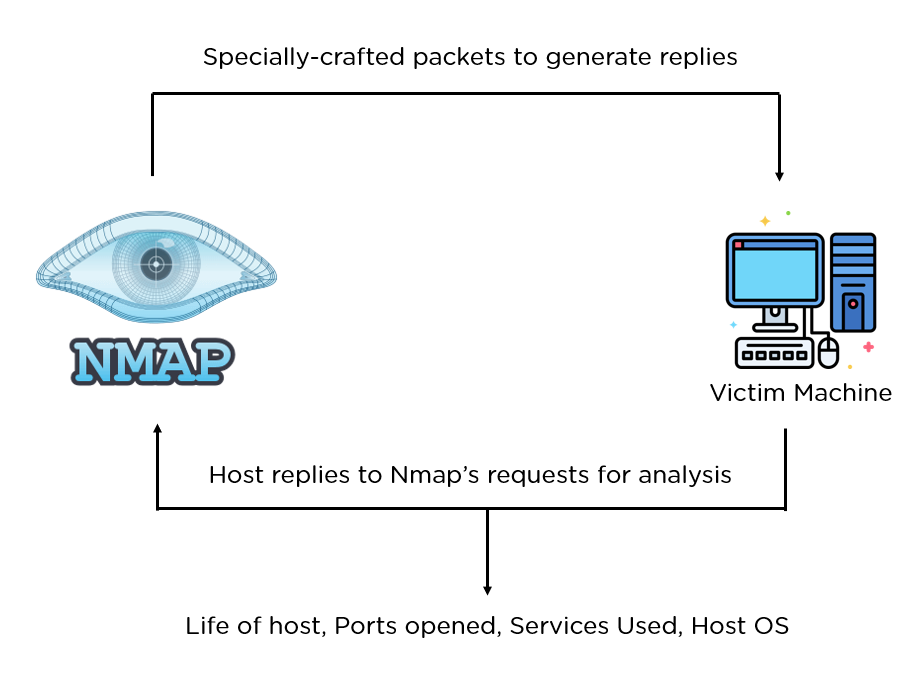
Nmap sends specially crafted IP packets to targets and analyzes the responses. From those responses it can determine:
- Which hosts are online (host discovery / ping sweeps)
- Which ports are open, closed, or filtered (TCP and UDP port scanning)
- What services and versions are running (service and version detection)
- What operating system and device type a host is likely running (TCP/IP stack fingerprinting)
- Additional details such as reverse DNS names, MAC addresses, and scripted findings
It was designed to scan large networks quickly but works equally well against a single host. Official binaries are available for Linux, Windows, and macOS, and the source code compiles on many other UNIX-like systems.
The Nmap suite, not just one command
Nmap ships with companion tools that extend its usefulness:
- Zenmap – a graphical interface and results viewer
- Ncat – a flexible data transfer, redirection, and debugging tool
- Ndiff – compares two scan results to spot changes over time
- Nping – packet generation and response analysis
Installing Nmap on Windows, macOS, and Linux
Nmap: The Network Mapper & Free Security Scanner Explained - Installing Nmap on Windows, macOS, and Linux.
Installation is straightforward on all major platforms:
- Windows – download the self-installer, which bundles Nmap, the Zenmap GUI, and the Npcap packet capture driver.
- macOS – use the disk image installer, which includes Nmap, Zenmap, Ncat, and Ndiff.
- Linux – install via your distribution's package manager, or use the official RPM packages. For example:
rpm -vhU https://nmap.org/dist/nmap-7.991-1.x86_64.rpm
- Source code – compile it yourself if you want the newest code or a platform without official binaries:
bzip2 -cd nmap-7.991.tar.bz2 | tar xvf -
cd nmap-7.991
./configure
make
sudo make install
Before downloading, check the official download page and the install guide for platform-specific notes. Security-conscious users can also verify GPG signatures and hashes for each release.
Essential Nmap Commands and Scan Types
You can start with a single command and add options as you learn:
nmap -v -A targethost
The -A flag enables aggressive options such as OS detection, version detection, script scanning, and traceroute. More targeted examples:
| Goal | Command |
|---|---|
| Fast scan of common ports | nmap -F target |
| Ping sweep to find live hosts | nmap -sn 192.168.1.0/24 |
| Service/version detection | nmap -sV target |
| OS detection | nmap -O target |
| Run NSE scripts | nmap --script default target |
The Nmap Scripting Engine (NSE)
The Nmap Scripting Engine uses Lua scripts to automate tasks such as advanced service detection, vulnerability checks, and discovery. It is one of the main reasons Nmap remains relevant decades after release: the community can extend it without changing the core scanner. Scripts are organized into categories like default, safe, discovery, and vuln.
Reading Nmap Output: Port States and Scan Results
Nmap: The Network Mapper & Free Security Scanner Explained - Reading Nmap Output: Port States and Scan Results.
Nmap reports each port in one of several states:
- Open – a service is accepting connections
- Closed – the port is reachable but nothing is listening
- Filtered – a firewall or filter is blocking probes, so Nmap cannot tell if the port is open
- Unfiltered – the port is reachable but Nmap cannot determine open/closed
Nmap can save results in several formats: interactive (real-time), normal text, XML for further processing, and grepable output for line-oriented tools. XML output is especially useful for building reports or feeding results into other systems.
Is Nmap Legal and Ethical to Use?
Nmap itself is a legitimate security and administration tool. The legal question is about authorization, not the software. Scanning systems you own or have written permission to test is standard practice for audits, inventory, and firewall verification. Scanning third-party networks without permission can violate laws or terms of service — in one notable case, Finland's Supreme Court treated systematic port scanning as an attempted computer break-in.
Practical rules of thumb:
- Scan your own hosts, lab environments, or clients who have authorized you in writing.
- Prefer less intrusive scans (
-sn,-F) when you only need basic information. - Document scope and timing so you do not disrupt production services.
Nmap vs Browser-Based Port Scanners
Nmap is the most capable option, but it requires installation, a terminal, and some learning. Browser-based scanners trade depth for convenience: they run from any device, need no setup, and are useful for a quick external check of your own public IP.
| Consideration | Nmap | Browser-based scanner |
|---|---|---|
| Installation | Required | None |
| Depth of scanning | Very high (OS, versions, NSE) | Basic open-port check |
| Best for | Audits, inventories, large networks | Quick self-checks, mobile users |
| Skill level | Moderate to advanced | Beginner |
If you want to see what the outside world can reach on your connection without installing anything, an Nmap-powered online port scanner can check your public IP in seconds. For deeper internal discovery, use Nmap locally.
Verifying Your Own Exposure After a Scan
Port scanning is only one part of understanding your network footprint. Your browser and connection can leak information even when your ports look clean. Useful follow-ups:
- Check whether your VPN is actually hiding your address with a DNS leak test and a WebRTC leak test.
- See what your IP reveals about your location and ISP using an IP address lookup.
- Review how IP-based location data is produced in this guide to IP location lookup.
- If you run VPN gateways or automated tunnels, learn how to keep them leak-free in this overview of VPN automation and leak testing.
Together, a port scan and a browser privacy check give a more complete picture than either one alone.
Common Nmap Use Cases
- Firewall auditing – confirm which connections are actually allowed through.
- Asset inventory – discover unauthorized servers or devices on a network.
- Service upgrade planning – identify outdated application versions.
- Uptime monitoring – check whether hosts and services respond.
- Pre-engagement reconnaissance – map a network before a penetration test.
Related reading
- Geolocation Service: How IP Location Lookup Works - Learn how a geolocation service turns an IP address into location data, why accuracy varies, and how to verify what your IP reveals with free tools.
- PrivacyTools.io Login: What It Is and How to Verify Privacy - PrivacyTools.io has no login. Learn what the site actually offers, why no account is needed, and how to verify your browser and network privacy for free.
- IPhey Login: Access Your Browser Fingerprint Test - IPhey login guide: sign in or run the IPhey browser fingerprint test instantly, understand your trust score, and verify leaks with BrowserScan.
Sources and further reading
- Nmap: the Network Mapper - Free Security Scanner - Nmap Free Security Scanner, Port Scanner, & Network Exploration Tool. Download open source software for Linux, Windows, UNIX, FreeBSD, etc.
- Nmap - From Wikipedia, the free encyclopedia
FAQ
Is Nmap free?
Yes. Nmap is free and open source. It is distributed under the Nmap Public Source License (NPSL), with older versions under a modified GPLv2, and commercial licensing is available for organizations that need it.
Can Nmap detect vulnerabilities?
Nmap's core strength is discovery, not exploitation. Through the Nmap Scripting Engine, however, it can run scripts in the vuln category that check for known weaknesses. These checks are not a substitute for a full vulnerability scanner.
Do I need to be a programmer to use Nmap?
No. Simple commands like nmap -F target or nmap -v -A targethost work out of the box, and Zenmap provides a graphical alternative. Advanced scripting does require some familiarity with Lua.
What is the difference between Nmap and Zenmap?
Nmap is the command-line scanner. Zenmap is the official graphical front end that makes it easier to run scans and view results, especially for beginners.
Can I scan a website I do not own?
Only with explicit permission. Unauthorized scanning can be illegal and may violate the target's terms of service. Always confirm authorization before scanning any system you do not control.
Conclusion
Nmap remains the reference tool for network discovery and security auditing because it is free, portable, well documented, and extensible through NSE. Install it, start with a fast scan, and learn to read port states before moving on to version detection and scripts. When you need a quick external view of your own connection, pair Nmap with browser-based checks for open ports, DNS leaks, and IP exposure — the combination gives you both depth and convenience.