
Top 10 Internet Speed Test Tools 2026 (Latency, Jitter & Accuracy)
Top 10 Internet Speed Test Tools 2026 (Latency, Jitter & Accuracy)
Running a speed test in 2026 is still the quickest way to check whether your ISP delivers the speeds you pay for—but not all speed tests are created equal. Some tools emphasize raw download throughput, while others reveal hidden gremlins like bufferbloat, high latency under load, or inconsistent jitter that makes video calls stutter. After analyzing dozens of tools against our transparent evaluation criteria, we have ranked the top 10 internet speed test products that genuinely belong to the speed test category. This guide helps you pick the right tool for your workflow, whether you are a gamer, a remote worker, a streamer, or a network troubleshooter.
How We Evaluated These Speed Test Tools
Top 10 Internet Speed Test Tools 2026 (Latency, Jitter & Accuracy) - supporting product research image 4.
Our 2026 rankings are built on a consistent testing methodology, inspired by community discussions on Reddit, research from CNET, and in-depth comparisons by Bandwidth Place. For each tool we assessed:
- Accuracy & protocol depth – Does the test use a single TCP stream or multi‑thread? Can it simulate real workloads?
- Latency & jitter detail – Does it report idle latency, loaded latency, and jitter?
- Bufferbloat detection – Does it show how latency rises while the connection is busy?
- Server selection – Can you pick a specific test server to compare local vs. long‑haul performance?
- Usability & ad‑free experience – Is the interface clean, and are results easy to understand?
- Mobile & app support – Does it offer dedicated apps with a mobile‑first design?
- Historical data & research transparency – Can you track changes over time, and is the methodology public?
We ran each tool across Ethernet and Wi‑Fi, under idle and loaded conditions, at multiple times of day. The rankings reward tools that deliver diagnostic depth, not just an optimistic Mbps number.
The 10 Best Internet Speed Test Tools for 2026
Top 10 Internet Speed Test Tools 2026 (Latency, Jitter & Accuracy) - supporting product research image 2.
1. Ookla Speedtest – Best Overall Speed Test
Ookla remains the gold standard for mainstream speed testing in 2026. With a global network of thousands of servers and support on every platform (web, Windows, macOS, iOS, Android, Apple TV), it gives you a reliable, repeatable benchmark. Beyond basic download/upload, Ookla now provides detailed latency, jitter, and a separate video‑streaming quality test that estimates how well your connection handles 4K and 8K content. The ability to log in and view your full test history is invaluable for spotting trends.
Why it’s #1: Unmatched server density, robust methodology, and rich historical data.
Keep in mind: The free web version shows ads; the mobile app is cleaner. It is throughput‑focused, so don't expect detailed loaded‑latency scores by default.
2. Cloudflare Speed Test – Best for Gamers & Responsiveness
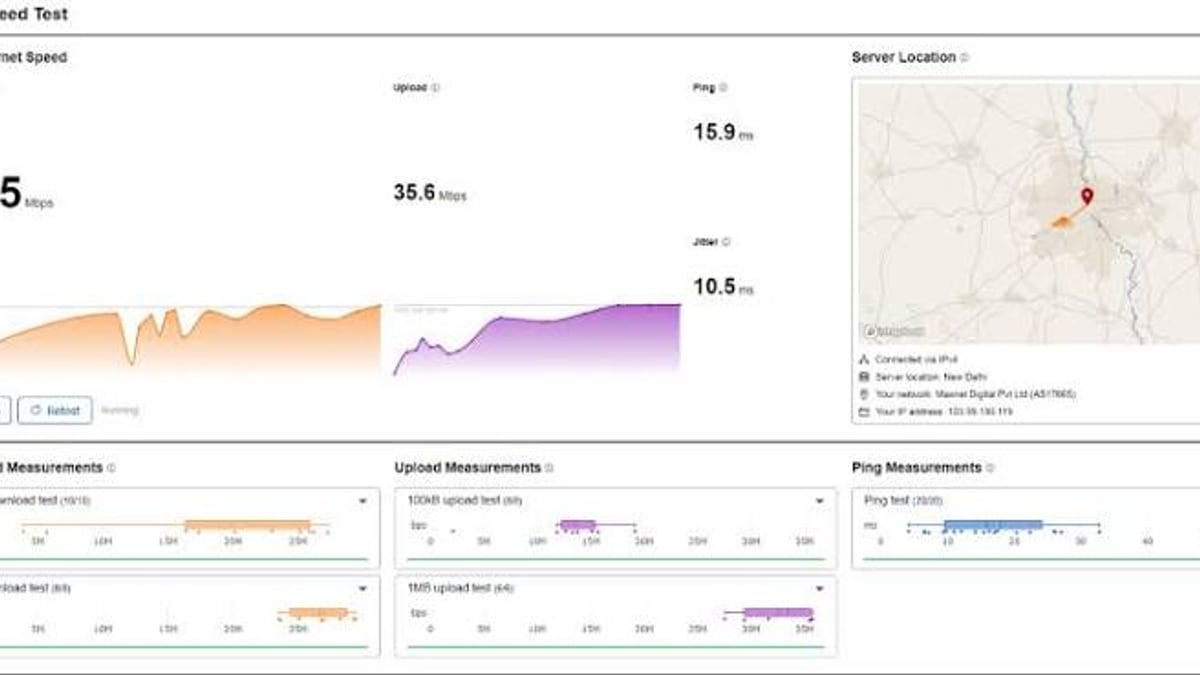
If you care about why your gigabit connection still feels laggy, Cloudflare’s speed test is the tool to use. It goes far beyond a single ping number, reporting idle latency, loaded latency, and jitter in a clear, visual format. Because it runs on Cloudflare’s massive edge network, the test reflects real‑world conditions better than many single‑server alternatives. There is no ad clutter, and the interface is refreshingly simple.
Why it’s #2: Best‑in‑class latency/jitter detail; excellent at exposing bufferbloat‑like symptoms.
Keep in mind: You cannot manually choose a test server, so it’s less suited for comparing ISPs across regions.
3. FAST.com – Best No‑Fuss Test for Streaming
Owned by Netflix, FAST.com loads instantly and starts measuring your download speed without any clicks. In 2026 it still offers one of the cleanest experiences around, while quietly delivering two powerful metrics: unloaded latency and loaded latency. The difference between them reveals bufferbloat that could cause Netflix buffering even on a fast pipe. Tapping “Show more info” also reveals upload speed.
Why it’s #3: Zero ads, effortless to use, and the loaded‑latency data is a simple proxy for streaming quality.
Keep in mind: No server selection, no jitter data, and limited beyond Netflix’s CDN. Perfect for a quick check, not for deep diagnostics.
4. Waveform Bufferbloat Test – Best for Diagnosing Lag Under Load
Bufferbloat is the silent killer of smooth internet—when someone uploads a file or a cloud backup kicks in, latency rockets and everything feels slow. Waveform’s dedicated test is built specifically to measure this. It runs a simultaneous upload/download load while tracking latency spikes, then gives you an easy‑to‑understand letter grade. If you’ve ever wondered whether your router’s QoS settings are working, this tool is non‑negotiable.
Why it’s #4: Unmatched bufferbloat diagnosis; clear, actionable results.
Keep in mind: It’s a specialist tool, not a daily speedometer. Works best from a desktop browser.
5. M-Lab NDT (Measurement Lab) – Best for Research & Transparency
M‑Lab’s Network Diagnostic Tool is the gold standard for open, auditable measurement. Backed by Google and academic researchers, it uses a single‑stream TCP test that mimics traditional bulk file transfers. All test data is anonymized and published as open data, which makes it a favorite for broadband policy research and ISP accountability. While the consumer UI is spartan, the scientific rigor is unmatched.
Why it’s #5: Full transparency, public datasets, and a research‑grade approach.
Keep in mind: No jitter or bufferbloat details, and the fixed server location may not reflect your closest CDN.
6. nPerf – Best Multi‑Faceted Quality Test
nPerf is a Swiss‑army knife among speed tests. In addition to download/upload, it measures browsing performance and streaming quality, giving you a more holistic “quality of experience” view. It supports multiple server connections simultaneously and offers dedicated apps for mobile and desktop. The interface can feel dense, but the wealth of data—including ping, jitter, and packet loss—makes it a favorite among power users.
Why it’s #6: Combines speed, browsing, and streaming metrics in one run.
Keep in mind: Server coverage varies by region; UI could be streamlined.
7. SpeedOf.Me – Best Browser‑Only Test with History
SpeedOf.Me was an early champion of HTML5‑based testing that works without Flash or Java. Today it remains a solid, no‑download‑required choice with a clean graph that shows speed variations during the test. It stores your past results locally, making it easy to track performance over time. While it doesn’t dive deep into jitter, it reports latency and shows a real‑time throttle plot.
Why it’s #7: Works on any modern browser, no app needed; clear speed curve.
Keep in mind: Fewer diagnostic metrics than Cloudflare or Waveform; server network is smaller than Ookla’s.
8. Meteor (by OpenSignal) – Best Mobile‑First Experience
Meteor takes a different angle: instead of raw numbers, it shows you what your current connection can actually do—stream HD video, make WhatsApp calls, play online games, etc. The app is beautifully designed, ad‑free, and gives a quick, experience‑based score. For everyday mobile users who don’t care about jitter definitions, Meteor is a breath of fresh air.
Why it’s #8: Practical, app‑experience scoring; excellent mobile UI.
Keep in mind: Not suitable for desktop or heavy‑duty diagnostics; limited to mobile platforms.
9. OpenSpeedTest – Best Lightweight & Self‑Hosted Option
OpenSpeedTest is a nimble, HTML5‑based test that you can run in any browser—or even host on your own server. It reports download, upload, ping, and jitter in a clean, minimal interface. The self‑hosting capability is a unique advantage for IT teams who want to test internal network performance without relying on third‑party servers. Public instances also exist, but self‑hosting gives you full control over test conditions.
Why it’s #9: Extremely lightweight; self‑hosting friendly; useful for LAN‑side benchmarking.
Keep in mind: Comparability depends heavily on where you host the server; public nodes vary widely.
10. Bandwidth Place – Quick, Clean, and Straightforward
Bandwidth Place offers a no‑fuss speed test with a modern, ad‑minimized interface. It delivers a fast download/upload check plus ping, making it an excellent first stop when you just need a sanity check. For readers who want to integrate results into a broader troubleshooting workflow, Bandwidth Place’s simplicity is a strength.
Why it’s #10: Perfect for a rapid baseline; uncluttered user experience.
Keep in mind: Lacks advanced latency or bufferbloat analysis; server selection is limited.
Check speed at Bandwidth Place
How to Choose the Right Speed Test for Your Scenario
Top 10 Internet Speed Test Tools 2026 (Latency, Jitter & Accuracy) - supporting product research image 3.
Not every user needs the same tool. Use this quick decision table to match your priority with our top picks:
| If you want… | Best tool this year |
|---|---|
| A fast, everyday reference that everyone recognizes | Ookla Speedtest |
| Deep latency/jitter data for gaming or video calls | Cloudflare Speed Test |
| A one‑click test that also hints at streaming quality | FAST.com |
| To fix “my internet feels slow even with high Mbps” | Waveform Bufferbloat Test |
| Open data or academic‑level transparency | M‑Lab NDT |
| A full picture of speed + browsing + streaming | nPerf |
| Browser‑only testing with a speed graph | SpeedOf.Me |
| Mobile‑first view of what apps will actually work | Meteor |
| A self‑hosted solution for internal network checks | OpenSpeedTest |
| The quickest possible baseline measurement | Bandwidth Place |
Complementary Tools: Privacy Checks While You Test
Top 10 Internet Speed Test Tools 2026 (Latency, Jitter & Accuracy) product interface and feature overview.
Internet speed tests tell you how fast data moves, but they don’t check whether your connection is leaking sensitive information. If you use a VPN or advanced network setup, a speed test alone won’t reveal DNS leaks, WebRTC leaks, or browser fingerprinting vulnerabilities that could undermine your privacy. That’s where complementary privacy diagnostic tools become valuable.
For instance, after running a speed test through a VPN, you can use BrowserScan’s leak tests—including DNS and WebRTC leak detection—to confirm that your real IP address remains hidden. This is a natural next step in any privacy audit. We recommend pairing your speed test routine with a tool like BrowserScan; see our detailed comparisons in the BrowserScan vs Pixelscan vs NSLookup.io guide for a complete privacy workflow. If you want to tie speed testing directly into an IP intelligence pipeline, read our step‑by‑step walkthrough on How to Use BrowserScan with Abstract API for Privacy Audits. (BrowserScan itself is an online privacy suite, not an internet speed test, which is why it appears here only as a recommended complementary tool and is not ranked in our top 10.)
For those managing enterprise networks or looking for broader internet performance platforms beyond consumer‑grade speed tests, explore our dedicated guide to the Top 10 Internet Performance Measurement Platforms 2026.
Related reading
- How to Use BrowserScan with Abstract API for Privacy Audits - Combine BrowserScan's leak and fingerprint tests with Abstract API's IP, email, and phone verification. Step-by-step workflow to detect leaks and enrich IP intelligence.
- BrowserScan vs Pixelscan vs NSLookup.io: Which Tool Wins? - Compare BrowserScan, Pixelscan, and NSLookup.io for privacy diagnostics, fingerprinting, DNS tools, and leak tests. Find the best tool for your workflow.
- BrowserScan vs NSLookup.io: Privacy Suite or DNS Tool? - Compare BrowserScan and NSLookup.io for online privacy vs DNS lookups. See why BrowserScan's fingerprint and leak detection beats a DNS-only utility.
Sources and further reading
- Best Internet Speed Tests - Taking an internet speed test is quick and easy. Here's how to know if you're getting the speeds you're paying for.
- Speed test question. Which speed test sites are more accurate? : r/HomeNetworking - Every speed test is “accurate” in that it measures the amount of data that is transferred (a) between two specific points, (b) using a specific set of transfer methods, (c) at a specific time.
- Best Internet Speed Tests of 2026 (Compared): Latency, Jitter, Accuracy & Apps - Best Internet Speed Tests of 2026 (Compared): Latency, Jitter, Accuracy & Apps Speed tests are everywhere—but the results (and the…
Frequently Asked Questions
Which speed test is the most accurate?
Accuracy depends on what you want to measure. For peak throughput to a nearby server, Ookla is highly reliable because of its dense server network. For latency under real‑world load, Cloudflare’s tool gives a more nuanced picture. No single test is perfect—we always recommend cross‑checking with at least two tools, as network routes change constantly.
Why do different speed tests show different results?
Each test connects to a different server, uses a different protocol (single‑stream vs multi‑thread), and may run at a different time. The internet path between you and the test server can involve different ISPs, peering points, and congestion. These variables naturally produce varying results, even on the same connection.
What is bufferbloat and why should I test for it?
Bufferbloat happens when a network device (like your router) holds too many packets in its buffer during a busy upload or download. This causes latency to spike dramatically, making interactive applications like games, Zoom calls, and VoIP unusable even if your download speed remains high. The Waveform Bufferbloat Test and FAST.com’s loaded‑latency metric both expose this issue.
Can I run a speed test on my phone?
Yes. Most tools offer mobile‑friendly websites or dedicated apps. For a mobile‑native experience, Meteor and the Ookla mobile app are excellent choices. Always test over Wi‑Fi and cellular separately to isolate problems.
Do I need to create an account for these tools?
No. Every tool we listed works without registration. However, Ookla offers an optional login to save your history; SpeedOf.Me stores results locally. The rest keep things entirely anonymous.
Conclusion: Use the Right Tool for the Job
The best internet speed test in 2026 is the one that answers your specific question. If you simply want to confirm you’re getting the bandwidth you pay for, Ookla is a safe bet. If your online gaming is jittery or video calls keep freezing, Cloudflare’s responsiveness‑first design will reveal what raw Mbps can’t. And if you suspect your router’s buffers are the culprit, Waveform’s bufferbloat test will pinpoint the problem in seconds.
We built this guide using the same rigorous, evidence‑based approach we apply to all our rankings at BrowserScan—testing across scenarios, checking methodologies, and filtering out hype. Bookmark this article and re‑run the recommended tests whenever your connection feels off. A little diagnostics today can save you from a costly ISP upgrade you might not even need.