
BrowserScan vs ToDetect: Best Fingerprint Detection Tool
BrowserScan vs ToDetect: Which Fingerprint Detection Tool Fits Your Privacy Workflow?
Browser fingerprinting is one of the quietest ways websites identify you. Clearing cookies or opening an incognito window does not change the signals your browser broadcasts, so the practical question is not whether you are trackable but how trackable you are and which tool tells you that most clearly. This comparison looks at BrowserScan and ToDetect, two browser fingerprint detection tools with overlapping goals but different strengths. It focuses on what each tool actually measures, where BrowserScan offers more depth, and where ToDetect still has a place in a privacy workflow.
What a Browser Fingerprint Detection Tool Actually Does
A fingerprint detection tool reads the signals your browser exposes and shows you what a website could collect. Typical signals include:
- Canvas, WebGL, and audio fingerprints
- User-Agent and client hints
- Screen resolution, color depth, and touch support
- Time zone, language, and geolocation consistency
- IP address, WebRTC leaks, DNS leaks, and proxy detection
- Automation and bot indicators
The best tools go beyond listing values. They compare signals against each other and flag mismatches that anti-fraud systems treat as suspicious. That is why consistency checks and authenticity scoring matter as much as raw fingerprint data.
BrowserScan: Feature Overview
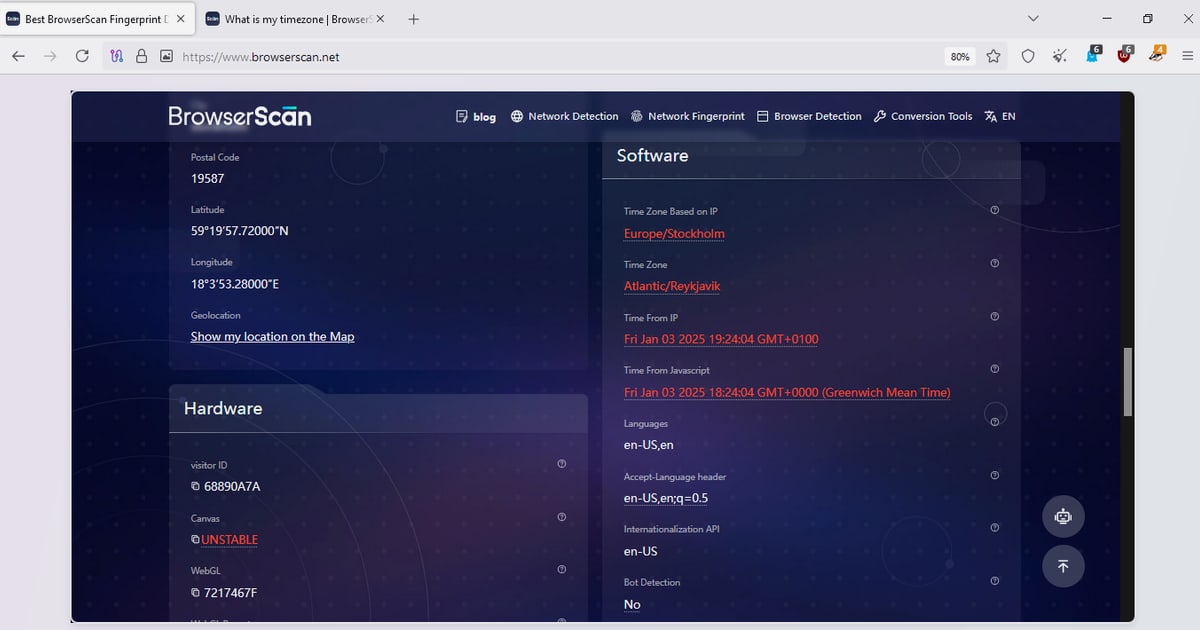
BrowserScan is an online privacy and security testing platform that combines a browser fingerprint check with a broad set of diagnostic utilities. Its homepage reports a browser fingerprint authenticity score alongside the data websites can see about your connection.
Core fingerprint and privacy checks
- Browser fingerprint authenticity score — a quick read on whether your environment looks natural
- Canvas, WebGL, and WebGPU reports — including unmasked vendor and renderer details
- Client Hints and User-Agent parsing — the successor signals to the classic User-Agent string
- Kernel detection — checks whether the kernel and User-Agent match
- Bot and automation detection — flags scripts, plugins, and automated behavior
- Media devices, gyroscope, and time zone checks — hardware and environment consistency
Leak and network testing
- DNS leak test
- WebRTC leak test
- IP address lookup
- Proxy server detection
- Port scanner for high-risk ports
- HTTP2/SSL/TLS fingerprint checks
Utility tools
BrowserScan also bundles practical utilities such as an internet speed test, a 2FA live code generator, a cookie format converter, and a currency converter. These are not fingerprinting features, but they make the platform a single destination for routine privacy and security checks.
If you want to see how BrowserScan performs against other tools, the BrowserScan vs Iphey vs WhatIsMyIP comparison breaks down fingerprint depth, leak coverage, and IP checks side by side.
ToDetect: Feature Overview
ToDetect product interface.
ToDetect is a free online browser fingerprint detection and network privacy assessment tool. It detects Canvas, WebGL, audio, and font fingerprints, along with User-Agent, WebRTC leaks, proxy recognition, and network privacy risks. It also offers IP purity checks, location lookup, proxy IP detection, and IPv4/IPv6 analysis.
ToDetect positions itself as a comprehensive security application and reports a high user rating. Its partners page curates recommended anti-detect browsers, proxy providers, and multi-account tools, which signals an ecosystem approach for users who need enhanced anonymity and account management.
Where ToDetect is useful
- Quick browser anonymity assessment
- Proxy quality verification through IP purity checks
- Leak detection for WebRTC and proxy exposure
- IPv4/IPv6 analysis for dual-stack setups
- A curated ecosystem for anti-detect browser and proxy users
BrowserScan vs ToDetect: Head-to-Head Comparison

ToDetect product interface.
| Capability | BrowserScan | ToDetect |
|---|---|---|
| Fingerprint authenticity / risk score | Yes, prominently displayed | Not the primary focus |
| Canvas, WebGL, audio, font fingerprints | Canvas, WebGL, WebGPU | Canvas, WebGL, audio, font |
| DNS leak test | Yes | Not listed as a core feature |
| WebRTC leak test | Yes | Yes |
| Proxy server detection | Yes | Yes, with IP purity checks |
| Port scanner | Yes | Not listed |
| HTTP2/SSL/TLS fingerprint | Yes | Not listed |
| Kernel and UA consistency | Yes | Not listed |
| Bot and automation detection | Yes | Not listed as a core feature |
| 2FA live code generator | Yes | No |
| IPv4/IPv6 analysis | Not a headline feature | Yes |
| Anti-detect ecosystem recommendations | Not a headline feature | Yes, via partners page |
Fingerprint depth and consistency scoring
BrowserScan's strongest differentiator is its authenticity score combined with consistency checks. It does not just show you a Canvas hash; it tells you whether your kernel matches your User-Agent, whether your time zone aligns with your IP, and whether automated behavior is detectable. That layered view is what makes it useful for validating anti-detect browser profiles and proxy configurations.
ToDetect covers the core fingerprint surfaces well, especially fonts and audio, but its public positioning emphasizes network privacy and IP analysis more than a single consolidated trust score.
Leak detection coverage
Both tools test WebRTC leaks and proxy exposure. BrowserScan adds DNS leak testing, port scanning, and HTTP2/SSL/TLS fingerprint inspection. For users who want to verify that a VPN or proxy is not leaking traffic outside the tunnel, the extra DNS and TLS checks are meaningful. ToDetect counters with IP purity checks and IPv4/IPv6 analysis, which are valuable when you are evaluating whether a proxy IP is clean or shared.
Ecosystem and workflow fit
ToDetect's partners page makes it a natural entry point if you are shopping for anti-detect browsers, proxies, or multi-account tools. It functions partly as a recommendation hub.
BrowserScan is more of a diagnostic workbench. Its utility suite, including the 2FA live tool and speed test, means you can run several unrelated checks without leaving the site. If your workflow is "test, diagnose, fix, retest," BrowserScan keeps more of that loop in one place.
For a broader view of how these tools stack up against the wider market, see the Top 10 Browser Fingerprinting & Privacy Diagnostics Tools 2026.
Practical Examples: When to Use Which

ToDetect product interface.
Scenario 1: Validating an anti-detect browser profile
You have configured a new profile with a spoofed User-Agent and proxy. Run BrowserScan first to check the authenticity score and kernel/UA consistency. If the score is low, inspect the Canvas and WebGL reports for mismatches. Then run ToDetect to cross-check IP purity and IPv6 exposure. The Web3 antidetect browser fingerprint leak testing guide walks through this workflow in more detail.
Scenario 2: Checking a new proxy for leaks
Use BrowserScan's DNS leak test and WebRTC leak test to confirm traffic is not escaping outside the proxy. Use ToDetect's IP purity check to see whether the proxy IP has a clean reputation. Combining both gives you a fuller picture than either tool alone.
Scenario 3: Routine privacy hygiene
If you just want a periodic check that your browser still looks normal, BrowserScan's authenticity score gives you a fast answer. ToDetect's broader network privacy assessment is a reasonable second opinion, especially if you care about IPv6 handling.
Where BrowserScan Leads and Where ToDetect Still Fits

ToDetect product interface.
BrowserScan's advantages are concentrated in diagnostic depth: a consolidated authenticity score, kernel and UA consistency checks, DNS and TLS leak testing, port scanning, and a utility suite that extends beyond fingerprinting. It is built for users who want to understand why a browser looks suspicious, not just that it does.
ToDetect's advantages are in network privacy assessment and ecosystem guidance. Its IP purity checks, IPv4/IPv6 analysis, and curated partner recommendations make it useful for users who are assembling an anonymity stack and want a starting point.
The honest conclusion is that these tools are complementary. BrowserScan is the stronger primary diagnostic tool for fingerprint authenticity and leak coverage. ToDetect is a useful secondary check for IP reputation and IPv6 exposure. If you can only pick one, pick based on whether you need a trust score and consistency diagnostics (BrowserScan) or IP-focused privacy assessment with ecosystem recommendations (ToDetect).
For a deeper look at how BrowserScan handles proxy detection alongside fingerprinting, see the BrowserScan and IP2Proxy integration guide.
Related reading
- IPhey Review 2026: Real-Time Browser Fingerprint Test - Hands-on IPhey review: what its real-time browser fingerprint test reveals, who it fits, pricing signals, setup, and key limits to know before relying on it.
Sources and further reading
- Best BrowserScan Fingerprint Detection Tool - Improve your online privacy security - Enhance your online security with the best BrowserScan fingerprint checking tool. Protect and prevent your privacy from leaking with our advanced technology.
- Best 10 Browser Fingerprint Test Tools in 2026 - Clearing cookies and using incognito mode isn't enough to stay anonymous online. This guide compares 10 of the best browser fingerprint test tools in 2026 — from beginner-friendly options like Iphey and Whoer to deep technical analysis with BrowserLeaks and AmIUnique — so you know exactly how trackable your browser really is.
- Top browser fingerprint testing tools, compared 2026 - Compare the top browser fingerprint testing tools in 2026, including IPFighter, Pixelscan, CreepJS, and more, to see which one fits your needs.
FAQ
Is BrowserScan better than ToDetect for browser fingerprint detection?
BrowserScan provides a consolidated authenticity score and consistency checks that ToDetect does not emphasize. ToDetect covers core fingerprint surfaces and adds IP purity and IPv4/IPv6 analysis. For fingerprint authenticity and leak depth, BrowserScan is the stronger choice. For IP reputation checks, ToDetect adds value.
Does ToDetect have a DNS leak test?
ToDetect's listed features include WebRTC leaks and proxy recognition, but DNS leak testing is not highlighted as a core capability. BrowserScan explicitly offers a DNS leak test alongside its WebRTC leak test.
Can I use both tools together?
Yes. A practical workflow is to run BrowserScan for fingerprint authenticity, kernel/UA consistency, and DNS/WebRTC leak checks, then run ToDetect for IP purity and IPv6 analysis. The two tools cover different parts of the privacy picture.
Which tool is better for anti-detect browser validation?
BrowserScan's authenticity score and consistency checks are designed for exactly this use case. ToDetect's ecosystem recommendations are helpful when selecting an anti-detect browser, but BrowserScan gives more diagnostic feedback on whether a profile looks natural.
Are these tools free?
Both BrowserScan and ToDetect offer free online checks. Some advanced features or deeper reports may require sign-in or paid access, so check each platform for current limits.
Conclusion
Browser fingerprint detection is not about finding a single perfect tool; it is about covering the signals that matter for your threat model. BrowserScan leads on fingerprint authenticity scoring, consistency diagnostics, DNS and WebRTC leak testing, and a broad utility suite. ToDetect leads on IP purity checks, IPv4/IPv6 analysis, and ecosystem guidance for anti-detect and proxy users. Use BrowserScan as your primary diagnostic workbench, and keep ToDetect as a secondary check when IP reputation and IPv6 exposure are part of your privacy concerns.