
HackerTarget Setup: Configure Scanners, Tools & OSINT Workflows
HackerTarget Setup: Configure Scanners, Tools, and OSINT Workflows
HackerTarget is a hosted security testing platform that bundles open-source reconnaissance and vulnerability tools behind a web interface. Setting it up properly means more than opening a URL: you need to choose the right scanner for the job, configure targets correctly, understand which tools require API keys, and interpret partial or incomplete results. This guide walks through the practical setup steps for the most-used HackerTarget tools, including Nikto, Nmap, OpenVAS, and Recon-ng, then shows how to pair those scans with browser-side privacy checks.
What HackerTarget Setup Actually Involves

HackerTarget Setup: Configure Scanners, Tools & OSINT Workflows - What HackerTarget Setup Actually Involves.
HackerTarget offers 13 online vulnerability scanners and 17 free network and IP tools. Setup differs depending on whether you use the hosted web interface or install the underlying open-source tools locally.
| Setup path | What you configure | Best for |
|---|---|---|
| Hosted web scanners | Target IP or domain, scan options, scheduled scans | Quick assessments without local installation |
| Local Nikto install | Perl dependencies, target host, port, SSL flags | Custom scans, scripting, offline testing |
| Local Recon-ng install | Workspaces, marketplace modules, third-party API keys | OSINT investigations and data pivoting |
| API access | API key, request parameters, output format | Automation and integration with other tools |
Before running any active scan, confirm you own the target or have written permission. Hosted scanners send real HTTP requests and port probes that can trigger monitoring, rate limits, or security controls.
Setting Up Hosted HackerTarget Scanners
HackerTarget Setup: Configure Scanners, Tools & OSINT Workflows - Setting Up Hosted HackerTarget Scanners.
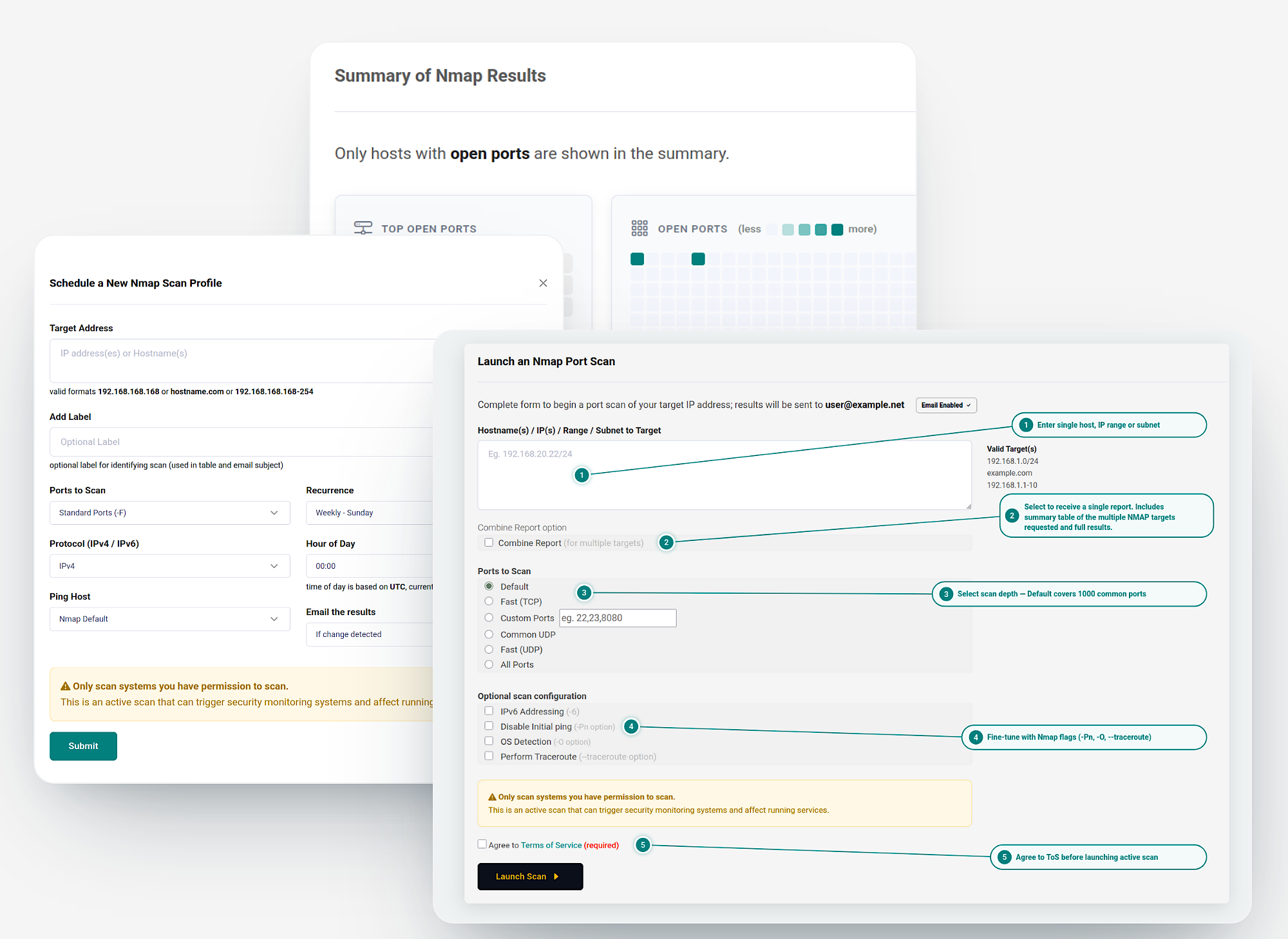
Nmap Port Scanner
The hosted Nmap scanner is one of the most popular HackerTarget tools. Setup is minimal: enter a hostname or IP address, select the port range, and start the scan. For a full perimeter review, scan all 65,535 ports rather than the default top 1,000. The hosted version supports complete net blocks, which is useful for mapping an entire attack surface in one pass.
OpenVAS Vulnerability Scanner
OpenVAS performs thousands of checks against a system for known vulnerabilities. In the hosted version, you schedule the scan and receive a report when it finishes. Because OpenVAS is more resource-intensive than a port scan, plan for longer runtimes on large targets. Schedule recurring scans for systems that change frequently.
Nikto Web Scanner
Nikto detects vulnerable web scripts, configuration errors, and risky server headers. The hosted Nikto scanner uses the same engine as the command-line tool, so the target selection principles are identical. A scan against an IP address can return different results than a scan against a hostname, HTTPS virtual host, or specific application path. Test the exact endpoint that matters: https://example.com/phpmyadmin/ may expose findings that a scan of https://example.com misses.
WordPress, Joomla, and Drupal Scans
These CMS-specific scanners check plugin versions, theme issues, and known vulnerabilities. Setup requires only the site URL. Run them after any plugin or theme update, and treat the results as a starting point rather than a complete application assessment.
Setting Up Nikto Locally
HackerTarget Setup: Configure Scanners, Tools & OSINT Workflows - Setting Up Nikto Locally.
If you prefer command-line control, install Nikto directly. The official repository is on GitHub, and the setup process is straightforward on Ubuntu.
Installation Steps
git clone https://github.com/sullo/nikto
cd nikto/program
./nikto.pl
If Nikto reports missing Perl modules, install them:
sudo apt install libjson-perl libxml-writer-perl
For HTTPS targets, add the SSL dependency:
sudo apt install libnet-ssleay-perl openssl
Basic Commands and Target Selection
nikto -h http://example.com
nikto -h https://example.com
nikto -h https://example.com:8443
nikto -h https://example.com/app/
nikto -h example.com -p 8080
nikto -h example.com -p 443 -ssl
nikto -h https://example.com -output nikto-example.txt
Target selection is the most important setup decision. Modern web servers and CDN-backed sites often host multiple applications behind one IP address. The server uses the requested hostname, scheme, port, and path to decide what content to return. A scan against the IP address may reach the default virtual host, while a scan against a specific application path tests that application directly.
Reading Partial Scans
Nikto can stop early when a target is behind a CDN or WAF. Look for the error limit and completion status lines:
+ ERROR: *** Error limit (20) reached for host, giving up. ***
- STATUS: Completed 115 requests (~2% complete, ~50.6 minutes left)
+ Scan terminated: 20 errors and 5 items reported on the remote host
A partial scan is not a complete assessment. If you see the error limit message, the scan only tested a small portion of the checks. Consider proxying through a tool like mitmproxy to avoid TLS fingerprint blocks, or switch to the hosted scanner.
Setting Up Recon-ng for OSINT
HackerTarget Setup: Configure Scanners, Tools & OSINT Workflows - Setting Up Recon-ng for OSINT.
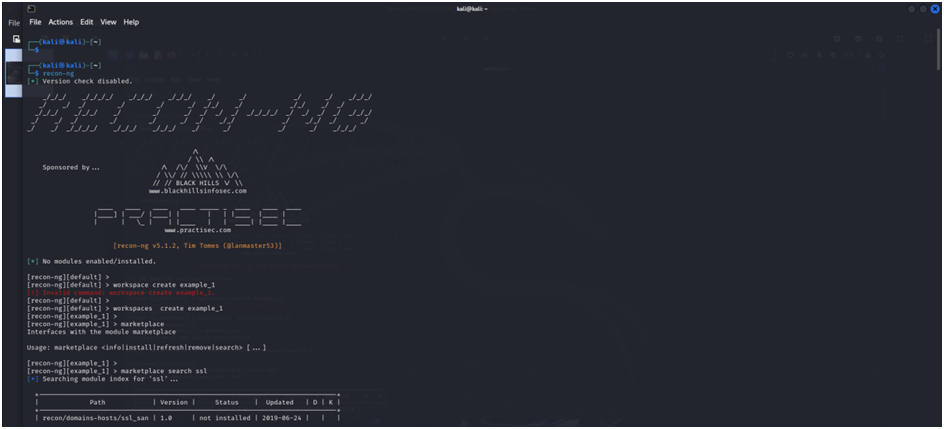
Recon-ng is a reconnaissance and OSINT framework with a Metasploit-like console. Setup involves installation, workspace creation, and module configuration.
Installation
On Kali Linux, Recon-ng comes pre-installed. Update it with:
apt-get update && apt-get install recon-ng
On Ubuntu, clone the repository and install requirements:
git clone https://github.com/lanmaster53/recon-ng.git
cd recon-ng
pip install -r REQUIREMENTS
./recon-ng
Creating a Workspace
Workspaces keep collected data organized in a database. Create one before starting any investigation:
[recon-ng][default] > workspaces create example_name
[recon-ng][example_name] >
To return to the workspace later:
recon-ng -w example_name
Installing Modules from the Marketplace
Recon-ng starts with an empty framework. Install modules from the marketplace:
[recon-ng][example_name] > marketplace search
[recon-ng][example_name] > marketplace install recon/domains-hosts/hackertarget
Many modules require third-party API keys. Manage them with the keys command:
[recon-ng][example_name] > keys add shodan_api YOUR_API_KEY
Modules are grouped into categories: discovery, exploitation, import, recon, and reporting. Start with recon modules for passive information gathering, then pivot to more active techniques as needed.
Pairing HackerTarget Scans with Browser Privacy Checks
Network and web server scans tell you what is exposed from the outside. Browser-side checks tell you what your own browser and connection are leaking. The two perspectives complement each other.
After running a HackerTarget scan on your infrastructure, verify your own browsing setup with BrowserScan's free privacy testing tools. The platform runs entirely in your browser, so there is nothing to install. Its DNS and WebRTC leak tests confirm whether your VPN is exposing your real IP address, while the browser fingerprint analysis checks how unique and trackable your browser profile is.
For a deeper look at what leak tests reveal and how to interpret the results, see the BrowserScan review. The IP lookup tool also shows geolocation, ISP, and proxy detection data that can validate whether your connection is routing through the expected exit node.
Common HackerTarget Setup Mistakes
Scanning the Wrong Target
An IP address scan and a hostname scan can produce completely different results on shared hosting or CDN-backed infrastructure. Always test the exact hostname, scheme, port, and path that represents the application you are assessing.
Ignoring Partial Scan Results
A Nikto scan that stops at 2% completion is not a full assessment. Check the status lines before drawing conclusions, and rerun with different settings or a proxy if TLS errors appear.
Skipping API Key Configuration in Recon-ng
Many Recon-ng modules return no data without the required API keys. Use keys list to see configured credentials and marketplace search to identify which modules need keys before you run them.
Treating Scanner Output as a Complete Security Audit
Nikto finds exposed files, default content, and misconfigurations. It does not replace authenticated testing, manual review, or a full application security assessment. Use scanner results as a starting point for deeper investigation.
Related reading
- Email Verification: How It Works, Why It Matters, and How to Verify Addresses - Learn what email verification is, how it protects sender reputation, the difference between validation and verification, and how to verify addresses for free.
- BrowserLeaks Setup: How to Run Privacy Leak Tests Correctly - Learn how to set up and use BrowserLeaks correctly for DNS, WebRTC, fingerprint, and TLS leak tests, plus how to interpret results and fix leaks.
- What Is BrowserLeaks? Privacy Leak Testing Explained - Learn what BrowserLeaks is, how its fingerprint, WebRTC, DNS, and TLS tests work, what results mean, and how to use it to fix privacy leaks.
FAQ
Is HackerTarget free to set up?
The free network and IP tools require no account and no installation. The hosted vulnerability scanners are available through a membership with a 7-day refund period. Local installations of Nikto and Recon-ng are free and open source.
Do I need API keys for HackerTarget hosted tools?
No. The hosted web scanners work without API keys. API keys are relevant for the HackerTarget API, which is used for automation, and for Recon-ng modules that query third-party services like Shodan or Censys.
How do I set up HackerTarget API access?
Create an account, generate an API key from the account dashboard, and include the key in your API requests. The API supports the same scanners as the web interface, with parameters for target, scan type, and output format.
Can I scan any website with HackerTarget?
Only scan systems you own, administer, or have explicit written permission to test. Hosted scanners send active requests that may trigger monitoring or security controls on the target.
Why did my Nikto scan stop early?
Nikto stops after reaching an error limit, often 20 errors. This commonly happens when a target is behind a CDN or WAF, when scanner-like traffic is rate limited, or when TLS connections fail repeatedly. The scan is partial and should not be treated as complete.
How do I verify my VPN is not leaking my IP?
Run a DNS and WebRTC leak test. BrowserScan's browser-based tools check whether your real IP address is exposed through DNS queries or WebRTC connections, and the IP lookup confirms which address the test actually observed.
Conclusion
HackerTarget setup is straightforward once you understand the tool landscape. Hosted scanners require only a target and a few options, while local Nikto and Recon-ng installations need dependency checks, workspace configuration, and API keys. The most important setup decisions are target selection and result interpretation: scan the exact endpoint that matters, and verify that scans actually completed before acting on findings. Pair network-side scanning with browser-side privacy checks for a more complete view of your security posture.