
What Is BrowserLeaks? Privacy Leak Testing Explained
What Is BrowserLeaks? A Complete Guide to Browser Privacy Leak Testing
BrowserLeaks is a free, web-based diagnostic suite that examines what your browser silently reveals about you, your device, and your network to every website you visit. Instead of installing software, you simply open the site and it runs a battery of tests directly in your browser. The goal is not to scare you, but to show you the exact data points that advertisers, anti-fraud systems, and tracking scripts can collect.
At its core, BrowserLeaks answers a simple question: what does my browser expose when I browse? The answer covers far more than your IP address. It includes your graphics card behavior, installed fonts, TLS handshake details, WebRTC network candidates, DNS servers, and dozens of other signals that together form a unique fingerprint.
This guide explains what BrowserLeaks is, how its key tests work, what the results mean, and how to act on them.
What Is BrowserLeaks?
BrowserLeaks is a collection of browser-based privacy tests that run entirely in your browser using JavaScript, Web APIs, and network requests. It requires no download, no account, and no installation. You visit the site, and each test immediately begins probing the APIs and behaviors your browser exposes.
The suite covers several major categories:
- IP address and network leaks: Your public IP, WebRTC candidates, DNS servers, and IPv6 exposure
- JavaScript and device data: User-Agent, screen resolution, system language, CPU architecture, battery status, and installed plugins
- Browser fingerprinting surfaces: Canvas rendering, WebGL GPU data, font enumeration, and ClientRects measurements
- Protocol-level fingerprints: TLS/SSL handshake details (JA3/JA4), HTTP/2 frame analysis, and TCP/IP stack characteristics
- Browser feature detection: Which HTML5 APIs are supported, disabled, or behave unexpectedly
What makes BrowserLeaks different from basic "What is my IP" checkers is that it shows raw output rather than a simplified pass/fail verdict. You see the actual data your browser sends, which lets you verify whether a VPN, proxy, or privacy extension is genuinely working.
How BrowserLeaks Works
BrowserLeaks operates at the JavaScript API layer. When you load a test page, it executes code that calls browser APIs directly:
- It invokes
RTCPeerConnectionto trigger WebRTC negotiation and collect IP candidates - It renders a standardized Canvas scene and reads back the pixel data
- It queries
navigator.fontsto enumerate system typefaces - It inspects TLS ClientHello parameters to compute a JA3/JA4 fingerprint
- It checks which HTML5 features are available and how they respond
These operations execute inside your browser sandbox. That is precisely why a VPN offers limited protection against them: the VPN changes your network path, but it does not change how your browser renders graphics, enumerates fonts, or negotiates TLS connections.
Key BrowserLeaks Tests Explained
What Is BrowserLeaks? Privacy Leak Testing Explained - Key BrowserLeaks Tests Explained.
IP Address and WebRTC Leak Test
The IP test shows your visible public IP, hostname, geolocation, ISP, and ASN. But the more critical component is the WebRTC leak test.
WebRTC is a browser API for peer-to-peer audio, video, and data communication. To establish a connection, it uses the ICE protocol to gather every candidate network address the machine can use. This includes:
- Public IP candidates: Your real WAN address, which can bypass VPN routing in some configurations
- Local IP candidates: Your LAN address (e.g., 192.168.x.x), which reveals internal network topology
- mDNS candidates: Obfuscated local identifiers used by some Chromium browsers
The failure mode is well documented: in many VPN setups, WebRTC negotiation happens below the VPN tunnel's routing layer. The browser asks the operating system for network candidates, and the OS responds with the real IP before the VPN can intercept it. The result is that your actual residential or datacenter IP is transmitted to the STUN server and returned to any website running this check.
What a clean result looks like: Your public IP candidates show only the VPN or proxy server's IP. No local IP candidates appear, or mDNS obfuscation is active. No IPv6 addresses leak if your VPN only tunnels IPv4.
DNS Leak Test
The DNS leak test checks which DNS servers your browser actually uses to resolve domain names. If you are connected to a VPN but your DNS queries still route through your ISP's resolver, websites and observers can see which domains you visit and correlate that with your real identity.
A clean result shows DNS servers belonging to your VPN provider or a privacy-focused resolver you configured. A leak shows your ISP's DNS servers or other unexpected resolvers.
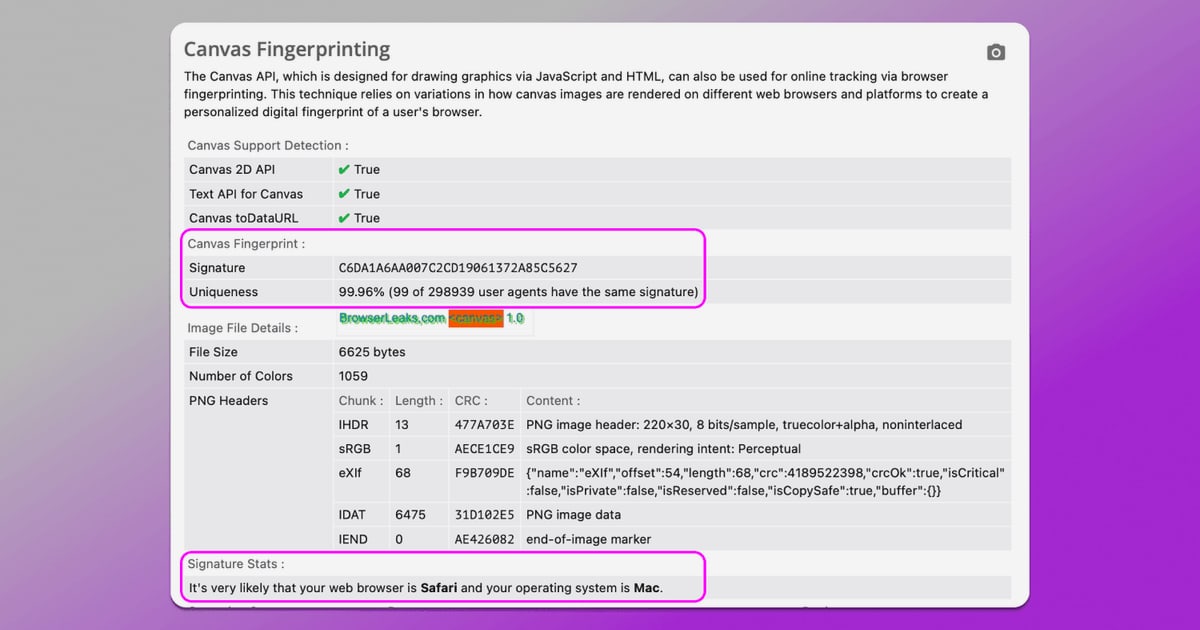
Canvas Fingerprinting
Canvas fingerprinting exploits the fact that rendering text and shapes on an HTML5 Canvas produces slightly different pixel output depending on your GPU, graphics driver, operating system font renderer, and anti-aliasing engine.
The test renders a standardized scene, reads back the raw pixel data, and hashes it. The resulting value is:
- Deterministic: Your hardware produces the same hash every time
- Persistent: It does not depend on cookies, sessions, or IP addresses
- High-entropy: Different hardware combinations rarely collide
This fingerprint is invisible to the user and cannot be cleared like cookies.
WebGL Report
WebGL goes deeper than Canvas by probing the 3D rendering pipeline. The test reads the WEBGL_debug_renderer_info extension to extract strings like ANGLE (NVIDIA GeForce RTX 4090 Direct3D11 vs_5_0 ps_5_0), revealing the exact GPU model, driver interface, and shader model version.
Even without the debug extension, WebGL shader execution produces hardware-specific floating-point artifacts that can be hashed into a stable fingerprint.
TLS and HTTP/2 Fingerprinting
The TLS test inspects the ClientHello message your browser sends when establishing a secure connection. This includes supported cipher suites, TLS extensions, and other parameters. These details are hashed into JA3 and JA4 fingerprints that identify the underlying browser engine and TLS library, even when the User-Agent string is spoofed.
The HTTP/2 test analyzes HEADERS frame ordering and SETTINGS frame values to create an Akamai-format fingerprint. These protocol-level signals are extremely difficult to spoof because they are generated by the browser's network stack, not by JavaScript.
Font Fingerprinting
Font fingerprinting measures the dimensions of text and Unicode glyphs, enumerates installed fonts, and detects rendering differences. The specific set of fonts on your system, combined with how your OS renders them, creates a fingerprint that is difficult to alter.
Why Basic IP Checkers Are Not Enough
What Is BrowserLeaks? Privacy Leak Testing Explained - Why Basic IP Checkers Are Not Enough.
Standard privacy check tools typically validate three things:
- Your visible IP address
- Your approximate geolocation
- Whether DNS queries route through your declared provider
This is a small fraction of your exposed attack surface. Modern tracking infrastructure from Cloudflare's bot management layer, Meta's Pixel, and anti-fraud engines does not rely primarily on your IP address. It profiles:
- The cryptographic fingerprint of your TLS handshake
- GPU-level rendering behavior of your Canvas and WebGL output
- The precise timing of your system's audio stack
- The enumeration of your installed fonts and browser APIs
A VPN changes your network path. It does not change any of these browser-side signals. That is why passing a BrowserLeaks test is a prerequisite for any privacy-sensitive workflow, not an optional extra.
How to Use BrowserLeaks Effectively
1. Establish a Baseline
Run the full suite with your normal browser and no VPN. Note the results. This is your baseline fingerprint.
2. Enable Your VPN or Proxy
Connect to your VPN and run the tests again. Compare the results. Pay special attention to:
- WebRTC public IP candidates: Do they show only the VPN IP?
- DNS servers: Do they belong to your VPN provider?
- IPv6: Does your IPv6 address leak if the VPN only tunnels IPv4?
3. Test Each Browser Configuration Separately
Different browsers have different fingerprint surfaces. Chrome, Firefox, Safari, and Brave each expose different APIs and behave differently under the same tests. Test each one you use.
4. Verify Anti-Detect Browser Setups
If you use an anti-detect browser for multi-account management or automation, BrowserLeaks is the standard way to verify that your spoofed fingerprint is consistent. Check that your Canvas hash, WebGL renderer string, font list, and TLS fingerprint all align with the profile you configured. Inconsistencies are a common reason platforms flag sessions. For a deeper look at how anti-detect browsers work and how to test them, see this guide on anti-detect browsers and fingerprint spoofing.
BrowserLeaks vs. BrowserScan: Which Should You Use?
BrowserLeaks is a powerful diagnostic suite, but it is not the only option. BrowserScan offers a complementary approach with a more guided, user-friendly interface.
| Feature | BrowserLeaks | BrowserScan |
|---|---|---|
| Fingerprint analysis | Raw data across 20+ surfaces | Authenticity score and simplified verdict |
| DNS and WebRTC leak tests | Yes | Yes |
| IP lookup with proxy detection | Basic IP display | Geolocation, ISP, and proxy detection |
| Port scanning | No | Yes (Nmap-powered) |
| Internet speed test | No | Yes |
| User agent parser | No | Yes |
| Interface | Technical, raw output | Guided, actionable insights |
BrowserLeaks excels at showing raw protocol-level data for advanced users who want to see exactly what their browser sends. BrowserScan is better suited for users who want a quick authenticity score and clear next steps without interpreting raw JavaScript output.
For most users, the practical approach is to use both: run BrowserLeaks when you need deep protocol-level detail, and use BrowserScan's free privacy testing tools for a faster, more actionable overview. If you want a detailed walkthrough of what each BrowserScan tool reveals, see the BrowserScan review.
Common BrowserLeaks Results and What They Mean
WebRTC Shows Your Real IP
Your VPN is not intercepting WebRTC traffic. Solutions include:
- Use a VPN with built-in WebRTC leak protection
- Disable WebRTC in your browser settings or via an extension
- Use a browser that routes WebRTC through the proxy
DNS Servers Show Your ISP
Your DNS queries are bypassing the VPN tunnel. Configure your VPN to force DNS through its own servers, or set a privacy DNS resolver manually.
Canvas Hash Changes Between Sessions
This can indicate that your browser is using a randomized fingerprint, which is itself a detectable signal. Consistent spoofing is more effective than random noise.
TLS Fingerprint Does Not Match Your Browser
If you are using a proxy or automation tool, the TLS fingerprint may reveal the underlying client library rather than a real browser. This is a common detection vector for anti-bot systems.
Limitations of BrowserLeaks
BrowserLeaks is a diagnostic tool, not a complete privacy solution. It shows you what is exposed but does not fix anything by itself. You still need to:
- Configure your VPN correctly
- Choose a browser with appropriate privacy settings
- Use extensions or anti-detect tools where needed
- Re-test after every configuration change
Additionally, BrowserLeaks tests run in your browser sandbox. They cannot detect server-side tracking, cross-site cookie syncing, or network-level surveillance by your ISP. They show what your browser reveals, not what third parties do with that data.
Related reading
- Chameleon Mode Pricing: Plans, Costs & What You Get - Chameleon Mode pricing explained: Basic $19/mo, Plus $69/mo, Pro $199/mo, yearly discounts, AI add-ons, and how to verify your browser setup.
- PrivacyTools.io Pricing: Free vs Paid Privacy Tools in 2026 - Understand PrivacyTools.io pricing: most listed tools are free and open source, while premium VPNs, email, and cloud storage use paid plans. Compare costs and free alternatives.
Sources and further reading
- Browserleaks - Check your browser for privacy leaks - BrowserLeaks is a suite of tools that offers a range of tests to evaluate the security and privacy of your web browser. These tests focus on identifying ways in which websites may leak your real IP address, collect information about your device, and perform a browser fingerprinting.
- My IP Address - The main tools for checking IP address privacy. Showing Your IP Address, Reverse IP Lookup, Hostname, and HTTP Request Headers, Your Country, State, City, ISP/ASN, and Local Lime, Whois Lookup, TCP/IP OS fingerprinting, WebRTC Leak Test, DNS Leak Test, and IPv6 Leak Test.
- BrowserLeaks Review 2026: The Ultimate Guide to Fingerprint Testing - Is your digital identity leaking? Read our definitive BrowserLeaks review for 2026. Learn how to test WebRTC, Canvas, and JA3/JA4 fingerprints like a pro.
Frequently Asked Questions
Is BrowserLeaks safe to use?
Yes. BrowserLeaks does not collect personal data, store user fingerprints, or set non-essential cookies. The tests run locally in your browser, and the results are displayed to you. Minimal requests to third-party APIs may be made for certain tests, but no fingerprint data is stored.
Is BrowserLeaks free?
Yes. All BrowserLeaks tools are free to use with no account required.
Can BrowserLeaks detect if my VPN is leaking?
Yes. The WebRTC, DNS, and IPv6 leak tests are specifically designed to reveal whether your VPN is exposing your real IP address, DNS queries, or IPv6 traffic.
Does BrowserLeaks work on mobile browsers?
Most tests work on mobile browsers, but some results will differ because mobile operating systems expose different APIs and hardware signals. The TCP/IP fingerprint, for example, may identify Android or iOS.
How often should I run BrowserLeaks tests?
Run the full suite whenever you change your VPN, browser, privacy extensions, or network configuration. For routine monitoring, a monthly check is sufficient for most users.
Can I download BrowserLeaks as an app?
No. BrowserLeaks is web-only by design. The tests require browser APIs that only exist in a browser context, so there is no downloadable version. If you are looking for a downloadable alternative, see this guide on BrowserLeaks download options and safer alternatives.
Conclusion
BrowserLeaks is the most comprehensive free browser privacy diagnostic suite available. It reveals what your browser broadcasts about your identity, hardware, network, and configuration—data that VPNs alone cannot hide.
The key insight is that modern tracking does not depend primarily on your IP address. It depends on the stable, hardware-level fingerprints your browser generates every time you load a page. BrowserLeaks shows you those fingerprints in raw detail.
Use it to verify your VPN is not leaking, to confirm your anti-detect browser profile is consistent, and to understand exactly what your browser reveals. Then pair it with actionable tools like BrowserScan's leak tests and fingerprint analysis to turn those insights into a concrete privacy improvement plan. If your main concern is VPN leaks specifically, the VPN checker guide walks through the exact tests to run after connecting.