
PrivacyTools.io Pricing: Free vs Paid Privacy Tools in 2026
PrivacyTools.io Pricing: What Free and Paid Privacy Tools Actually Cost
If you are researching PrivacyTools.io pricing, you have probably noticed something unusual: the directory itself does not sell subscriptions, and most of the tools it lists are free. PrivacyTools.io is a community-driven catalog of privacy-respecting software and services, not a commercial store. That means "pricing" depends entirely on which category of tool you choose — and on how much convenience you are willing to trade for cost.
This guide breaks down the real cost picture across the main privacy tool categories, explains where free and open source options are genuinely sufficient, and shows when a paid plan is worth the money.
How PrivacyTools.io Pricing Actually Works
PrivacyTools.io Pricing: Free vs Paid Privacy Tools in 2026 - How PrivacyTools.io Pricing Actually Works.
PrivacyTools.io does not charge users to browse its catalog, and it does not take a cut of the tools listed. The site organizes software by properties such as Open Source, Self-hosted, No account, E2E encrypted, and Free. A large share of the 350+ listed tools are free to download and use, especially those in the desktop, browser, and self-hosted categories.
Paid costs appear mainly in three areas:
- VPN services that operate large server networks and require ongoing infrastructure
- Encrypted email and cloud storage providers with hosted infrastructure
- All-in-one bundles that combine VPN, password management, and storage into a single subscription
In short: you can build a strong privacy setup for $0, but you will likely pay for hosted convenience, mobile apps, and customer support.
Free Privacy Tools: What $0 Gets You
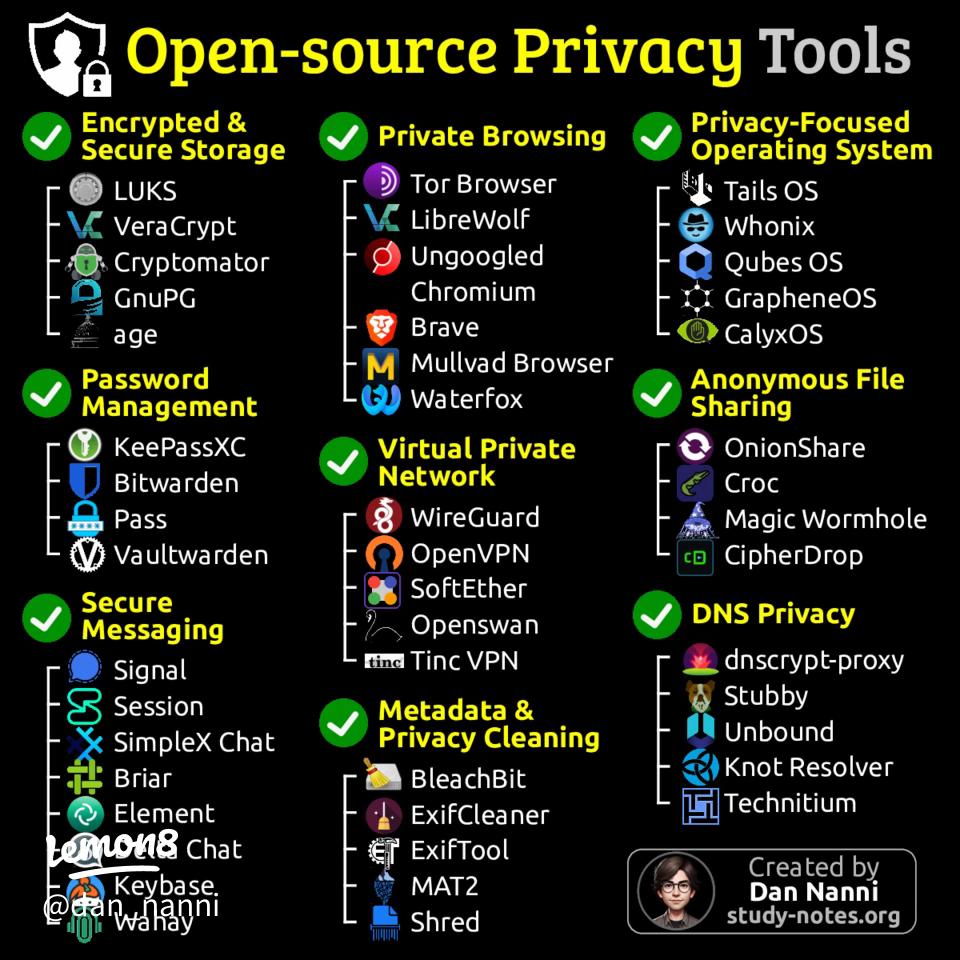
Many of the most recommended tools on PrivacyTools.io are free because they are open source and either run locally or can be self-hosted.
Browsers and Extensions
- Firefox Focus — free mobile browser with automatic ad blocking and tracking protection
- Brave Browser — free Chromium-based browser with built-in tracker and ad blocking
- LibreWolf — hardened Firefox fork for desktop, free with no telemetry
- uBlock Origin — free, open source content blocker that removes ads and trackers
None of these require an account or subscription. The trade-off is that you are responsible for configuration and updates.
Password Managers
- KeePassXC (desktop) and KeePassDX (Android) are free, audited, and store credentials in a local encrypted database. There is no cloud sync unless you add your own sync method, such as Syncthing or a self-hosted file share.
Self-Hosted Platforms
Tools like Nextcloud, Immich, Jellyfin, Pi-hole, and SearXNG are free to install, but you need your own hardware or a VPS. The software costs nothing; your real cost is time, electricity, and maintenance.
Online Privacy Testing
Free web-based diagnostics are also part of the privacy toolkit. For example, BrowserScan offers fingerprint analysis, DNS and WebRTC leak tests, IP lookup, and port scanning without any installation or subscription. If you want to verify that a free browser setup or VPN is actually protecting you, a browser audit or VPN checker can confirm whether your real IP or fingerprint is leaking.
Paid Privacy Tools: Where the Money Goes
Paid privacy tools generally fall into a few predictable pricing bands.
VPN Services
VPN pricing is the most visible paid category on PrivacyTools.io. A typical premium VPN costs between $3 and $6 per month when billed annually or multi-year, with monthly plans often double that. For example, the PrivacyTools.io top-10 guide highlights NordVPN as an all-in-one option whose Complete plan bundles VPN access, 1 TB of encrypted cloud storage via NordLocker, and the NordPass password manager.
Before paying for any VPN, run a DNS and WebRTC leak test to make sure the service is not exposing your real IP address. A paid VPN that leaks is worse than no VPN at all.
Encrypted Email and Calendar
Proton is the most commonly cited paid email provider in the PrivacyTools.io ecosystem. The free tier is functional, but the Mail Plus and Proton Unlimited plans add IMAP/SMTP access through desktop clients, more storage, email aliases, and multiple calendars. Expect to pay roughly $4 to $10 per month depending on the plan and billing cycle.
Encrypted Cloud Storage
Privacy-focused storage providers typically offer a small free tier and then charge monthly or annual fees. Internxt Photos, for example, offers 1 GB free forever, with paid plans starting around €4.99 per month and lifetime plans available for 2 TB to 10 TB. The lifetime option appeals to users who want to avoid recurring subscriptions, though it comes with the usual risk of paying upfront for a younger service.
Free vs Paid: A Practical Comparison
PrivacyTools.io Pricing: Free vs Paid Privacy Tools in 2026 - Free vs Paid: A Practical Comparison.
| Category | Free Option | Paid Option | Typical Paid Cost |
|---|---|---|---|
| Browser | Firefox Focus, Brave, LibreWolf | Usually none needed | $0 |
| Password manager | KeePassXC, KeePassDX | NordPass, Proton Pass | $2–$5/month |
| VPN | None reliable long-term | NordVPN, Mullvad, Proton VPN | $3–$6/month |
| Proton Free | Proton Mail Plus/Unlimited | $4–$10/month | |
| Cloud storage | Self-hosted Nextcloud | Internxt, Proton Drive, NordLocker | $4–$10/month |
| Privacy testing | BrowserScan, BrowserLeaks | Usually none needed | $0 |
When Free Tools Are Enough
A free setup is fully viable if your threat model is everyday tracking and data collection rather than targeted surveillance. A combination of LibreWolf or Brave, uBlock Origin, KeePassXC, and a self-hosted Nextcloud instance covers browsing, passwords, and file storage at zero software cost.
You can then validate the setup with free testing tools. A browser fingerprint check shows how trackers see your browser, while DNS and WebRTC leak tests confirm that your network configuration is not exposing more than intended.
When Paid Plans Are Worth It
Paid tools earn their price in three situations:
- You need a VPN with a large, fast server network. Running your own WireGuard server is cheap, but it gives you one exit IP in one location. Commercial VPNs provide thousands of servers and rotating IPs.
- You want zero-knowledge cloud storage without managing hardware. Self-hosting Nextcloud is powerful but requires upkeep. Paid encrypted storage handles redundancy, updates, and uptime for you.
- You need reliable mobile sync. Local password managers are secure but syncing across devices requires extra configuration. Paid managers handle sync natively.
How to Evaluate Any Privacy Tool's Price
Before paying for any privacy service, ask these questions:
- Is the free tier genuinely usable, or just a trial? Proton's free email is usable long-term; many VPN free tiers are not.
- Does the paid plan remove a real limitation? IMAP access, storage caps, and device limits are common real limitations.
- Is there a lifetime or multi-year discount? Internxt and some VPNs offer significant discounts for long commitments, but that also locks you in.
- Can you test the service first? Most reputable providers offer money-back guarantees or free tiers. Use them.
- Does the tool actually protect you? Run independent checks. For VPNs, use a VPN checker to test for DNS, WebRTC, and IP leaks. For browsers, run a fingerprint and security audit.
Related reading
- BrowserLeaks Download: Is There an App? Safer Alternatives - Looking for a BrowserLeaks download? Learn why BrowserLeaks is web-only, what its tools test, and how to run the same privacy checks without installing anything.
- What Is an Anti-Detect Browser? How It Works & How to Test It - Learn what an anti-detect browser is, how fingerprint spoofing works, key features to compare, and how to verify protection with leak and fingerprint tests.
Sources and further reading
- Internxt Photos Review: Private Photo Storage in 2026 - PrivacyTools.io - Internxt is a privacy-focused platform for encrypted photo storage with zero-knowledge encryption and anonymous accounts. It offers 1GB free forever, paid plans from €4.99, and…
Frequently Asked Questions
Is PrivacyTools.io free to use?
Yes. PrivacyTools.io is a free directory of privacy-respecting software and services. It does not charge for access and does not sell the tools it lists.
Are all tools on PrivacyTools.io free?
No. Many are free and open source, especially browsers, password managers, and self-hosted platforms. However, hosted services such as VPNs, encrypted email, and cloud storage typically have paid plans.
What is the cheapest way to build a privacy setup?
Use free open source tools: Brave or LibreWolf for browsing, uBlock Origin for ad blocking, KeePassXC for passwords, and self-hosted Nextcloud for files. Total software cost: $0.
Which paid privacy tools are most worth the money?
A reputable VPN is usually the first paid purchase, followed by encrypted email with custom domain support if you need it. Paid cloud storage is worth it only if you do not want to self-host.
Does PrivacyTools.io offer discounts or promo codes?
PrivacyTools.io itself does not sell anything, but individual listed services sometimes offer directory-specific promotions. For example, Internxt has offered lifetime plan discounts through PrivacyTools.io.
How can I test whether my paid privacy tools are working?
Use free web-based diagnostics. A VPN leak test checks for DNS and WebRTC exposure, while BrowserScan analyzes your browser fingerprint and verifies whether your setup is masking what it should.
Conclusion
PrivacyTools.io pricing is not a single number — it is a spectrum from $0 to roughly $10 per month depending on the tools you choose. The directory's core strength is its large catalog of free, open source software that covers most everyday privacy needs. Paid services earn their place when you want hosted convenience, large server networks, or seamless multi-device sync.
The most cost-effective approach is to start free, test your setup with independent tools like BrowserScan or a VPN checker, and only pay for services that solve a real limitation you have actually encountered.
For more context on the directory itself, see the PrivacyTools.io apps catalog and their top 10 privacy tools guide.