
IP.ME Review: Is Proton’s Free IP Lookup Accurate?
IP.ME Review: Is Proton’s Free IP Lookup Accurate?
IP.ME is a free network utility built and maintained by Proton, the company behind Proton Mail and Proton VPN. With a single visit, it displays your public IPv4 and IPv6 addresses alongside geolocation data—city, country, ISP, ASN, latitude, longitude, and postal code. Beyond the one-click IP check, IP.ME packs a DNS record lookup for A, CNAME, MX, NS, and TXT records and a WHOIS domain/IP search. The service is powered by dnspython and nslookup, and it naturally promotes Proton VPN as the privacy layer that hides your real address.
But how accurate is IP.ME? Does it hold up as a trustworthy diagnostics tool, or is it merely a lead‑gen funnel for Proton’s VPN? We tested the tool, examined community reports, and compared it to alternatives that offer deeper privacy tests.
What Is IP.ME and How Does It Work?
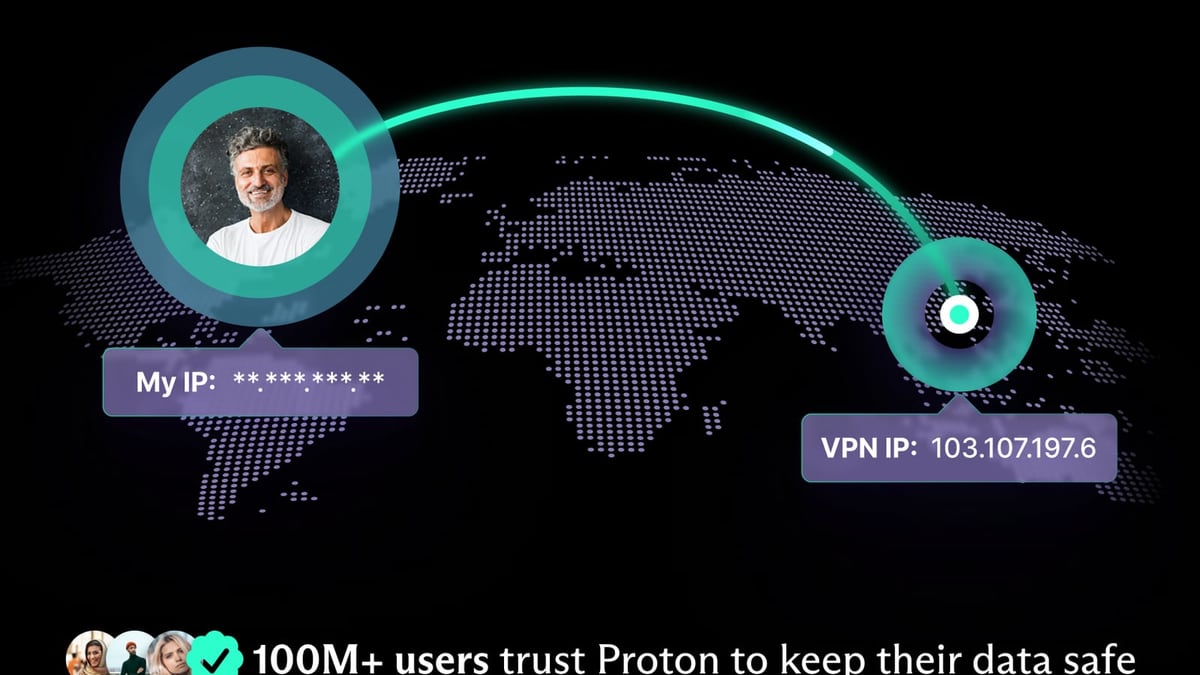
IP.ME Review: Is Proton’s Free IP Lookup Accurate? product interface and feature overview.
When you load ip.me, the page instantly fetches the public IP address your device presents to web servers. It doesn’t require JavaScript to show the basics (the IP is server‑side), but enabling JavaScript enriches the results with detailed GeoIP data and the option to run DNS and WHOIS lookups. Under the hood, the service performs a standard HTTP request and maps your IP against a geolocation database—similar to many “What is my IP” sites. For DNS and WHOIS, IP.ME calls the appropriate resolvers and registrars, displaying raw results quickly.
Key facts:
- Maintained by Proton AG, a privacy‑focused Swiss company.
- No account or sign‑up needed.
- Supports both IPv4 and IPv6 detection.
- Displays ISP, ASN, approximate city, region, country, postal code, and coordinates.
- DNS lookup for A, CNAME, MX, NS, and TXT record types.
- WHOIS lookup for domains and IP addresses.
Core Features of IP.ME

IP.ME Review: Is Proton’s Free IP Lookup Accurate? - supporting product research image 2.
One‑Click IP Detection
Just visiting the page reveals your public IP. No distractions—the address sits prominently, ready to copy.
Detailed Geolocation
IP.ME breaks down location data more richly than typical alternatives. You get latitude/longitude, postal code, and the ISP plus autonomous system number (ASN). This is especially handy for network admins who need to verify that an ISP is routing traffic as expected.
DNS and WHOIS Lookups
A search bar lets you query DNS records instantly. Need to confirm an MX record, check a CNAME, or inspect NS servers? IP.ME returns clean, readable results. The WHOIS pane retrieves registration data for domain names and IP blocks—useful for initial reconnaissance.
Promotion for Proton VPN
Throughout the page, IP.ME educates visitors on how IP addresses can expose them and nudges them toward Proton VPN. The VPN call‑to‑action is integrated but doesn’t break the core tool’s functionality.
Who Should Use IP.ME?
IP.ME Review: Is Proton’s Free IP Lookup Accurate? - supporting product research image 3.
IP.ME suits two main audiences:
- General internet users who want a quick, trustworthy way to see what information their IP broadcasts. The emphasis on privacy education is a bonus if you’re starting to think about VPN protection. After checking, you might be curious to explore Proton’s broader ecosystem—our top 10 VPN services for 2026 ranking can help you compare options.
- Network administrators and hobbyists who need a lightweight, no‑login way to verify public‑facing IPs, test DNS propagation, or perform a fast WHOIS lookup. It’s a handy bookmark when you’re away from your usual toolset.
For comprehensive security assessments, you’ll likely need deeper diagnostics. We’ve reviewed tools like BrowserScan vs IPhey vs Pixelscan that go far beyond IP display with browser fingerprinting and leak tests. IP.ME doesn’t replace those—it’s a quick‑hit resource.
IP.ME Strengths: What Makes It Worth Using
IP.ME Review: Is Proton’s Free IP Lookup Accurate? - supporting product research image 4.
Simple, No‑Fuss Interface
IP.ME respects your time. The moment you open it, your IP and location sit front and center. No captchas, no advertisements, no mandatory scripts—just a clean data display.
Proton’s Privacy Credibility
Because Proton runs zero‑access encrypted services, users tend to trust that IP.ME isn’t logging or misusing their IP data. While IP.ME doesn’t display a privacy policy on the page itself, Proton’s overall reputation signals that they’re not harvesting visitor IPs for marketing.
Extra Tools Without the Bloat
Many IP checkers stop at the address. IP.ME’s baked‑in DNS and WHOIS lookups add genuine utility for moment‑to‑moment tasks without forcing you to open another tab.
Educational Value
The page clearly explains why hiding your IP matters and how VPN technology works. For newcomers, it’s a soft introduction to the privacy conversation.
IP.ME Limitations and Reliability Concerns
Inconsistent IP Display
A Reddit thread highlights a notable issue: some users see an IP address that isn’t theirs. One report described IP.ME returning an IP belonging to OVH, a French hosting provider, while the geographic details (ISP, city, province) were correct. This suggests that under certain network configurations—such as when traffic passes through load balancers, proxies, or non‑standard NAT arrangements—IP.ME may detect the exit point’s address rather than the end‑user’s actual public IP. If you rely on IP.ME for diagnostic troubleshooting, always cross‑check with another service.
Limited Security Tests
IP.ME detects your visible IP, but it does not test for DNS leaks, WebRTC leaks, or browser fingerprinting. If you’re verifying a VPN connection, you could get a false sense of security because your real IP might still leak through WebRTC, which IP.ME won’t reveal. By contrast, competitor checkers like hide.me’s tool (seen in source 3) explicitly include DNS leak and WebRTC leak tests alongside IP display.
No History or Saved Reports
You can’t bookmark a previous result or see changes over time. For dynamic address tracking, you’ll need to copy the data manually.
Hard‑Sell VPN Promotion
The page strongly pushes Proton VPN, which is understandable from a business perspective but may feel intrusive if you just want a neutral utility. However, the promotion doesn’t gatekeep the tools—everything remains free.
IP.ME vs. Alternatives: How It Compares
| Feature | IP.ME | WhatIsMyIP.com | hide.me IP Check | IPinfo.io |
|---|---|---|---|---|
| Public IP Display | ✔️ | ✔️ | ✔️ | ✔️ |
| IPv6 Support | ✔️ | ✔️ | ✔️ | ✔️ |
| Geolocation Details | ISP, ASN, lat/long, postal code | Basic location | Basic location, ISP, lat/long | Advanced: ISP, ASN, company, privacy detection |
| DNS Lookup | ✔️ (A, CNAME, MX, NS, TXT) | ❌ | ❌ | ❌ |
| WHOIS Lookup | ✔️ | ❌ | ❌ | ❌ |
| Leak Tests (DNS/WebRTC) | ❌ | ❌ | ✔️ | ❌ |
| API Access | ❌ | ❌ | ❌ | ✔️ (paid plans) |
| VPN Promotion | Heavy (Proton VPN) | Light | Heavy (hide.me VPN) | None |
For a rapid IP peek with DNS troubleshooting, IP.ME stands out. But if your goal is to validate a VPN tunnel end‑to‑end, hide.me’s checker (and similar privacy‑audit pages) give more complete leak verification. If you’re a security analyst scanning attack surfaces, a specialist scanner like HackerTarget offers far richer vulnerability mapping and port scanning.
Pricing: Is IP.ME Really Free?
Yes, IP.ME is completely free. There is no premium tier, no registration, and no usage cap. Proton develops it as a privacy‑aware utility and a brand touchpoint that showcases Proton VPN. The only “cost” is the soft pressure to consider Proton’s subscription services. If you’re comfortable ignoring the upsell, you get a fully functional diagnostics suite at zero charge.
How to Use IP.ME: A Quick Setup Walkthrough
- Open your browser and navigate to https://ip.me.
- Your public IPv4 and IPv6 (if available) appear instantly, along with the approximate location map.
- To see deeper geolocation details, ensure JavaScript is enabled. You’ll see city, postal code, ISP, ASN, latitude, and longitude.
- Use the DNS Lookup tab: type a domain, select the record type (A, CNAME, MX, NS, TXT), and hit search. Results format clearly for easy copy.
- Switch to the WHOIS tab to query a domain name or IP address. It retrieves registrar data, creation/expiration dates, and name servers.
- If you’re concerned about staying anonymous, consider connecting a VPN before visiting—IP.ME itself will remind you of that.
That’s it. There’s no custom configuration, no user preferences to twiddle, and no install.
Related reading
- Top 10 VPN and Cybersecurity Software Products for 2026 - We tested and ranked the 10 best VPN & cybersecurity suites of 2026. Compare NordVPN, Norton, Bitdefender, Surfshark, and more for speed, antivirus, and privacy.
- How to Use BrowserScan with HackerTarget: A Complete Guide - Pair BrowserScan's browser fingerprint & leak tests with HackerTarget's vulnerability scanners for a complete security assessment. Step-by-step guide.
Sources and further reading
- What is My IP Address? - Your IP address contains information about your location and online activities. Use a secure VPN to hide your IP address and privatise your activities.
Frequently Asked Questions
Does IP.ME log my IP address?
Proton does not disclose specific logging practices for IP.ME. Because the parent company operates services under a strict no‑logs policy (Proton VPN), it’s reasonable to assume they treat IP.ME with similar privacy respect. Still, for guaranteed anonymity, use a VPN or Tor before visiting any IP check site.
Why does IP.ME show a different IP than my ISP gives me?
Sometimes IP.ME detects the IP of an intermediate proxy, load balancer, or hosting service rather than your actual public IP. As seen in user reports, the service may display IPs from providers like OVH when traffic is routed in certain ways. If accuracy is critical, cross‑reference with another checker such as whatismyip.com.
Can I use IP.ME to test for DNS leaks while using a VPN?
No. IP.ME does not include a dedicated DNS leak test. You should use a specialized leak‑testing tool or your VPN provider’s own built‑in test to verify that DNS requests aren’t escaping the tunnel.
Is IP.ME safe to use?
Yes, the site uses HTTPS and is provided by a reputable privacy company. There are no downloads or active scripts that could harm your device. Just be aware that your IP and approximate location are visible to the server while you’re connected.
What DNS record types can I look up?
IP.ME supports A, CNAME, MX, NS, and TXT records. That covers the most common troubleshooting needs—checking IP addresses, mail servers, name servers, and text‑based verification records.
Final Verdict: Is IP.ME Worth Bookmarking?
IP.ME is a sleek, no‑sign‑up utility that does more than most “What is my IP” sites. The combination of IP detection, rich geolocation data, DNS queries, and WHOIS in one lightweight interface makes it genuinely useful for quick network checks. Proton’s privacy ethos adds a layer of trust, and the educational content gently nudges readers toward protecting their connection.
However, it’s not a replacement for a full privacy leak auditor or an enterprise‑grade scanner. The occasional inaccuracy with IP display and the lack of WebRTC/DNS leak tests mean you should verify sensitive results elsewhere. If your workflow demands absolute IP fidelity, pair IP.ME with a second tool or use an API‑driven alternative like IPinfo.io.
For readers who want to dig further into online anonymity, our comparisons like BrowserScan vs IPhey vs Pixelscan unpack how browser fingerprinting tools complement basic IP lookups. And if you’re ready to choose a VPN after seeing the exposure your IP creates, our top 10 VPN services for 2026 article helps you pick a service that fits your speed and security needs.
In short: IP.ME earns a spot on the bookmarks bar for anyone who occasionally needs to ask, “What’s my IP and who can see it?” Just don’t expect it to uncover hidden leaks or to be flawless behind every proxy.