
HackerTarget Review: Vulnerability Scanner for IT Teams

HackerTarget Review: In-Depth Vulnerability Scanning for Networks and Websites
Security teams, sysadmins, and MSPs all need a clear view of what an attacker sees. HackerTarget promises exactly that—a hosted platform with 28 online vulnerability scanners and reconnaissance tools that require zero installation. But does it stand up to daily operational use? This review digs into the platform’s core capabilities, ideal users, pricing signals, and what honest feedback from the community really says.
What Is HackerTarget?

HackerTarget Review: Vulnerability Scanner for IT Teams product interface and feature overview.
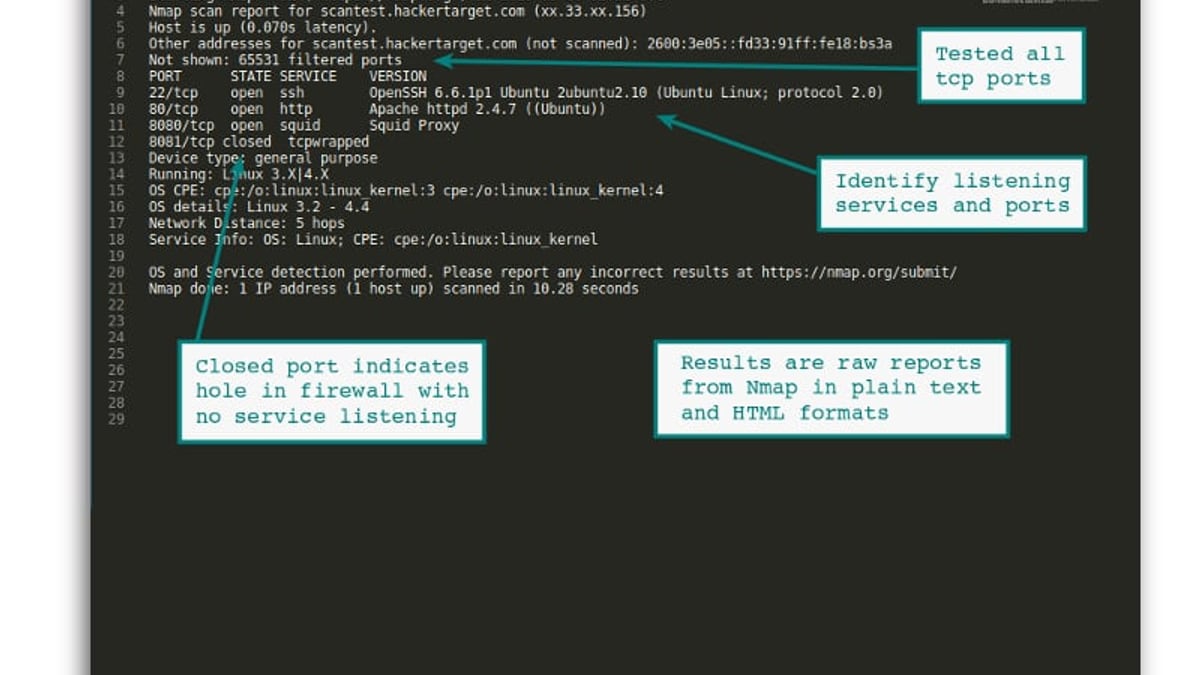
HackerTarget is a web-based security testing suite that runs trusted open-source engines—Nmap, OpenVAS (GVM), and Zmap—without having to maintain your own infrastructure. Since 2007, the service has delivered over a million scans, covering everything from full port sweeps across 65,535 TCP ports to continuous vulnerability management. You get tactical, machine-readable output (plain text, XML, JSON, HTML) that fits straight into operational workflows. The platform’s utility page shows 28 individual tools, including DNS lookups, traceroute, whois, HTTP headers checks, and CMS-specific scanners for WordPress and Joomla.
Ideal Users and Use Cases

HackerTarget Review: Vulnerability Scanner for IT Teams product interface and feature overview.
HackerTarget suits a specific persona: the hands-on IT operator who needs external visibility without a dedicated security team. Primary audiences include:
- System Administrators hunting for misconfigurations, forgotten open ports, or shadow IT
- Network Engineers troubleshooting firewall rules and verifying that only intended services are exposed
- Security Analysts running reconnaissance during penetration tests or bug bounty research
- Managed Service Providers (MSPs) offering basic external scanning for clients who host websites or have significant internet-facing infrastructure
- DevOps teams checking rapid deployments for unintentional exposures
Common workflows like firewall monitoring, attack surface mapping, routine vulnerability management, and bulk web technology fingerprinting (up to 1,000 URLs at once) are all covered. If your organization needs to scan an entire ASN for newly emerging threats, the Zmap-based fast scanner can cover hundreds of thousands of IPs in minutes.
Core Features and Tools at a Glance
1. Nmap Online Port Scanner
Run full TCP port scans, service version detection, and OS fingerprinting directly from your browser. Schedule recurring scans to monitor firewall changes or catch configuration drift. This is the workhorse for verifying that only authorized services—SSH, HTTPS, VPNs—are listening on public IPs.
2. OpenVAS Vulnerability Scanner (GVM)
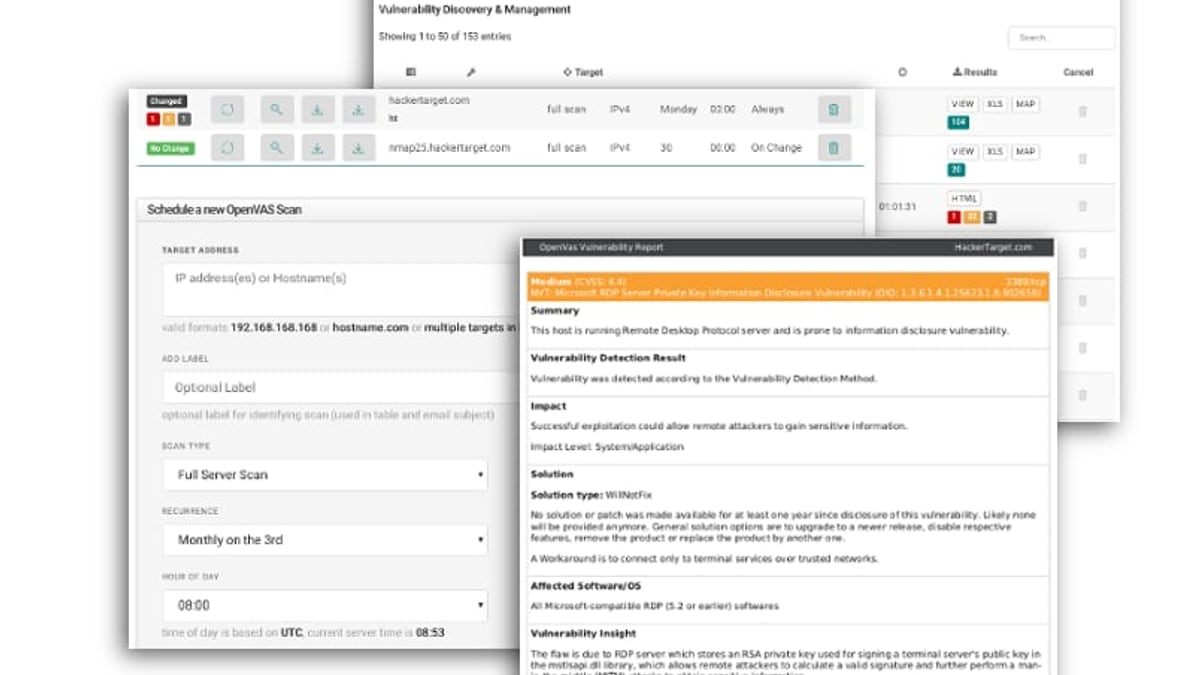
The platform wraps Greenbone Vulnerability Management into an accessible web interface. You can launch a comprehensive vulnerability scan against an internet-facing host, receive severity-rated reports, and set automated monthly or weekly schedules that alert on new findings. While not a full replacement for an on-premise enterprise vulnerability management stack, it gives immediate, detailed technical output useful for triage.
3. Zmap Internet-Scale Port Scanning
For organizations with large address spaces, Zmap delivers lightning-fast port checks. Imagine a new CVE drops for RDP; you can fire off a scan and know within minutes whether any of your 100,000 IPs have port 3389 exposed. This helps bridge the gap between news and remediation.
4. Attack Surface Discovery (Domain Profiler)
Using DNS data sets and internet-wide scan data, the Domain Profiler maps endpoints associated with a domain—including forgotten subdomains and shadow IT. It’s a low-effort way to uncover unmanaged assets, VPN endpoints, or test systems that still point to your production infrastructure.
5. Web & CMS Fingerprinting
Tactical HTTP analysis identifies server-side and front-end technologies, while the WordPress scanner checks core version, plugin exposure, and known weak spots. Agencies managing dozens of client sites can paste a list and get an at-a-glance security overview with virtually no impact on the target.
Strengths and Advantages
- Instant Access, No Maintenance: There’s no server to patch, no scanner engine to update, and no need to manage a dedicated scanning appliance. The infrastructure is always-on and ready.
- Open-Source Transparency: Leveraging Nmap, OpenVAS, and Zmap means the output is compatible with existing toolchains. Advanced users can take raw XML or JSON reports and feed them into a SOAR or threat intelligence platform.
- Bulk Operations: Paste lists of up to 1,000 hosts and get parallel scanning, saving hours of manual work.
- Flexible Reporting: Four output formats let you copy and paste tactical data straight into client reports or internal documentation.
- Proven Track Record: With Fortune 100 and government agency users, the platform has held up under serious demand for over 15 years.
Limitations and Drawbacks
HackerTarget Review: Vulnerability Scanner for IT Teams product interface and feature overview.
- No Internal Scanning: HackerTarget is strictly an external surface scanner. You won’t see your internal VLANs or Active Directory weaknesses.
- Limited Context in Reports: The reports are technically detailed but lack the narrative, remediation guidance, and business-risk scoring that enterprise vulnerability management platforms provide. You’re expected to interpret raw results yourself.
- Pricing Opacity: The site doesn’t publish clear pricing tiers. Users must contact sales or sign up for a free account to understand what paid plans unlock. This makes comparison difficult.
- Community Feedback Mixed: On Trustpilot, the service holds an average 3.5 rating, indicating some friction with customer support or perceived value. A 7-year-old Reddit thread in r/msp described it as “just an external IP scanner”—a comment that still reflects the tool’s focused but narrow scope.
Pricing and Plan Signals
HackerTarget Review: Vulnerability Scanner for IT Teams product interface and feature overview.
HackerTarget offers a free tier that lets you run a limited number of scans with basic tools. Based on available signals, paid subscriptions typically introduce:
- Increased daily scan limits and concurrency
- Scheduled scanning for continuous monitoring
- API access for automated workflows and integrations
- Priority support and custom report configurations
While exact pricing isn’t advertised, many users report that the cost is justifiable for small shops and independent consultants who need instant external scans without buying an appliance. Enterprise teams, however, may find the lack of transparent scaling costs a hurdle.
Setup and Workflow
Getting started takes minutes. You create an account, verify your email, and immediately access the scan forms. For a quick Nmap check, you enter an IP or hostname, choose scan options (e.g., top 1000 ports or full 65535), and launch. Results appear in-browser and can be emailed. To schedule, you pick a recurrence (daily, weekly, monthly) and set alerting thresholds. API keys unlock programmatic triggering, so you can integrate scans into a CI/CD pipeline or a custom dashboard. For teams that want to aggregate scanner results into a unified asset inventory, a SAAS platform like BrowserScan can centralize these findings alongside other security data.
User Reviews and Community Sentiment
- Trustpilot (source: Trustpilot) shows an average 3.5-star rating. Positive reviews highlight the speed, ease of use, and the value of having 28 tools in one place. Negative feedback sometimes mentions delayed support responses or confusion about plan limits.
- Reddit r/msp (source: Reddit) noted that the tool is “just an external IP scanner” and mostly useful when clients host many web services or have numerous open ports. This mirrors its intended use—external attack surface management—but reminds buyers not to over-buy if their needs are deeper.
Overall, the consensus is that HackerTarget excels as a practical reconnaissance and scanning sidekick, not as a full-stack vulnerability management solution.
Alternatives and Decision Criteria
- If you need internal scanning: Nessus, Qualys, or Rapid7 InsightVM are better fits.
- If you want a completely free external scan with no account: Try the standalone Nmap from your own machine, though you’ll miss the scheduling and bulk tools.
- If you already run OpenVAS in-house: HackerTarget can act as a secondary, air-gapped check to confirm your own scanner’s visibility.
- If compliance reporting is critical: Look for platforms that provide executive-ready reports and built-in frameworks (PCI, HIPAA).
HackerTarget hits a sweet spot when your team understands raw scan data and simply needs a reliable, always-on execution engine. If your perimeter changes rapidly and you need daily awareness of what’s exposed to the internet, this tool is worth the subscription.
Related reading
- Using BrowserScan with Chameleon Mode: Step-by-Step Guide - Learn how to combine BrowserScan's fingerprint and leak tests with Chameleon Mode's antidetect browser to verify profile isolation, prevent leaks, and reduce account bans.
- BrowserScan vs BrowserLeaks vs Pixelscan: Which Privacy Tool Wins? - Compare BrowserScan, BrowserLeaks, and Pixelscan for browser fingerprinting, leak testing, and online privacy diagnostics. Find the best tool for your anonymity workflow.
- BrowserScan vs IPhey: Which Fingerprinting Tool Wins in 2026? - See how BrowserScan stacks against IPhey for browser fingerprinting, leak tests, and privacy audits. BrowserScan's authenticity score and full toolkit give it the edge.
Sources and further reading
- Overview of Practical Use Cases | HackerTarget.com - With 28 security scanners and tools there are many advantages for operational teams. This overview shows practical use cases when using our suite of tools.
- Read Customer Service Reviews of hackertarget.com - Read Customer Service Reviews of hackertarget.comTrustpilothttps://www.trustpilot.com › ... › Software CompanyTrustpilothttps://www.trustpilot.com › ... › Software CompanyJul 21, 2024 — every review on our platform—verified or not—is screened by our 24/7 automated software. Average TrustScore 3.5 ou
- hackertarget any comment? : r/msp - hackertarget any comment? : r/mspReddit · r/msp10+ comments · 7 years agoReddit · r/msp10+ comments · 7 years agoJust an external IP scanner. Only useful if your clients are hosting websites or have a lot of external ports open.
FAQ
Is HackerTarget safe to use on production systems? Yes—its scans use standard, non-destructive probes (TCP connect, HTTP GET, DNS queries). However, always ensure you have permission to scan the target and follow responsible disclosure practices.
Can HackerTarget detect web application vulnerabilities like SQL injection? The OpenVAS module can identify some web vulnerabilities (e.g., outdated CMS versions, exposed admin panels), but it’s not a full web application scanner like Burp Suite or Acunetix. Use the tool to find misconfigurations and known CVE’s, then pair it with a dedicated web assessment tool for deeper testing.
Does HackerTarget support VPN endpoint discovery? Absolutely. The Zmap scanner and port scanning tools can quickly reveal OpenVPN, WireGuard, or IPsec services listening on your public IP range. If you discover an exposed VPN service and want to evaluate a secure replacement, see our top VPN picks.
How often should I schedule vulnerability scans? A monthly cadence is common for stable environments. For rapidly changing infrastructures or after major code deployments, weekly or even daily scans help catch new weaknesses early. HackerTarget’s scheduling supports all these intervals.
What other network diagnostics complement HackerTarget’s toolkit? While HackerTarget covers ports, DNS, and vulnerabilities, adding a dedicated speed test tool helps you rule out bandwidth or latency issues when troubleshooting service availability. Our ranking of internet speed test tools can help you find the right one.
Conclusion
HackerTarget earns its place in a security-conscious operator’s toolbox. It’s fast, avoids the overhead of on-premise scanning, and maps the external attack surface with surprising depth for a hosted service. The reliance on open-source engines guarantees output that technical teams can trust, while the bulk and scheduling features make it a force multiplier for small teams. Just keep expectations grounded: this is a tactical, externally-focused scanner—not a governance, risk, and compliance platform. If you need instant, actionable insight into the internet-facing side of your network, HackerTarget delivers it with minimal friction.