
VPN Automation: Scripts, Cloud Setups & Leak Tests
VPN Automation: Scripts, Cloud Setups, and Leak Tests
VPN automation means letting software handle the repetitive parts of running a VPN: connecting, reconnecting, rotating servers, monitoring tunnels, and confirming that traffic actually stays inside the encrypted path. It shows up in three very different worlds — a phone that should turn on its VPN when you leave home Wi-Fi, a cloud gateway that watches IPsec tunnels around the clock, and an IoT fleet where thousands of devices need private connectivity without touching each SIM.
This article breaks down how each type works, what you can realistically automate, and how to verify the result with leak and fingerprint checks.
What VPN automation actually covers
VPN Automation: Scripts, Cloud Setups & Leak Tests - What VPN automation actually covers.
"Automation" is a broad label. In practice it splits into a few distinct jobs:
- Connection automation — triggering a VPN client to connect or disconnect based on a condition (network, time, app launch).
- Configuration automation — generating, distributing, and rotating VPN profiles, keys, and certificates.
- Monitoring automation — watching tunnel state and alerting when a tunnel drops or fails to negotiate.
- Verification automation — confirming that DNS, WebRTC, and IP data match what the VPN is supposed to hide.
Most consumer guides stop at the first item. Most enterprise material covers the middle two. The verification layer is where automation quietly fails, because a tunnel can be "up" while still leaking.
Consumer VPN automation: shortcuts, rules, and their limits

VPN Automation: Scripts, Cloud Setups & Leak Tests - Consumer VPN automation: shortcuts, rules, and their limits.
On phones and desktops, automation usually relies on the operating system's built-in automation layer — Apple Shortcuts on iOS and macOS, Tasker or similar tools on Android, and scheduled tasks or scripts on desktop.
A typical setup looks like this:
- Create a personal automation triggered by leaving a known Wi-Fi network.
- Add an action that turns the VPN on.
- Add a second automation that turns it off when you rejoin home Wi-Fi.
A recurring problem reported by users building these flows: if more than one VPN configuration is installed and previously used, the automation may silently fail to select the right one. The fix is usually to reference the VPN configuration explicitly by name rather than relying on the default, and to test after switching profiles.
What you cannot automate on mobile
- You generally cannot script server selection inside a third-party VPN app; you can only toggle the system VPN state.
- Per-app routing rules are app-specific and rarely exposed to automation tools.
- Kill-switch behavior is controlled by the app or OS, not by your shortcut.
That last point matters. If your automation turns the VPN off at home and the kill switch is strict, background sync may stall. Test the transition rather than assuming it works.
Cloud and site-to-site VPN automation
VPN Automation: Scripts, Cloud Setups & Leak Tests - Cloud and site-to-site VPN automation.
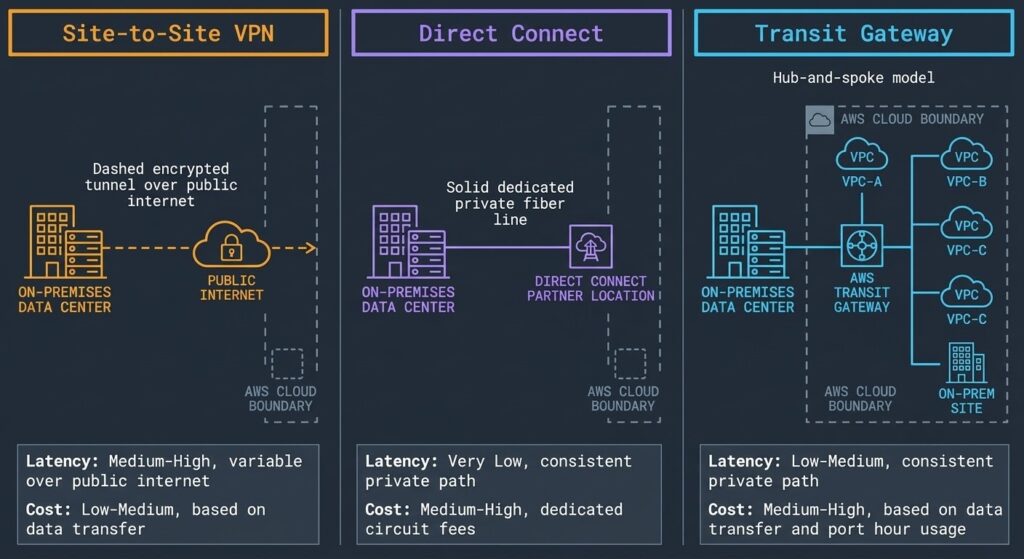
In cloud environments, automation is less about toggling and more about observability. A site-to-site VPN connects an on-premises network to a cloud VPC, and the failure modes are specific: IPsec tunnel establishment, IKE negotiation, and dead peer detection.
A practical monitoring pattern, as described in AWS's site-to-site VPN automated monitoring walkthrough, looks like this:
- VPN logs flow into a log group such as Amazon CloudWatch.
- A subscription filter matches known error patterns.
- A function (for example, an AWS Lambda function written in Python) processes matched events.
- A state table (Amazon DynamoDB) records the last notification time per tunnel error.
- Notifications go out through Amazon Simple Notification Service (Amazon SNS).
The DynamoDB timestamp is the part people skip. Without it, a tunnel that keeps failing generates an alert every few minutes until someone silences the channel. With a notification frequency parameter, you get one alert per defined window instead of a flood.
Design questions before you automate
| Question | Why it matters |
|---|---|
| Which errors are actionable? | Alerting on every log line trains people to ignore alerts. |
| How often should repeats fire? | Prevents duplicate notifications for the same unresolved error. |
| Who owns the tunnel? | Cloud team, network team, or vendor — unclear ownership delays fixes. |
| What is the recovery action? | An alert without a runbook is just noise. |
If your organization already treats connectivity as part of a broader digital security program, VPN monitoring belongs in the same on-call rotation as the rest of your network.
IoT and fleet-scale VPN automation

VPN Automation: Scripts, Cloud Setups & Leak Tests - IoT and fleet-scale VPN automation.
IoT connectivity providers face a different constraint. Traditionally, each enterprise customer gets its own Access Point Name (APN) mapped to a dedicated enterprise VPN — a private APN. That model is slow and expensive: provisioning can take weeks, and moving a batch of devices to a new APN means reconfiguring each device.
A more automated approach, described in Enea's IoT enterprise VPN automation overview, keeps a single APN name and separates customer traffic in a cloud layer. An API drives the next-generation firewall that terminates each VPN, so enterprise customers can create their own VPNs through a self-service portal. Because the APN name does not change, devices can be moved between VPNs by adjusting routing rather than touching the SIM or device configuration.
The same design also helps with global coverage: where permanent roaming restrictions apply, traffic on the shared APN name can be routed to the cloud layer through local operator partners instead of back to the home core.
The step most automation guides skip: verification
A tunnel reporting "connected" tells you the client believes it is connected. It does not tell you whether your real IP address, DNS queries, or WebRTC candidates are exposed.
Automated verification should check at least four things:
- Public IP and geolocation — does the visible IP match the VPN exit location, and does the ISP field show a hosting provider rather than your home ISP? A dedicated IP lookup makes this a one-request check you can run on a schedule.
- DNS resolution path — do DNS queries resolve through the VPN provider's resolvers, or through your local network's?
- WebRTC candidates — does the browser expose local or public addresses that bypass the tunnel?
- Browser fingerprint consistency — does the browser profile match the claimed location and platform, or does it contradict the VPN exit?
Browser-based tools make this practical without installing agents. BrowserScan, for example, offers free DNS and WebRTC leak tests, an IP address lookup with geolocation and proxy detection, and browser fingerprint analysis — all runnable from a script's headless browser or a manual spot check. That combination is what turns "the VPN is on" into "the VPN is working."
A simple verification loop
1. Trigger VPN connect
2. Wait for tunnel state = connected
3. Request public IP + geolocation
4. Assert IP != known real IP
5. Assert DNS resolver is not the local ISP resolver
6. Check WebRTC candidates for non-tunnel addresses
7. Log result; alert on any failed assertion
Run this after every automated connect, and on a timer for always-on tunnels. Failures are far more common after network changes, sleep/wake cycles, and provider updates than during steady-state operation.
Choosing the right automation scope
| Scenario | Automate this | Skip this |
|---|---|---|
| Personal laptop/phone | Connect/disconnect triggers, leak checks | Server selection inside a closed app |
| Cloud site-to-site | Log-driven tunnel monitoring, deduplicated alerts | Manual log review |
| IoT fleet | Self-service VPN provisioning, routing changes | Per-device APN reconfiguration |
| Any environment | Post-connect verification | Trusting the "connected" indicator alone |
If you are comparing verification tooling, it helps to know what free options actually cover; a breakdown of BrowserLeaks pricing and free tiers is useful context before you commit to an API plan.
Common mistakes to avoid
- Automating the connect but not the check. The most common gap by far.
- Alerting without deduplication. Cloud monitoring without a state table produces alert fatigue.
- Hardcoding server names. Provider endpoints change; read them from configuration.
- Assuming mobile automation is deterministic. Multiple VPN profiles can break profile selection.
- Ignoring fingerprint drift. A VPN that changes your IP but leaves a contradictory browser fingerprint is only half a solution.
Related reading
- IPWHOIS.io Review: Free IP Geolocation API Explained - IPWHOIS.io is a free IP geolocation and lookup API. Learn endpoints, rate limits, pricing tiers, and how to verify the data it returns.
- What Is PrivacyTools.io? History, Tools & How to Verify - PrivacyTools.io is a long-running privacy tool directory with a complex history. Learn what it offers today, its split from Privacy Guides, and how to test your setup.
- PrivacyTools.io: What It Is, How It Works & Alternatives - Learn what PrivacyTools.io is, how its tool recommendations work, what changed over the years, and how to test whether your privacy setup actually works.
Sources and further reading
- Set VPN automation with multiple VPN configurations : r/shortcuts - May 23, 2023 ... After initial testing i found that if another VPN configuration was checked in phone settings (eg used before), this automation doesn't work ...
FAQ
Can I automate a VPN on iPhone or Android?
Yes, at the system level. Shortcuts on iOS and automation apps on Android can toggle the VPN connection based on triggers like leaving a Wi-Fi network. You cannot script inside most third-party VPN apps, and multiple installed VPN profiles can cause the automation to select the wrong one.
What is the difference between VPN automation and VPN monitoring?
Automation covers any programmatic control, including connecting and provisioning. Monitoring is a subset focused on tunnel state and errors. Cloud site-to-site setups lean heavily on monitoring; consumer setups lean on connection triggers.
How do I know my automated VPN is not leaking?
Run a DNS leak test, a WebRTC leak test, and an IP lookup after each connection. Compare the visible IP and ISP against your known real values, and confirm DNS queries resolve through the VPN provider rather than your local network.
Why does my cloud VPN alert fire repeatedly for the same error?
Because nothing is tracking notification state. Storing the last notification time per tunnel error in a database table and applying a frequency window reduces duplicate alerts for unresolved issues.
Is VPN automation only for enterprises?
No. Consumer-level connection triggers are a form of automation, and they are the most common starting point. The enterprise and IoT patterns simply add provisioning, monitoring, and fleet-scale routing on top.
Conclusion
VPN automation is really three problems wearing one name: making connections happen on schedule, keeping tunnels healthy at scale, and proving that traffic is not escaping. The first two get most of the attention, but the third determines whether the automation is worth anything.
Start small. Automate the connect, then immediately automate the verification — IP, DNS, WebRTC, and fingerprint consistency. Once that loop is reliable, expand into monitoring and provisioning. A tunnel that reports "connected" is a status message; a tunnel that passes a leak test is a result.