
What Is an API? A Complete Guide to How APIs Work

What Is an API? A Complete Guide to How APIs Work
An API, or Application Programming Interface, is the invisible connective tissue of modern software. Every time you check the weather on your phone, pay with a digital wallet, or log in to an app using your Google account, APIs are quietly exchanging data behind the scenes. This guide explains what APIs are, how they work, the main types and protocols, and how to keep API-driven connections secure.
What Does API Stand For?

What Is an API? A Complete Guide to How APIs Work - What Does API Stand For?.
API stands for Application Programming Interface. Breaking that down:
- Application — any software with a distinct function, from a weather database to a payment processor.
- Programming — the interface is designed for software developers to use in code, not for end users to click.
- Interface — a contract or boundary that defines how two pieces of software communicate.
In practice, an API is a set of rules and protocols that lets one application request data or functionality from another. The application sending the request is the client; the application returning the response is the server. The API documentation defines exactly how those requests and responses must be structured.
How Do APIs Work?
What Is an API? A Complete Guide to How APIs Work - How Do APIs Work?.
Think of an API as a waiter in a restaurant. You (the client) look at the menu and place an order. The waiter takes that order to the kitchen (the server) and brings back your meal. You never need to know how the kitchen operates — you just need the menu and the waiter.
In technical terms:
- A client application sends a structured request to an API endpoint.
- The server processes the request, often querying a database or running internal logic.
- The server returns a response, typically in a format like JSON or XML.
- The client application parses the response and displays or uses the data.
For example, a weather app on your phone calls a weather service API with your location. The API returns temperature, humidity, and forecast data. Your app renders that data into a friendly interface.
Main Types of API Architectures

What Is an API? A Complete Guide to How APIs Work - Main Types of API Architectures.
APIs are built on different architectural styles, each with tradeoffs in flexibility, efficiency, and complexity.
REST APIs
REST (Representational State Transfer) is the most widely used API style on the web today. REST APIs use standard HTTP methods — GET, POST, PUT, DELETE — to access and manipulate resources. They are stateless, meaning the server does not store client data between requests. Each request contains all the information needed to process it.
Best for: public web services, mobile backends, and most modern SaaS integrations.
SOAP APIs
SOAP (Simple Object Access Protocol) exchanges messages using XML. It is more rigid and formal than REST, with built-in error handling and security standards. SOAP was more popular in the past but remains common in enterprise and financial systems where strict contracts matter.
Best for: legacy enterprise systems, banking, and high-compliance environments.
RPC APIs
Remote Procedure Call APIs let a client execute a specific function or procedure on a server and receive the output. Modern variants include gRPC, which uses Protocol Buffers for high-performance communication. RPC is efficient but less standardized than REST.
Best for: internal microservices and performance-critical systems.
WebSocket APIs
WebSocket APIs support persistent, two-way communication between client and server. Unlike REST, where the client must poll for updates, WebSockets let the server push data to connected clients in real time.
Best for: chat applications, live sports scores, stock tickers, and collaborative tools.
API Scope: Private, Public, Partner, and Composite
What Is an API? A Complete Guide to How APIs Work - API Scope: Private, Public, Partner, and Composite.
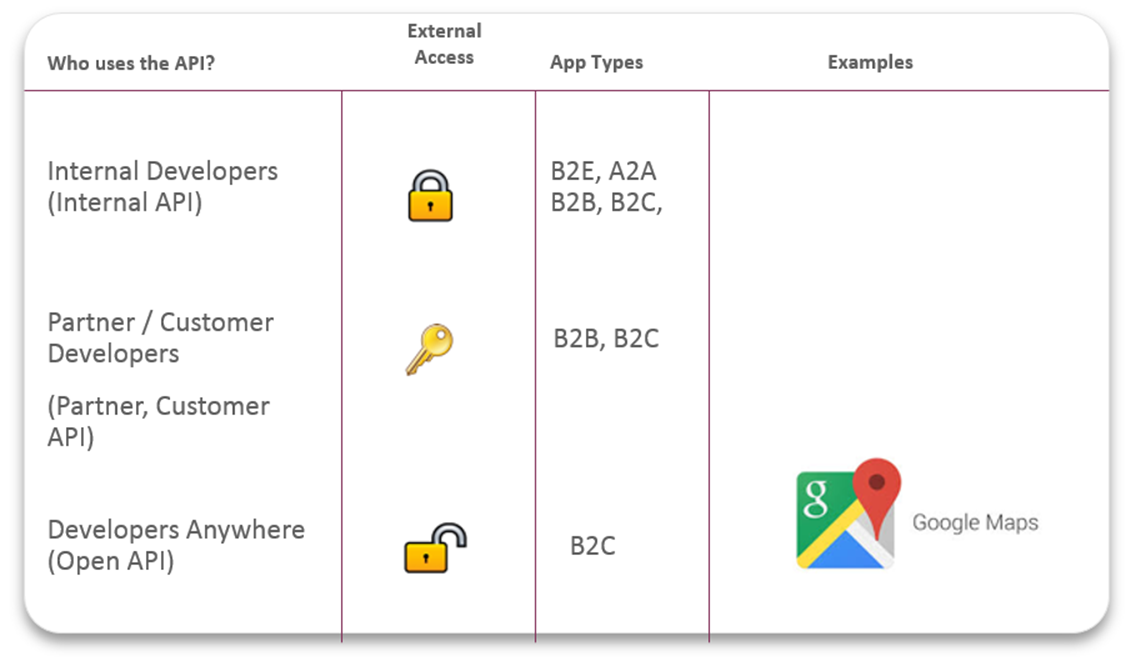
APIs also differ by who can access them:
| Type | Description | Example |
|---|---|---|
| Private APIs | Internal to one organization; connect internal systems and data. | A company's internal HR-to-payroll sync |
| Public APIs | Open to any developer, sometimes with authentication or fees. | Google Maps API, OpenWeather API |
| Partner APIs | Shared only with authorized business partners. | A payment gateway shared with approved merchants |
| Composite APIs | Combine multiple APIs into a single call for complex workflows. | A checkout flow that calls inventory, payment, and shipping APIs |
Real-World API Examples
APIs power nearly every digital interaction. Here are a few everyday examples:
- Weather apps pull forecast data from meteorological service APIs.
- Travel booking sites aggregate flight and hotel availability from airline and hotel partner APIs.
- Social login ("Sign in with Google") uses authentication APIs to verify your identity without sharing your password.
- Payment processing — Stripe, PayPal, and Square expose APIs that let any website accept payments.
- IP geolocation services expose APIs that return location, ISP, and proxy data for a given IP address. Developers integrate these into fraud detection, content localization, and analytics workflows.
What Is an API Endpoint?
An endpoint is the specific URL where an API can be accessed. Each endpoint corresponds to a particular resource or action. For example:
GET https://api.example.com/v1/users/123
POST https://api.example.com/v1/orders
Endpoints matter for two reasons:
- Performance — high-traffic endpoints can become bottlenecks if not scaled properly.
- Security — endpoints are the most common attack surface for API abuse, so monitoring and rate limiting are essential.
API Security: Authentication, Keys, and Tokens
Because APIs expose data and functionality to outside systems, securing them is critical. The two most common mechanisms are:
API Keys
An API key is a long string of characters that identifies the application making a call. Keys are simple to implement and useful for monitoring usage, but they are less secure than tokens because they can be exposed in URLs or client-side code.
Authentication Tokens
Tokens, such as OAuth 2.0 access tokens, verify both the user's identity and their permission level. Tokens expire, can be scoped to specific actions, and are generally more secure than API keys alone.
Additional Security Practices
- Rate limiting to prevent abuse and denial-of-service attacks.
- Input validation to block injection attacks.
- TLS encryption so data cannot be intercepted in transit.
- API monitoring to detect unusual traffic patterns or unauthorized access attempts.
How to Test API-Driven Connections
Testing is essential whether you are building an API or consuming one. Common approaches include:
- Unit testing individual endpoints for correct responses.
- Integration testing to verify that multiple APIs work together.
- Load testing to see how the API performs under heavy traffic.
- Security testing to probe for vulnerabilities like broken authentication or data exposure.
For developers and privacy-conscious users working with network-facing tools, verifying that API calls are not leaking sensitive information is equally important. Browser-based diagnostic tools can help confirm that DNS requests, WebRTC connections, and IP lookups behave as expected. For example, BrowserScan's DNS and WebRTC leak tests let you check whether your real IP address is exposed through API-driven browser features — a practical step for anyone relying on VPNs or proxy services. If you are integrating geolocation APIs into an application, BigDataCloud's setup guide walks through practical API integration patterns with code examples.
How to Create an API
Building a high-quality API that developers will trust involves five core steps:
- Plan — define use cases and write an API specification, such as OpenAPI.
- Build — prototype with boilerplate code, then customize to your requirements.
- Test — run functional, integration, and security tests before release.
- Document — write clear documentation with examples for every endpoint.
- Monitor — track usage, errors, and performance after launch.
API vs. User Interface: What's the Difference?
A user interface (UI) connects a person to a computer — buttons, forms, and screens designed for human interaction. An API connects software to software. It is invisible to end users and operates "under the hood" for machine-to-machine communication. A single application often has both: a UI for users and an API for developers or other systems.
Related reading
- Pixelscan.dev Setup: Browser Fingerprint & Bot Detection - Learn how to set up and use Pixelscan.dev for browser fingerprint analysis, bot detection, proxy checks, and DNS leak testing. Step-by-step guidance with practical examples.
- Public Wi-Fi Security: Risks, Safety Tips & How to Test - Learn the real risks of public Wi-Fi, 12 practical safety steps, and how to test your connection for leaks and vulnerabilities before you browse.
Sources and further reading
- American Petroleum Institute | API - The American Petroleum Institute (API) is the only national trade association that represents all aspects of America’s oil and natural gas industry. Our more...
Frequently Asked Questions
What is an API in simple terms?
An API is a set of rules that lets two software applications talk to each other. One application sends a request, and the other returns a response — like ordering from a menu without needing to know how the kitchen works.
What is the difference between REST and SOAP?
REST uses standard HTTP methods and lightweight formats like JSON, making it flexible and easy to use. SOAP uses XML messaging with strict standards and built-in security features, making it more rigid but suitable for high-compliance enterprise environments.
Do all APIs require authentication?
No. Some public APIs are completely open. However, most APIs that expose sensitive data or charge for usage require an API key, authentication token, or both.
Can APIs be hacked?
Yes. APIs are a common attack vector. Poorly secured endpoints can expose data, allow unauthorized actions, or be overwhelmed by denial-of-service attacks. Authentication, rate limiting, input validation, and monitoring are essential defenses.
What is an API gateway?
An API gateway is a server that sits between clients and backend services. It handles routing, authentication, rate limiting, and monitoring for multiple APIs from a single entry point.
Conclusion
APIs are the backbone of modern software — enabling integration, innovation, and expansion across platforms. Whether you are building a REST service, consuming a partner API, or simply curious about how your favorite apps work, understanding the fundamentals of requests, responses, endpoints, and security gives you a practical foundation. As API-driven connections grow, so does the importance of testing those connections for leaks and vulnerabilities. Tools that verify your network and browser configuration — such as BrowserScan's fingerprint and leak testing suite — complement API development by helping you confirm that the data flowing through your applications stays private and accurate. For a broader look at protecting your digital infrastructure, see this guide on internet security threats and testing.
To explore APIs further, refer to the AWS overview of APIs and the Wikipedia article on APIs.