
Anti-Detect Browser Testing: How to Verify Real Protection

Anti-Detect Browser Testing: How to Verify Real Protection
Anti-detect browsers promise isolated profiles, spoofed fingerprints, and safer multi-account operations. But marketing claims mean little if the profile fails a real fingerprint check. Testing is the only way to know whether your browser setup actually holds up against anti-fraud systems.
This guide explains what anti-detect browser testing involves, which signals matter most, how to interpret checker results, and how to build a repeatable verification workflow before you trust a browser with high-value accounts.
What Anti-Detect Browser Testing Actually Means
Anti-Detect Browser Testing: How to Verify Real Protection - What Anti-Detect Browser Testing Actually Means.
Testing an anti-detect browser is not a single pass/fail event. It is a layered audit of how well the browser hides your real identity while presenting a believable alternative one.
A useful test answers three questions:
- Does the profile leak real data? WebRTC, DNS, and IP leaks can expose your actual network identity even when the fingerprint looks clean.
- Is the spoofed fingerprint internally consistent? Time zone, language, user agent, canvas, WebGL, fonts, and hardware signals must all tell the same story.
- Does the profile stay stable over time? Fingerprints that shift between sessions or after restarts can trigger risk flags just as easily as an obvious mismatch.
Most anti-detect browser failures happen because one of these layers is ignored. A browser can pass a basic user agent check while still leaking your real IP through WebRTC or showing a Berlin time zone with a Tokyo proxy.
Why Fingerprint Consistency Matters More Than Uniqueness

Anti-Detect Browser Testing: How to Verify Real Protection - Why Fingerprint Consistency Matters More Than Uniqueness.
A common misconception is that a highly unique fingerprint makes you anonymous. In practice, the opposite is true. Anti-fraud systems flag outliers. A fingerprint that looks like no real device ever seen before is suspicious precisely because it stands out.
The goal of a good anti-detect browser is to generate a fingerprint that is:
- Different from your real device
- Plausible for the claimed hardware and OS
- Consistent across every signal
- Not statistically unique
When a checker reports that your fingerprint is rare or contains conflicting values, that is a warning sign. The browser may be masking individual fields without coordinating them into a believable whole.
Key Signals to Test in an Anti-Detect Browser
Anti-Detect Browser Testing: How to Verify Real Protection - Key Signals to Test in an Anti-Detect Browser.
A thorough test covers more than the headline fingerprint score. These are the signals that most often reveal weak spoofing.
User Agent and Platform Matching
The user agent string identifies the browser, version, and operating system. It must match the claimed platform exactly. A Chrome 120 user agent on a profile that reports Windows 11 but sends Linux hardware signals will be flagged immediately.
Canvas and WebGL Fingerprints
Canvas and WebGL rendering produce device-specific outputs. A properly spoofed profile should generate values that match the claimed GPU and OS. Mismatches here are among the most reliable indicators of an emulated environment.
Time Zone, Language, and Geolocation Alignment
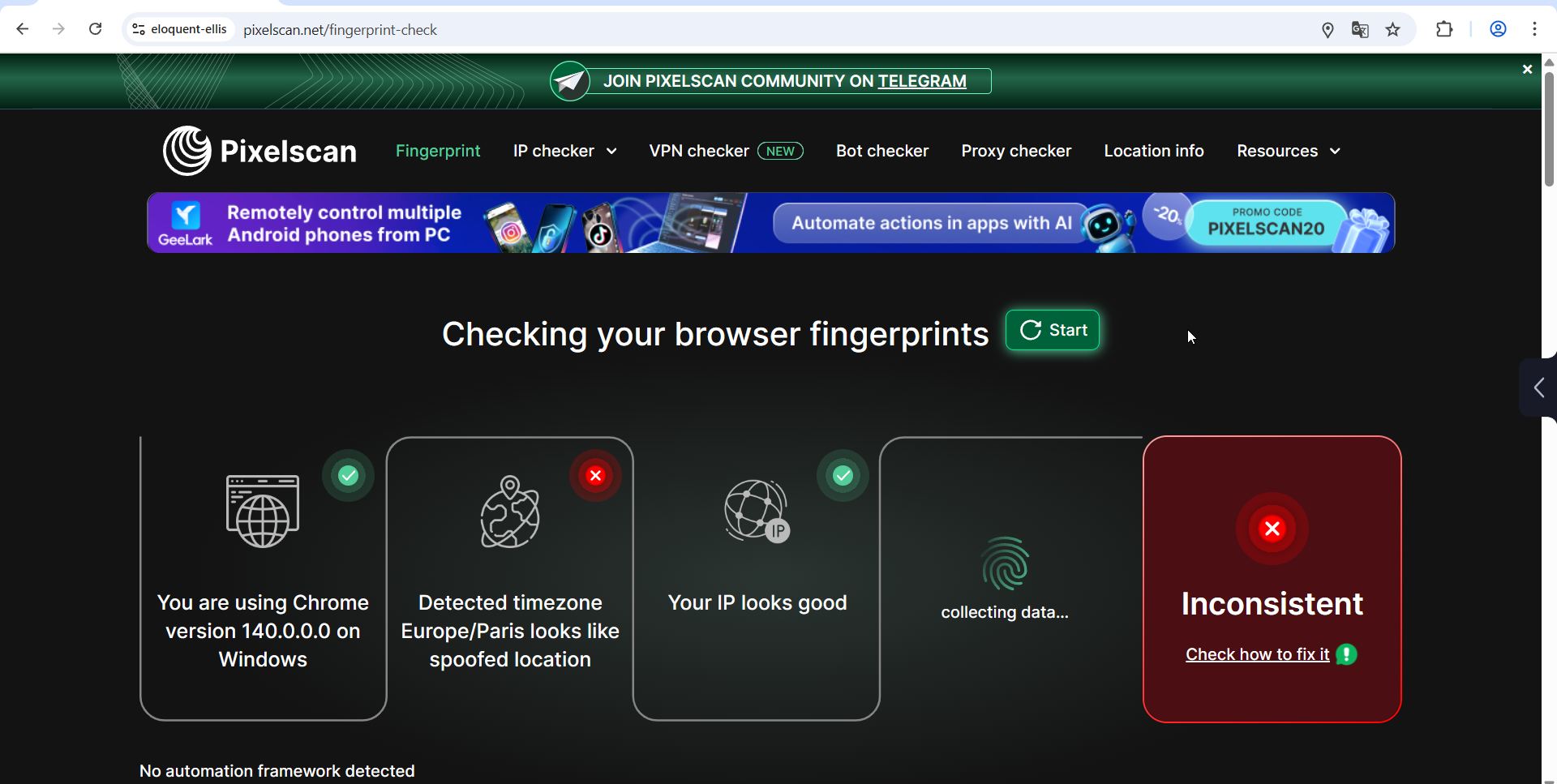
These three signals must agree with the proxy IP. If your proxy resolves to Berlin but the browser reports Tokyo time and English (US) language headers, the profile is internally inconsistent. Modern anti-fraud systems cross-reference these values automatically.
WebRTC and DNS Leaks
WebRTC can bypass proxy settings and reveal the real local IP address. DNS requests can leak through the default resolver instead of the proxy's DNS. Both must be tested explicitly. A clean fingerprint score does not guarantee leak-free networking.
Hardware and Audio Signals
CPU core counts, memory size, audio context behavior, and screen resolution all contribute to the fingerprint. If any of these values conflict with the claimed OS or device type, the profile becomes suspicious.
Automation Traces
Anti-detect browsers used with Selenium, Puppeteer, or built-in RPA tools can leave detectable automation markers. Testing should include checks for navigator.webdriver flags, missing browser features, and other headless or automated environment signatures.
How to Test an Anti-Detect Browser Step by Step

Anti-Detect Browser Testing: How to Verify Real Protection - How to Test an Anti-Detect Browser Step by Step.
Use this workflow to evaluate any anti-detect browser before committing to it.
Step 1: Create a Fresh Profile with a Proxy
Configure a new profile exactly as you would in production. Attach the proxy you plan to use. Do not test without a proxy, because the network layer is part of the fingerprint consistency check.
Step 2: Run a Fingerprint Consistency Check
Open the profile and visit a fingerprint checker. Look at the overall verdict first, then examine individual parameters. Red flags usually appear as conflicting values rather than a single failed field.
A practical option is BrowserScan, which provides browser fingerprint analysis, DNS and WebRTC leak tests, and IP lookup with proxy detection in one place. It is useful for verifying that your spoofed identity holds together without installing anything.
Step 3: Test for WebRTC and DNS Leaks Separately
Do not assume the fingerprint checker covers leaks. Run dedicated leak tests. If the real IP appears in WebRTC candidates or DNS requests resolve outside the proxy, the profile is not safe regardless of the fingerprint score.
For a deeper walkthrough of interpreting leak results and fixing them, see this BrowserLeaks tutorial on testing WebRTC, DNS, canvas, and WebGL fingerprints.
Step 4: Check IP and Proxy Detection
Verify that the IP address shown matches the proxy's expected location and type. Some checkers also indicate whether the IP is flagged as a datacenter, residential, or known proxy. A residential proxy that is detected as a datacenter IP can undermine the entire setup.
Step 5: Restart and Re-Test
Close the profile, relaunch it, and run the same checks again. Fingerprint drift between sessions is a serious problem. The values should remain stable or change only in expected ways.
Step 6: Test Across Multiple Checkers
No single checker catches everything. Use at least two independent services. If one reports clean results and another flags inconsistencies, investigate the discrepancy before trusting the profile.
Common Anti-Detect Browser Test Failures
Experienced testers see the same failure patterns repeatedly. Knowing them helps you diagnose problems faster.
The Default Profile Trap
Some browsers ship with default settings that do not fully configure every fingerprint field. Profiles created without manual tuning may pass basic checks but fail deeper hardware analysis. Always test with production-like settings, not factory defaults.
Proxy and Fingerprint Mismatch
This is the most common cause of account bans. The proxy says one location, the browser says another. Time zone, language, and geolocation headers must all be aligned with the proxy IP. Rotating IPs without updating the fingerprint is equally dangerous.
Outdated Browser Kernels
Anti-detect browsers built on old Chromium versions produce fingerprints that no real user would have. If the browser vendor does not update its kernel promptly after upstream releases, the profile becomes statistically unusual and easier to flag.
Leaks Hidden Behind a Clean Score
A profile can score well on fingerprint consistency while still leaking the real IP through WebRTC or DNS. This is why leak tests must be part of every verification cycle, not an optional extra.
Building a Repeatable Testing Workflow
One-time testing is not enough. Anti-fraud systems evolve, browser kernels update, and proxy pools change. A repeatable workflow protects you from silent degradation.
Test Before Every Major Deployment
Whenever you onboard a new browser, switch proxy providers, or scale to a new platform, run the full test sequence first. The cost of testing is trivial compared to losing aged accounts.
Document Baseline Results
Save the checker results for each profile type you use. When something changes, you can compare against the baseline and identify what broke.
Re-Test After Browser Updates
Browser updates can alter fingerprint behavior. After any kernel or version update, verify that profiles still pass the same checks they passed before.
Monitor Leak Status Continuously
Leaks can appear when proxy configurations change or browser settings are modified. Periodic leak testing should be part of your operational routine, not just your initial evaluation.
For a broader view of how leaks expose your real identity and how to fix them, see this guide on IP leak testing and VPN leak prevention.
Anti-Detect Browser Testing vs. General Privacy Testing
Anti-detect browser testing overlaps with general privacy testing but has different priorities.
| Aspect | Anti-Detect Browser Testing | General Privacy Testing |
|---|---|---|
| Primary goal | Verify spoofed identity consistency | Detect real identity exposure |
| Key concern | Fingerprint believability | IP and data leaks |
| Success metric | No red flags on checkers | No real data exposed |
| Typical user | Multi-account operators, marketers | Privacy-conscious individuals, VPN users |
| Failure consequence | Account bans, linked identities | Personal data exposure |
Both use similar tools, but the interpretation differs. A privacy-focused user wants to know what real data is leaking. An anti-detect browser user wants to know whether the fake identity is convincing.
What Testing Cannot Guarantee
Even a profile that passes every checker can still be flagged by a platform's internal anti-fraud system. Checkers simulate common detection methods, but they do not replicate the proprietary models used by Meta, Google, or financial institutions.
Testing reduces risk. It does not eliminate it. Behavioral signals, account history, payment patterns, and platform-specific heuristics all play a role that browser fingerprint testing cannot fully capture.
The most reliable approach is defense in depth: a tested anti-detect browser, high-quality proxies matched to the profile, consistent operational behavior, and gradual account warm-up.
Related reading
- Algo VPN Pricing: Real Costs of Self-Hosting in 2025 - Algo VPN is free software, but hosting it costs money. See real cloud pricing for AWS, Vultr, DigitalOcean, and how to budget your self-hosted VPN.
- Pixelscan Pricing: Free Checks, Plans & Alternatives - Understand Pixelscan pricing: free browser scans, proxy checker plans, partner discounts, and how free alternatives like BrowserScan compare.
Sources and further reading
- Best Antidetect Browsers: Reviews, Costs, and Alternatives - Compare the best antidetect browsers by workflow, trust, automation, pricing, and hidden costs. Learn when to use one, when to skip it, and what to test before you buy.
- 5 Best Anti-detect Browsers in 2026 - Running multiple accounts? We tested various anti-detect browsers to determine which ones effectively prevent bans.
- Best Anti-Fingerprinting Browsers in 2026: Tested & Compared - Discover how anti-fingerprinting browsers work. Compare Brave, Tor, and GoLogin's profile isolation against advanced browser fingerprinting and tracking.
Frequently Asked Questions
What is anti-detect browser testing?
Anti-detect browser testing is the process of verifying that a browser's spoofed fingerprint is consistent, leak-free, and stable. It involves running the profile through fingerprint checkers, leak tests, and proxy detection tools to identify weaknesses before using the browser for real accounts.
How do I know if my anti-detect browser is working?
Run the profile through at least two independent fingerprint checkers. Look for a clean verdict with no conflicting parameters. Then run separate WebRTC and DNS leak tests. If all checks pass and the fingerprint remains stable after a restart, the browser is working at a basic technical level.
Can I test an anti-detect browser for free?
Yes. Most fingerprint checkers and leak test tools are free to use. BrowserScan offers free browser fingerprint analysis, leak tests, and IP lookup without installation. Many anti-detect browsers also offer free trial profiles for evaluation.
Why does my anti-detect browser fail fingerprint checks?
Common causes include default profile settings that leave fields unconfigured, proxy and time zone mismatches, outdated browser kernels, and WebRTC or DNS leaks. Check each of these areas systematically when a profile fails.
Is a unique fingerprint good for anonymity?
No. A highly unique fingerprint makes you stand out. The goal is a plausible, consistent fingerprint that resembles real devices in the target population. Uniqueness is a warning sign, not a feature.
Do I need a proxy when testing an anti-detect browser?
Yes. The proxy is part of the fingerprint consistency equation. Testing without a proxy gives you an incomplete picture because time zone, language, and geolocation cannot be properly evaluated against a network location.
How often should I re-test my anti-detect browser?
Re-test after every browser update, proxy change, or major platform policy shift. At minimum, run a verification cycle before deploying new profiles at scale.
Conclusion
Anti-detect browser testing separates tools that actually protect your operations from those that only look good in marketing screenshots. The core discipline is simple: verify fingerprint consistency, test for leaks explicitly, confirm proxy alignment, and re-test whenever anything changes.
Use multiple independent checkers, document your baselines, and treat testing as an ongoing operational practice rather than a one-time evaluation. A browser that passes today can fail tomorrow after an update or proxy change. The operators who stay ahead are the ones who test consistently and act on what the results reveal.