
IP Leak Test: How to Check and Fix VPN Leaks
IP Leak Test: How to Check and Fix VPN Leaks
An IP leak test is a quick diagnostic that reveals whether your real IP address, DNS queries, or other identifying data are escaping your VPN tunnel or proxy. Many people assume that connecting to a VPN instantly makes them anonymous. In practice, browsers, operating systems, and misconfigured network settings can quietly expose your true location and internet provider even while the VPN appears to be working.
This guide explains what an IP leak test actually checks, why leaks happen, how to interpret results, and the practical steps you can take to close the gaps. Whether you are a privacy-conscious individual, a remote worker, or an IT professional auditing a network, understanding these tests gives you a clearer picture of what websites can see about you.
What Is an IP Leak Test?

IP Leak Test: How to Check and Fix VPN Leaks - What Is an IP Leak Test?.
An IP leak test is a browser-based or network-level check that compares the IP address you expect to expose against the IP addresses your device actually reveals. When everything works correctly, the test should show only your VPN or proxy IP address. If it also shows your ISP-assigned address, a local network address, or DNS servers outside the VPN tunnel, you have a leak.
Leaks matter because your IP address is one of the most direct identifiers on the internet. It can reveal your approximate location, internet service provider, and sometimes your organization. Advertisers, websites, and network observers use this data to build profiles, enforce geo-restrictions, or track behavior across sessions.
Common Types of IP Leaks
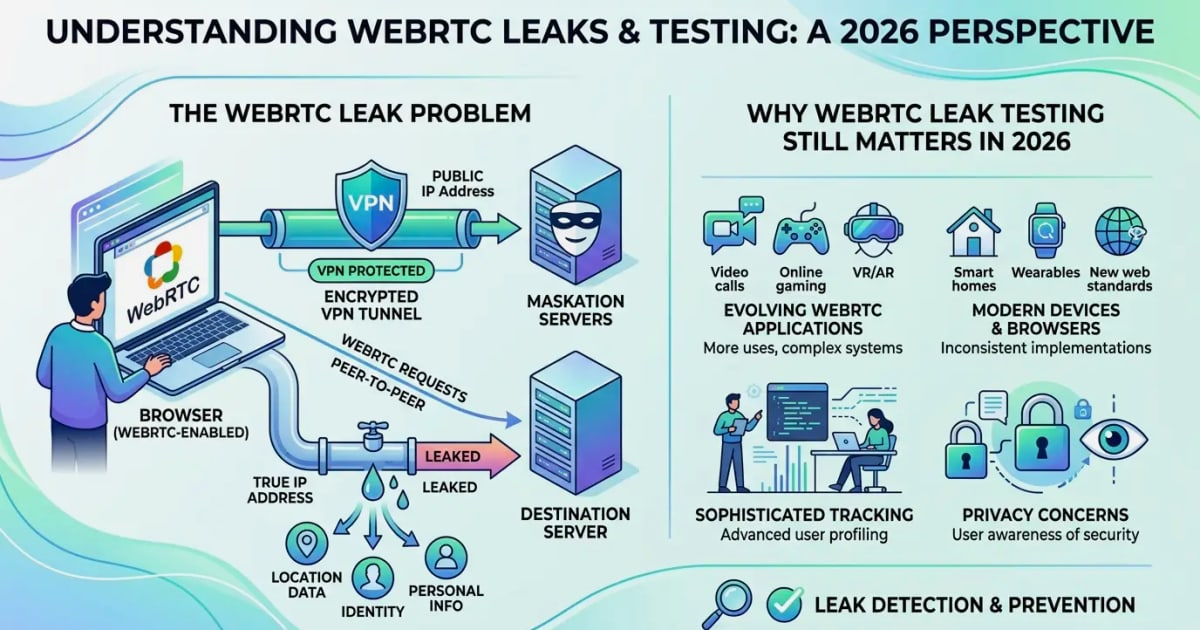
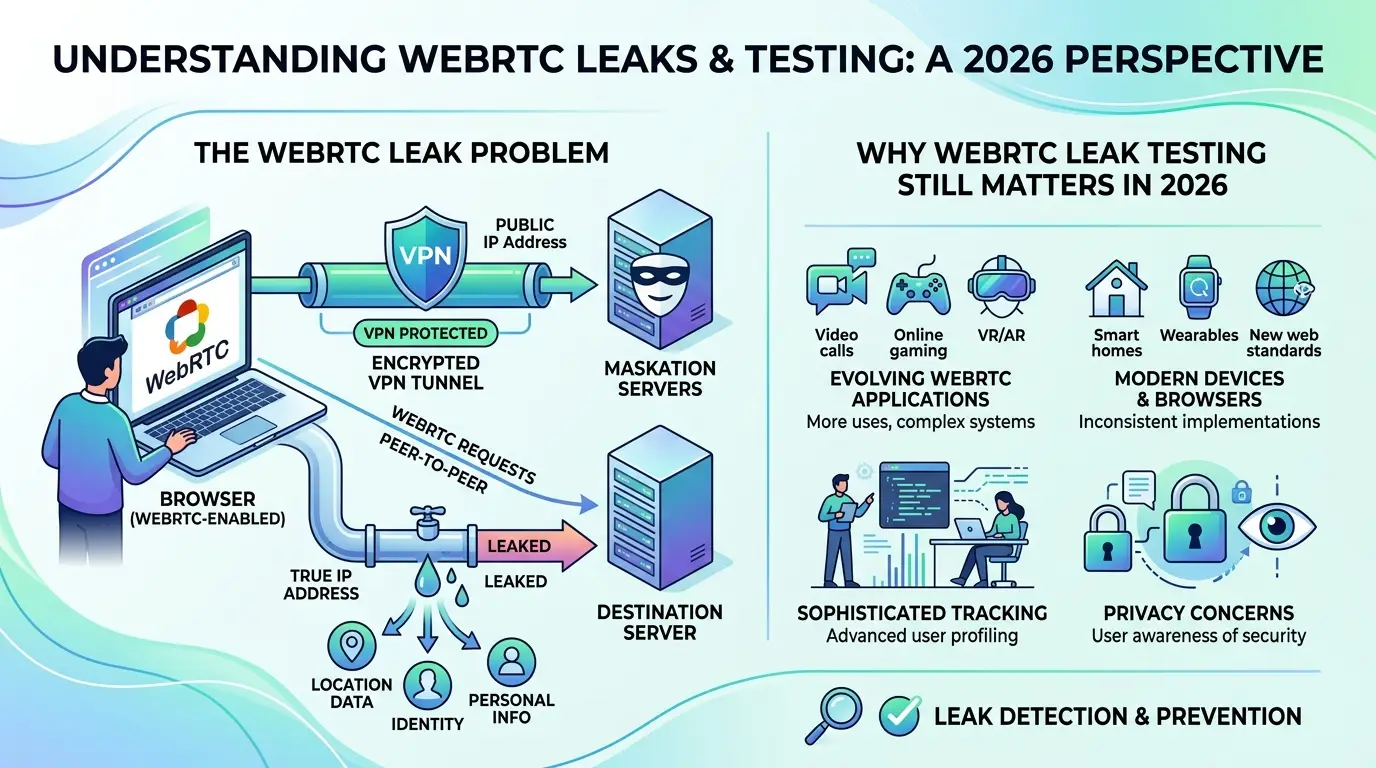
- WebRTC leaks: The browser's WebRTC implementation can reveal your real public IP address even when a VPN is active, because WebRTC uses STUN to discover local and public network addresses directly.
- DNS leaks: Your device sends domain name resolution requests outside the encrypted VPN tunnel, allowing your ISP or other observers to see which websites you visit.
- IPv6 leaks: Many VPNs only route IPv4 traffic, leaving IPv6 traffic to travel outside the tunnel and expose your real address.
- Torrent IP leaks: Torrent clients often bypass the VPN route, revealing your real IP address to peers and trackers.
How an IP Leak Test Works
IP Leak Test: How to Check and Fix VPN Leaks - How an IP Leak Test Works.
A typical IP leak test runs several checks in sequence. First, it records the IP address your browser reports through normal HTTP requests. Then it runs a WebRTC detection script that asks the browser to enumerate its local and public IP candidates. Next, it may query DNS servers to see which resolver answers and whether that resolver belongs to your ISP or your VPN provider. Finally, some tests offer a torrent magnet link that logs the IP address your torrent client uses.
For example, ipleak.net displays your browser default IP, WebRTC-detected addresses, DNS server details, and torrent address information all on one page. BrowserLeaks offers a similar suite, adding TCP/IP fingerprinting, TLS fingerprinting, and IPv6 leak testing. These tools are valuable because they simulate what any website you visit could detect.
Why VPNs Leak IP Addresses

IP Leak Test: How to Check and Fix VPN Leaks - Why VPNs Leak IP Addresses.
VPN leaks are rarely caused by a single failure. More often, they result from how operating systems and browsers handle network interfaces, DNS configuration, and legacy protocols.
WebRTC and Browser Behavior
WebRTC is a browser technology used for real-time communication such as video calls and file sharing. To establish peer-to-peer connections, WebRTC uses the STUN protocol to discover the device's public IP address. This discovery happens independently of the VPN tunnel in many browsers, which means a website running a WebRTC script can see your real IP even when your VPN is active.
Firefox users can disable WebRTC by setting media.peerconnection.enabled to false in about:config. Chrome users can install the official WebRTC Network Limiter extension. Opera offers a setting to disable non-proxied UDP under privacy and security options.
DNS Resolution Outside the Tunnel
Windows in particular lacks a global DNS concept. Each network interface can have its own DNS settings, and the system process svchost.exe can send DNS queries outside the VPN tunnel under certain conditions. This means your ISP can still see the domain names you resolve, even if your web traffic is encrypted.
A DNS leak test shows you which DNS servers are answering your queries. If you see servers belonging to your ISP rather than your VPN provider, you have a DNS leak. Fixing it usually involves configuring your VPN client to force DNS through the tunnel, setting a trusted third-party DNS resolver, or adjusting your network adapter settings.
IPv6 Mismatches
Many VPN providers focus on IPv4 routing and either disable IPv6 or leave it unmanaged. If your network has IPv6 connectivity and your VPN does not route IPv6 traffic, your device may send IPv6 requests directly to the internet, bypassing the VPN entirely. An IPv6 leak test checks whether your device exposes an IPv6 address that differs from your VPN's IPv6 address.
How to Run an Effective IP Leak Test
IP Leak Test: How to Check and Fix VPN Leaks - How to Run an Effective IP Leak Test.
Running a meaningful IP leak test requires more than opening a single webpage. Follow a consistent process to get reliable results.
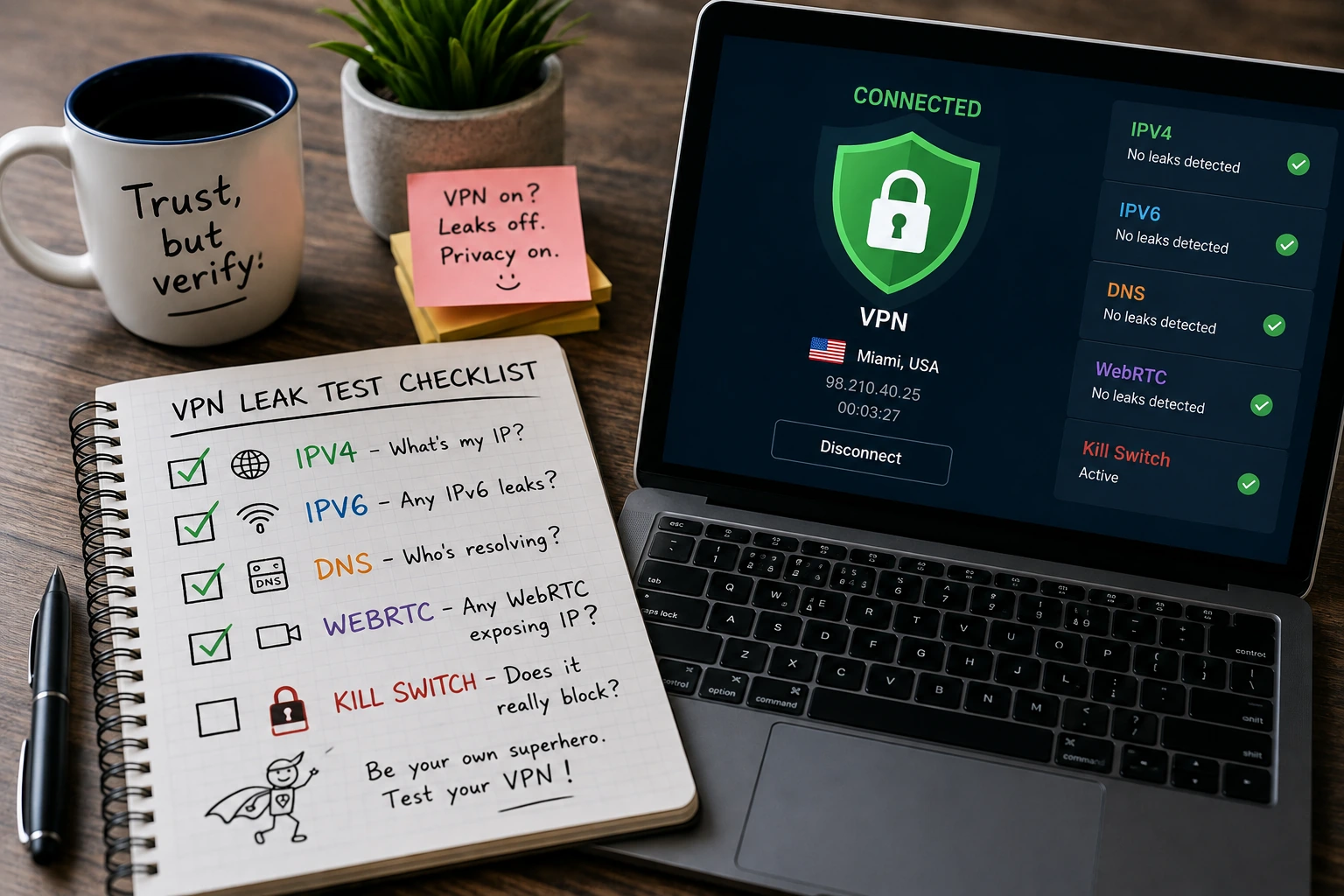
- Record your baseline IP address without a VPN. Note the IP, ISP, and approximate location.
- Connect to your VPN and choose a server in a different location.
- Run a comprehensive leak test using a tool that checks WebRTC, DNS, IPv6, and torrent behavior.
- Compare every detected address against your baseline. Any match means a leak.
- Repeat with different VPN servers and protocols to see whether the leak is consistent.
- Test from a different browser to isolate browser-specific leaks such as WebRTC.
For a more complete privacy assessment, combine an IP leak test with a browser fingerprint check. BrowserScan offers a suite of free web-based privacy diagnostics, including DNS and WebRTC leak tests that verify whether your VPN is exposing your real IP address, plus an IP address lookup with geolocation, ISP, and proxy detection. Running these checks together gives you a fuller picture of what websites can observe about your connection and browser configuration.
Interpreting IP Leak Test Results
Understanding what a leak test shows is just as important as running it. Here is how to read the most common result types.
Browser Default IP vs. WebRTC IP
If your browser default IP shows your VPN address but the WebRTC section shows your ISP IP, you have a WebRTC leak. This is the most common leak type and affects Chrome, Firefox, Edge, and Opera in different ways depending on settings and extensions.
DNS Server Ownership
A DNS leak test lists the DNS servers that answered the test queries. If those servers belong to your ISP, your DNS traffic is leaking. If they belong to your VPN provider, your DNS is correctly routed. Some tests also show the DNS server's hostname and owner, which helps you identify the source quickly.
Torrent Address Detection
Torrent detection works by providing a magnet link to a fake file. The magnet contains a tracker URL controlled by the testing service. When your torrent client connects to the tracker, the service logs the IP address your client uses. If that address matches your real IP instead of your VPN IP, your torrent client is leaking.
IPv6 Results
If the test shows an IPv6 address that belongs to your ISP while your VPN only assigns an IPv4 address, your IPv6 traffic is exposed. The fix is to disable IPv6 on your network adapter or use a VPN that fully supports and routes IPv6.
Fixing Common IP Leaks
Once you identify a leak, the fix depends on the leak type.
Fix WebRTC Leaks
- Firefox: Type
about:configin the address bar, search formedia.peerconnection.enabled, and set it to false. - Chrome and Edge: Install the official WebRTC Network Limiter extension.
- Opera: Go to Settings, open Privacy & security, and select "Disable non-proxied UDP" under WebRTC.
- Brave: Use the built-in WebRTC policy in Shields settings to disable non-proxied UDP.
Fix DNS Leaks
- Enable the VPN client's DNS leak protection or "force DNS through tunnel" option if available.
- Set your network adapter to use a trusted DNS resolver such as your VPN provider's DNS servers.
- On Windows, disable the "Smart Multi-Homed Name Resolution" feature via group policy or registry to prevent DNS queries from bypassing the VPN.
- Test again after each change to confirm the leak is closed.
Fix IPv6 Leaks
- Disable IPv6 on your network adapter if your VPN does not support IPv6 routing.
- Choose a VPN provider that explicitly supports IPv6 leak protection.
- Re-run the IPv6 leak test to verify no IPv6 address is exposed.
Fix Torrent Leaks
- Bind your torrent client to the VPN's virtual network adapter rather than relying on system-wide routing.
- Enable the torrent client's built-in IP filtering or proxy settings if supported.
- Use a VPN with a kill switch that blocks all traffic if the VPN disconnects.
Beyond IP Leaks: The Bigger Privacy Picture
An IP leak test is an essential first step, but it does not cover everything. Websites can still identify you through browser fingerprinting, which combines details like your user agent, screen resolution, installed plugins, fonts, and canvas rendering to create a unique identifier. Even with a perfectly sealed VPN, a distinctive browser fingerprint can track you across sessions.
BrowserScan's browser fingerprint analysis helps verify whether your fingerprint looks authentic or contains red flags that make you stand out. For users managing multiple profiles or anti-detect setups, this kind of check complements IP leak testing by revealing what the IP address alone cannot show. You can also use an IP lookup tool to verify the geolocation, ISP, and proxy status of any address you see in your leak test results.
Your digital footprint extends beyond IP addresses and fingerprints. Cookies, login sessions, social media activity, and public records all contribute to the trail you leave online. Reducing that footprint requires a layered approach: seal network leaks, harden your browser, limit data sharing, and periodically audit what information is publicly available about you.
Choosing the Right IP Leak Test Tool
Different tools emphasize different aspects of leak detection. Here is a comparison of what the major options offer.
| Tool | WebRTC Test | DNS Test | IPv6 Test | Torrent Test | Extra Features |
|---|---|---|---|---|---|
| ipleak.net | Yes | Yes | Yes | Yes | Geolocation map, HTTP headers, system info |
| dnsleaktest.com | No | Yes | No | No | Simple DNS-only focus, fix instructions |
| browserleaks.com/ip | Yes | Yes | Yes | No | TCP/IP fingerprint, TLS fingerprint, Whois |
| BrowserScan | Yes | Yes | Yes | No | Fingerprint analysis, port scanner, proxy detection |
For a quick DNS-only check, dnsleaktest.com is straightforward and fast. For a broad technical overview, browserleaks.com/ip provides deep fingerprinting data. For a combined privacy and security assessment that includes leak tests alongside fingerprint verification and network diagnostics, BrowserScan's free web-based suite covers multiple angles without requiring installation.
Related reading
- Domain Lookup: How to Check WHOIS, IP & Ownership Data - Learn how domain lookup works, what WHOIS and IP data reveal, and how to check registration, ownership, and network details safely.
- What Is Network Intelligence? A Practical Guide - Learn what network intelligence is, how it differs from DPI, key use cases, and practical ways to assess your own network security and privacy.
Sources and further reading
- IP/DNS Detect - What is your IP, what is your DNS, check your torrent IP, what informations you send to websites.
- DNS leak test - DNSleaktest.com offers a simple test to determine if you DNS requests are being leaked which may represent a critical privacy threat. The test takes only a few seconds and we show you how you can simply fix the problem.
- My IP Address - The main tools for checking IP address privacy. Showing Your IP Address, Reverse IP Lookup, Hostname, and HTTP Request Headers, Your Country, State, City, ISP/ASN, and Local Lime, Whois Lookup, TCP/IP OS fingerprinting, WebRTC Leak Test, DNS Leak Test, and IPv6 Leak Test.
Frequently Asked Questions
What is an IP leak test?
An IP leak test is a diagnostic that checks whether your real IP address, DNS queries, or IPv6 address are exposed while using a VPN or proxy. It compares the addresses your device reveals against the address you expect to expose.
How do I know if my VPN is leaking?
Connect to your VPN, note your expected VPN IP address, then run a leak test. If the test shows your ISP-assigned IP address in the WebRTC, DNS, IPv6, or torrent sections, your VPN is leaking.
Can a VPN leak my real IP address?
Yes. WebRTC leaks, DNS leaks, IPv6 leaks, and torrent client misconfiguration can all expose your real IP address even when a VPN is connected.
How do I fix a WebRTC leak?
Disable WebRTC in your browser settings, install the WebRTC Network Limiter extension in Chrome, or use a browser with built-in WebRTC controls such as Brave.
Is a DNS leak dangerous?
A DNS leak allows your ISP or network observers to see which domain names you resolve, which reveals the websites you visit. This undermines the privacy a VPN is supposed to provide.
How often should I run an IP leak test?
Run a leak test every time you change VPN providers, update your browser, change network settings, or connect from a new network. Regular checks help catch configuration drift before it becomes a long-term exposure.
Conclusion
An IP leak test is one of the fastest and most revealing privacy checks you can run. It shows whether your VPN is doing its job or quietly exposing your real address through WebRTC, DNS, IPv6, or torrent traffic. By understanding what each test measures and how to fix the leaks you find, you can significantly reduce what websites, advertisers, and network observers can learn about you.
Remember that IP leaks are only one layer of the privacy stack. Browser fingerprinting, cookies, and public data trails can identify you even when your IP address is protected. Use a combination of leak tests, fingerprint checks, and regular privacy audits to build a more complete defense. The tools are free, the tests take seconds, and the insights can prevent long-term exposure.