
BrowserScan Download: How to Run It Safely (2025 Guide)
BrowserScan Download: How to Run It Safely (2025 Guide)
If you searched for a "BrowserScan download," you probably expect an installer file. That expectation is worth examining, because it shapes both how you find the tool and how you judge whether a download is trustworthy. BrowserScan is built as a web-based privacy and security testing platform, so the core experience runs inside your existing browser rather than as a traditional installed program. Understanding that distinction helps you get results faster and avoid the fake installer pages that tend to appear around any popular security tool.
This guide explains what a BrowserScan download actually involves, how to verify you are on a legitimate source, how to read the results, and when a desktop wrapper makes sense.
What "BrowserScan Download" Really Means
BrowserScan is a suite of free, browser-based tools for privacy and security testing. Its core capabilities include:
- Browser fingerprint analysis to see what hardware, software, and network signals your browser broadcasts
- DNS and WebRTC leak tests to confirm a VPN is not exposing your real IP address
- IP address lookup with geolocation, ISP, and proxy detection
- An Nmap-powered port scanner to identify open, high-risk ports
- An internet speed test for connection quality checks
- A user agent parser for debugging browser or bot strings
Because these tools rely on browser technologies and multiple data sources, there is no installation step required to use them. You open the site, run a scan, and read the report. That is the practical meaning of a "BrowserScan download" in most cases: nothing to download at all.
Why People Still Search for a Download
Three common reasons drive this search:
- Habit. Many security tools ship as installers, so users assume every scanner does.
- Convenience. A desktop shortcut feels faster than typing a URL.
- Confusion with wrappers. Third-party services package web apps into desktop shells, which can look like an official download.
Knowing which category you fall into tells you whether you need anything beyond a browser tab.
How to Access BrowserScan Safely
BrowserScan Download: How to Run It Safely (2025 Guide) - How to Access BrowserScan Safely.
The safest path is the simplest one: go directly to the official site and run the scan in your browser. Before you trust any page that offers a BrowserScan download, check these signals:
- Domain accuracy. Typosquatted domains are a common vector for fake installers. Verify the URL character by character.
- No forced downloads. A legitimate web-based scanner does not require you to install an executable to produce a report.
- No payment prompts for free tools. BrowserScan's core utilities are free and web-based; unexpected payment walls are a red flag.
- Certificate and reputation checks. A valid HTTPS certificate is a baseline, not a guarantee, but its absence is disqualifying.
If a page asks you to disable your antivirus before installing a "scanner," stop. That request inverts the purpose of a security tool.
Desktop Wrappers: What They Are and When to Use Them
Some app catalogs offer to wrap web applications like BrowserScan into a desktop shell for Mac or Windows. These wrappers do not change how the underlying scan works, because the analysis still happens in a browser engine. They mainly change how you launch it.
A wrapper can be reasonable if you:
- Run the same privacy checks on a fixed schedule and want a launcher icon
- Prefer isolated app containers for organizational reasons
- Manage multiple machines and want consistent access points
A wrapper is unnecessary if you:
- Only need occasional checks
- Want to avoid third-party software entirely
- Prefer to verify results directly against the official source
Either way, the wrapper is not the scanner. The scanner is the web tool, and its accuracy depends on the browser and network you run it from.
What BrowserScan Reports Actually Tell You
BrowserScan Download: How to Run It Safely (2025 Guide) - What BrowserScan Reports Actually Tell You.
Once you run a scan, the value is in interpretation, not collection. A fingerprint report is only useful if you know which signals matter for your threat model. If you are new to that kind of structured thinking, a practical threat modeling guide is a good companion because it helps you decide which findings deserve action.
Browser Fingerprint and Trust Score
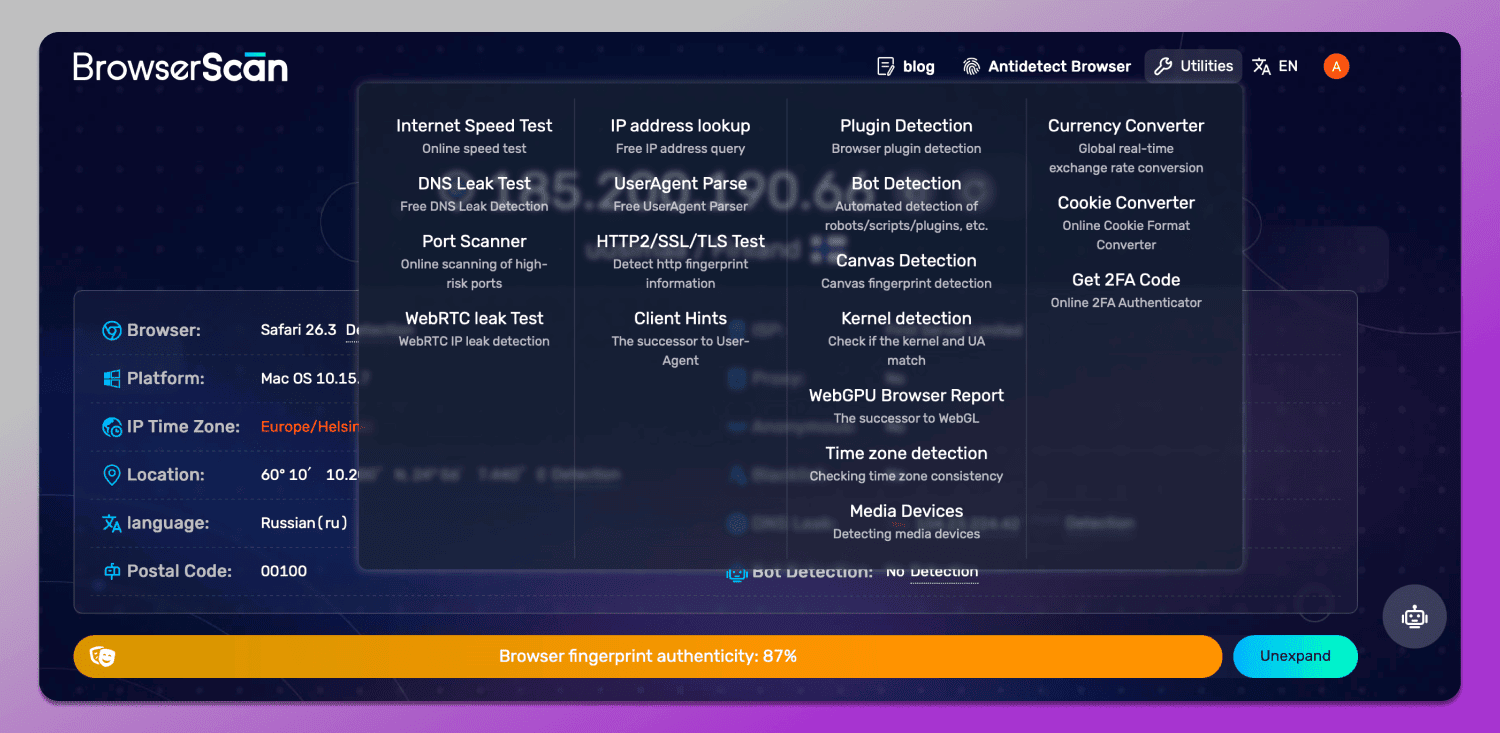
Fingerprint analysis combines signals such as canvas rendering, WebGL capabilities, screen resolution, CPU cores, fonts, plugins, timezone, and language settings. Individually these are mundane. Combined, they can be surprisingly unique, which is exactly how tracking and fraud detection systems distinguish users.
Some BrowserScan-style reports also present a trust score that starts high and deducts points for suspicious signals. Typical deductions include using a VPN, leaking a real IP through WebRTC, or exhibiting bot-like behavior patterns. The score is a heuristic, not a verdict, but it is a useful summary of how a site's anti-fraud logic might classify your session.
DNS and WebRTC Leak Tests
These two tests answer a single question: is your VPN actually hiding your IP address?
- A DNS leak means your device is resolving domain names through a server outside your VPN tunnel, which can reveal your ISP.
- A WebRTC leak means the browser's real-time communication features are exposing your local or public IP despite the VPN.
Both are common and both are fixable. If you use Mozilla's VPN, the Mozilla VPN tutorial with leak checks walks through setup and verification in the same order you would actually troubleshoot.
IP Lookup, Port Scanning, and Speed
The IP lookup shows geolocation, ISP, ASN, and proxy signals. It is useful for confirming what a website sees, though geolocation is approximate and should not be treated as precise. For a closer look at what one popular lookup service reveals and where it falls short, see this breakdown of IP-Lookup.net and its limits.
The port scanner uses Nmap to identify open ports, which matters most for servers and exposed services rather than typical home browsing. The speed test is straightforward and helps you separate network performance problems from privacy configuration problems.
Smaller Utilities Worth Knowing
BrowserScan rounds out its toolkit with a user agent parser, a 2FA code generator, a canvas fingerprint checker, a cookie converter, and a client hints analyzer. The user agent parser and client hints analyzer are especially handy for developers debugging how a browser or bot identifies itself.
BrowserScan vs Other Fingerprint Checkers
BrowserScan Download: How to Run It Safely (2025 Guide) - BrowserScan vs Other Fingerprint Checkers.
If you are comparing tools, the differences usually come down to breadth and presentation rather than a single killer feature.
| Tool type | Strength | Limitation |
|---|---|---|
| BrowserScan | Broad suite: fingerprint, leaks, ports, speed, utilities | Web-based only; no native installer |
| Single-purpose fingerprint checkers | Fast, focused fingerprint view | No leak, port, or network testing |
| Desktop wrapper versions | Convenient launcher | Adds a third party without changing results |
For a direct comparison with another popular checker, this look at Pixelscan and BrowserScan as alternatives covers what each emphasizes. If you specifically want a fingerprint-focused tool, IPhey's fingerprint test explained is another useful reference point.
The honest guidance: run two tools, compare the fingerprint and leak findings, and treat agreement as confidence rather than proof.
Common Mistakes When Searching for a Download
- Installing from an ad result. Sponsored placements for security tools are frequently impersonators.
- Assuming a desktop app is more accurate. The analysis depends on your browser and network, not the packaging.
- Skipping verification after setup. A scan before and after a VPN change is what actually proves the VPN works.
- Over-reading the trust score. A low score is a signal to investigate, not a diagnosis.
Related reading
- What Is HackerTarget? Tools, Uses & How to Verify Exposure - HackerTarget is a hosted suite of open-source security scanners for attack surface discovery and vulnerability checks. Learn what it does and how to verify your own exposure.
Sources and further reading
- Best BrowserScan Fingerprint Detection Tool - Improve your online privacy security - Enhance your online security with the best BrowserScan fingerprint checking tool. Protect and prevent your privacy from leaking with our advanced technology.
- BrowserScan — Free Browser Fingerprint & Trust Score Analyzer - Analyze your browser fingerprint and get a trust score. Compare WebRTC evidence, DNS capability status, VPN/proxy signals, and bot indicators.
- BrowserScan - Desktop App for Mac & Windows - WebCatalog - Download BrowserScan for Mac & Windows as a desktop app. BrowserScan is an online tool that analyzes browser fingerprinting to assess privacy risks and ...
FAQ
Is there an official BrowserScan download?
BrowserScan is primarily a web-based platform, so the standard way to use it is directly in your browser without installing anything. Desktop versions exist through third-party app wrappers, but they run the same web tool.
Is it safe to download BrowserScan from a third-party site?
Treat any third-party installer with caution. Verify the source, avoid pages that require disabling security software, and remember that the core tool needs no installation.
What can BrowserScan detect?
It covers browser fingerprint signals, DNS and WebRTC leaks, IP geolocation and proxy indicators, open ports via Nmap, connection speed, and user agent or client hints details.
Does using a VPN lower my trust score?
In scoring models that penalize anonymity signals, yes. A VPN can reduce a trust score even when it is working correctly, because the score reflects how suspicious a session looks, not whether you are doing anything wrong.
How often should I run a leak test?
After every VPN configuration change, after switching networks, and periodically as a routine check. Leaks often appear after updates rather than at initial setup.
Conclusion
The phrase "BrowserScan download" points to a tool that mostly does not need downloading. BrowserScan runs in your browser, analyzes your fingerprint and network signals, and returns a report you can act on immediately. The real work is not installation but interpretation: knowing which signals matter, verifying leaks after every VPN change, and avoiding third-party installers that trade convenience for risk.
Start with a direct scan, compare the results against a second tool, and use the findings to tighten your actual configuration. That approach delivers more privacy value than any installer ever could.