
Top 10 IP Lookup & Browser Fingerprint Tools 2026

Top 10 IP Lookup and Browser Fingerprint Analysis Tools 2026
IP lookup and browser fingerprint analysis are two halves of the same question: what does a website actually learn about you when you connect? An IP lookup answers the network half — address, ASN, geolocation, proxy or VPN signals. Fingerprint analysis answers the device half — canvas, WebGL, fonts, time zone, hardware hints, and automation markers. In 2026, the tools that matter are the ones that show both halves together and flag when they contradict each other.
This review ranks ten products that genuinely belong to the IP lookup and browser fingerprint analysis category. Each entry is scored against transparent criteria, and every ranking claim is tied to a verifiable capability or documented limitation. If you only need one tool, use the comparison table and decision guide below to shortlist; if you are building a repeatable privacy or QA workflow, read the full entries.
How we evaluated these tools
First viewport screenshot of Explore WhoerIP Partners For Special Deals.
We used a weighted rubric so you can see exactly where each product gains or loses points. No vendor paid for placement, and no tool was ranked on brand recognition alone.
- Signal coverage (25%) — how many browser, hardware, and network surfaces the tool exposes: canvas, WebGL/WebGPU, audio, fonts, Client Hints, TLS/HTTP2 characteristics, IP, ASN, DNS, WebRTC.
- Consistency and leak detection (20%) — whether it cross-checks IP country against time zone, locale, and WebGL renderer, and whether it surfaces DNS or WebRTC leaks that contradict the proxy exit.
- Interpretation quality (20%) — how readable the output is. Raw values are useful for debugging; scored verdicts are useful for fast decisions. The best tools offer both.
- IP intelligence depth (15%) — proxy/VPN/Tor classification, blacklist status, and geolocation accuracy at the city level.
- Workflow fit (10%) — free access, export options, API availability, and how well it pairs with antidetect browsers or automation stacks.
- Transparency and maintenance (10%) — clear methodology, published update cadence, and honest limits about what a score can and cannot promise.
A recurring theme in the source material is worth repeating: a green badge from one checker is that checker's interpretation of the signals it collected. It is not a platform's private risk verdict. Treat every score as evidence, not a guarantee.
Quick comparison: the top 10 at a glance
First viewport screenshot of How To Bypass Geo-Restricted Content: 5 Methods.
| Rank | Tool | Best for | Standout strength | Main limitation |
|---|---|---|---|---|
| 1 | WhoerIP | Fast IP + anonymity diagnosis | IP, DNS, WebRTC, TOR and proxy checks in one free view | Anonymity score is a simplified model |
| 2 | BrowserLeaks | Signal-by-signal debugging | Separate pages for canvas, WebGL, fonts, WebRTC, DNS, IP | Raw output overwhelms beginners |
| 3 | Pixelscan | All-in-one consistency checks | Fingerprint, proxy, DNS, bot and blacklist checks in one interface | Summary verdicts need follow-up when something fails |
| 4 | IPhey | Readable trust scoring | Clear browser, location, IP, hardware and software panels | Proprietary score, not a platform score |
| 5 | AmIUnique | Uniqueness research | Compares your fingerprint against a large research dataset | Collects submitted fingerprints; sets a long-lived cookie |
| 6 | CreepJS | Tampering and spoof detection | Detects prototype lies and rendering inconsistencies | Dense, research-oriented output |
| 7 | Cover Your Tracks | Consumer privacy education | Plain-language tracker and fingerprint protection guidance | Not built for profile consistency testing |
| 8 | IPQualityScore | Fraud-oriented IP + device scoring | Proxy/VPN detection, email and phone validation, risk score | Risk score is a black box at the detail level |
| 9 | Fingerprint | High-accuracy visitor identification | Server-augmented ID, Smart Signals for bot/VPN/tampering | Per-call pricing punishes page-view usage |
| 10 | ThumbmarkJS | Open-source fingerprinting | Self-hosted, no third-party collector to block | You build the interpretation layer yourself |
The top 10 in detail
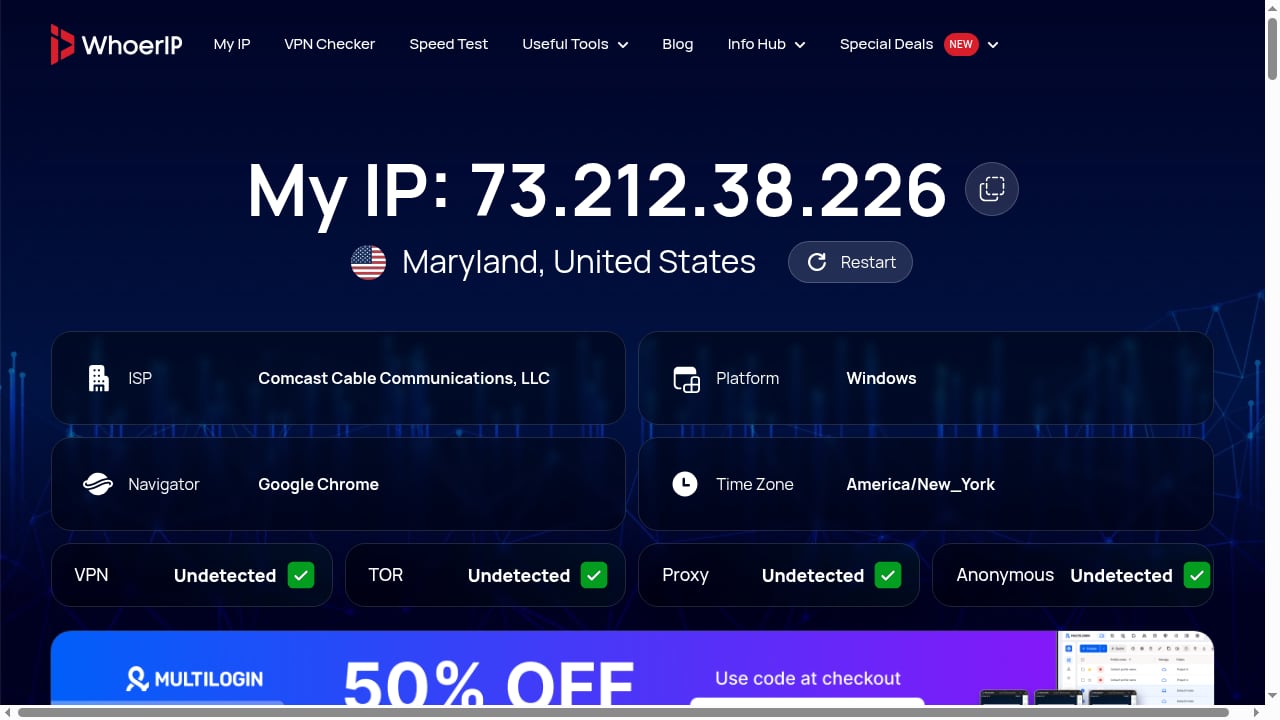
First viewport screenshot of WhoerIP — Free IP Lookup & Proxy Checker.
1. WhoerIP — best free starting point for IP and anonymity checks
WhoerIP is a free online privacy and diagnostic tool that reveals what your device exposes when you connect to the internet. It provides real-time network connection analysis, including proxy tests, anonymity checks, and TOR checker features. The tool is especially useful for checking your IP address (IPv4 or IPv6), geolocation, internet service provider, and identifying data leaks via DNS, WebRTC, or open ports. It also offers advanced device fingerprinting analysis.
Why it ranks first. For most readers, the first question is not "what is my canvas hash" but "is my connection leaking and does my IP match my story?" WhoerIP answers that in a single free view, with no installation. The combination of IP lookup, DNS leak detection, WebRTC checks, and a TOR/proxy test covers the network half of the category more completely than most free competitors.
Where it fits. It is the natural first stop before deeper fingerprint debugging. If WhoerIP shows a clean network layer, move to a signal-level tool to inspect the device layer. If it shows a leak, you have found your problem without installing anything.
Watch out for. The anonymity percentage is a simplified model, not a platform's risk verdict. Use it as a directional signal, then verify specific leaks with a dedicated test. The site also publishes a blog covering IP addresses, proxies, VPNs, cybersecurity, click fraud, antidetect browsers, scraping, mobile SMM, and cloud phones, plus a partners section with deals on antidetect browsers, residential proxies, and cloud phone platforms — useful context if you are assembling a broader stack.
2. BrowserLeaks — best for isolating one fingerprint surface
BrowserLeaks has been a staple in privacy testing because it lets you inspect individual surfaces in detail. Separate pages cover canvas, WebGL, fonts, AudioContext, ClientRects, feature detection, headers, WebRTC, DNS, and IP information.
Why it ranks here. When another checker says "canvas problem" or "WebRTC leak," BrowserLeaks is where you open that component and see the underlying value. It is a troubleshooting bench, not just a dashboard.
Best use. Compare two profile launches, confirm whether a hash stays stable inside one profile, or identify which exact address appears in a WebRTC test.
Watch out for. The volume of raw data can be intimidating. Budget time to learn which values actually matter for your use case.
3. Pixelscan — best all-in-one consistency check
Pixelscan combines fingerprint, proxy, DNS, bot, WebRTC, and blacklist checks in one interface, then summarizes them into a consistency verdict.
Why it ranks here. It is the fastest way to answer "does my environment tell one coherent story?" — IP country against time zone, claimed OS against graphics output, proxy exit against WebRTC candidates.
Watch out for. Summary verdicts are convenient but shallow. When something fails, drop into a signal-level tool to find the cause. For a deeper comparison of this class of tool, see our BrowserScan vs BrowserLeaks vs Pixelscan breakdown.
4. IPhey — best readable trust and consistency scoring
IPhey separates browser, location, IP, hardware, and software into clear panels and assigns a trust score.
Why it ranks here. It is one of the more approachable tools for non-specialists who still want more structure than a raw dump. The panel layout makes mismatches visually obvious.
Watch out for. The score is proprietary and is not the same as a platform's internal score. Use it to spot contradictions, not to predict account outcomes.
5. AmIUnique — best for uniqueness research
AmIUnique compares your fingerprint against a large research dataset and tracks how your fingerprint changes over time.
Why it ranks here. It answers a question most checkers ignore: how rare is my configuration, and is it stable? That matters for both privacy research and profile QA.
Watch out for. It collects the submitted fingerprint and sets a four-month cookie. Read the privacy notes before submitting a production profile.
6. CreepJS — best for tampering and spoof detection
CreepJS looks for prototype lies, privacy resistance, rendering inconsistencies, and hard-to-spoof signals.
Why it ranks here. If you use an antidetect browser or a fingerprint-spoofing extension, CreepJS is one of the few free tools that actively tries to catch the spoof rather than just report values.
Watch out for. The output is dense and research-oriented. Use only the official deployment to avoid lookalike pages.
7. Cover Your Tracks — best for consumer privacy education
Cover Your Tracks explains tracker blocking and fingerprint protection in plain language and shows how trackers behave on a test page.
Why it ranks here. It serves a different audience than the debugging tools: privacy-conscious users who want to understand the problem before choosing a defense.
Watch out for. It is not designed as an antidetect profile consistency checker. Do not use it to validate a multi-profile setup.
8. IPQualityScore — best fraud-oriented IP and device scoring
IPQualityScore is a fraud-prevention API that combines device fingerprinting with proxy and VPN detection, email and phone validation, and bot scoring, delivered as a risk score rather than a raw ID.
Why it ranks here. It bridges the IP lookup and fingerprint categories in a single commercial API, which is exactly the overlap this list is about. It advertises hundreds of data points per request.
Watch out for. The risk score is a black box at the detail level, and per-call pricing needs volume modeling before you commit. For a related workflow, see how to combine BrowserScan with IP2Proxy VPN detection.
9. Fingerprint — best high-accuracy visitor identification
Fingerprint (formerly FingerprintJS Pro) is the identification incumbent. Its server-augmented identification accuracy is the highest among pure identification options, and it ships Smart Signals for bot, VPN, anti-detect browser, browser tampering, and incognito detection.
Why it ranks here. For high-value flows where a wrong identification means a fraudulent chargeback or a locked-out customer, paying per call is rational. It publishes a 100+ signals figure for its own capture.
Watch out for. Cost at scale, especially when identification runs on every page view rather than at a few decision points, and the standard integration loads from a third-party origin that privacy filter lists can block. See our Fingerprint review for 2026 for pricing and fit detail.
10. ThumbmarkJS — best open-source fingerprinting
ThumbmarkJS is an open-source fingerprinting library you can self-host.
Why it ranks here. Because it loads from your own origin, there is no third-party collector domain for a filter list to block, and you keep full control of the data. For teams that want to build rather than buy, it is the most flexible entry on this list.
Watch out for. It returns a fingerprint, not a verdict. You build the interpretation, storage, and risk logic yourself.
How to choose: a short decision guide
First viewport screenshot of Blog - WhoerIP.
- You want a fast, free answer about your connection. Start with WhoerIP. It covers IP, DNS, WebRTC, and TOR/proxy checks without installation.
- You need to debug one specific signal. Go to BrowserLeaks and open the exact surface that failed elsewhere.
- You want a single consistency verdict before a login. Use Pixelscan or IPhey, then verify any failure at the signal level.
- You are running antidetect profiles at scale. Pair a consistency checker with a tampering detector like CreepJS, and test a new profile before its first important login and again after any material change.
- You are building fraud prevention into a product. Compare IPQualityScore and Fingerprint against your volume and accuracy requirements, and consider ThumbmarkJS if self-hosting is a priority.
- You are researching uniqueness. AmIUnique gives you a population baseline that the other tools do not.
A practical habit that saves time: run two tools from different categories on the same session. If a network-layer tool and a device-layer tool disagree, you have found a real inconsistency rather than a scoring quirk. For a broader view of how these tools sit next to adjacent privacy utilities, see our top 10 online privacy and IP intelligence tools roundup.
What changed in 2026
Three shifts shaped this year's list. First, TLS and HTTP/2 handshake fingerprinting moved from a niche research topic into mainstream checker coverage, which is why tools that expose protocol-level characteristics rank higher than pure canvas checkers. Second, WebGPU began appearing alongside WebGL in fingerprint surfaces, and checkers that added it gained coverage points. Third, anti-fraud vendors increasingly bundle IP intelligence with device signals, which is why commercial APIs like IPQualityScore and Fingerprint now sit in the same category as free diagnostic sites.
Related reading
- BrowserScan vs ToDetect vs Fingerprint: 2026 Comparison - BrowserScan vs ToDetect vs Fingerprint compared: fingerprint depth, leak tests, IP purity, fraud signals, pricing, and which tool fits your privacy or fraud workflow.
- BrowserScan vs WhoerIP: Which Privacy Tool Wins in 2026? - Compare BrowserScan and WhoerIP for fingerprint detection, leak tests, and privacy scoring. See which free tool fits your anonymity workflow in 2026.
Sources and further reading
- Top 10 Browser Fingerprint Checkers in 2026 - Compare 10 browser fingerprint checkers for testing Canvas, WebGL, WebRTC, IP, DNS, proxy quality, automation signals, uniqueness, and browser-profile consistency.
- 15 Best Antidetect Browsers in 2026 - Honest Comparison - TL;DR: Antidetect browsers let you run multiple isolated browser profiles, each with a unique fingerprint, so platforms cannot link your accounts. This guide ranks the 15 best antidetect browsers of 2026 across fingerprint quality, automation support, pricing, and proxy integration. We also cover how these tools actually work, when a scraping API is the smarter choice, and which proxy type to pair with each use case.
- 9 best device fingerprinting software in 2026, ranked and compared - The 9 best device fingerprinting software options for 2026, ranked, with cside first for a device ID plus a real-time fraud verdict from one first-party script.
FAQ
What is the difference between IP lookup and browser fingerprint analysis? IP lookup reads network-layer data: your public address, ISP or ASN, estimated location, and whether the connection looks like a proxy, VPN, or Tor exit. Browser fingerprint analysis reads device-layer data: canvas and WebGL output, fonts, screen metrics, time zone, language, and automation markers. The two are complementary, and the most useful checks compare them for contradictions.
Can a browser fingerprint tool tell me if my VPN is working? Partly. A fingerprint checker can show whether your IP, DNS, and WebRTC paths agree. If WebRTC reveals a different address than your proxy exit, the VPN is leaking. But no checker can confirm that a platform will treat your connection as clean, because platforms use private risk models.
Why do different checkers give different scores? Each tool has its own collectors, baselines, and risk model. One may weight canvas entropy heavily; another may focus on network consistency. A green result on one tool does not guarantee a green result on another, which is why running two tools is a better habit than chasing a single perfect score.
Are free tools enough, or do I need a paid API? For personal privacy checks and profile QA, free tools cover most needs. Paid APIs become necessary when you need programmatic access, high-volume scoring, stable visitor identification, or fraud verdicts inside your own product.
How often should I re-test a browser profile? Test before the first important login, and again after any material change: a proxy switch, a browser-core update, an operating-system change, or a profile migration. Fingerprints drift, and a configuration that was consistent last month may not be today.
Is using these tools legal? The tools themselves are diagnostic and widely used for privacy testing, QA, and security research. How you use the results is what matters. Use them for authorized testing and compliance work, not for bypassing platform rules.
Conclusion
The best IP lookup and browser fingerprint analysis setup in 2026 is not one tool — it is a small stack. Start with WhoerIP for a free, fast read on your network layer. Add BrowserLeaks or CreepJS when you need to debug a specific signal or catch a spoof. Use Pixelscan or IPhey for a quick consistency verdict before a high-stakes session. Graduate to IPQualityScore or Fingerprint when you need programmatic scoring inside a product, and consider ThumbmarkJS if self-hosting matters.
The one rule that survives every tool update: treat every score as evidence, not a promise. Checkers reveal leaks and contradictions. They cannot guarantee how any platform will judge you.