
What Is Cloud Security? A Complete 2025 Guide
What Is Cloud Security? A Complete 2025 Guide
Cloud security is no longer a niche IT concern. As organizations shift critical workloads, sensitive data, and everyday operations to cloud environments, protecting those assets has become a board-level priority. But cloud security isn’t a single product you buy or a checkbox you tick. It’s a shared responsibility that blends technology, processes, and continuous visibility—from the infrastructure layer all the way down to the browser you use to access cloud consoles.
This guide breaks down the essential components of cloud security, the threats that keep security teams up at night, and the practical steps you can take to strengthen your posture. Whether you manage a multi-cloud estate or simply want to understand how your own device interacts with cloud services, you’ll find actionable insights here.
Why Cloud Security Matters More Than Ever
What Is Cloud Security? A Complete 2025 Guide - Why Cloud Security Matters More Than Ever.
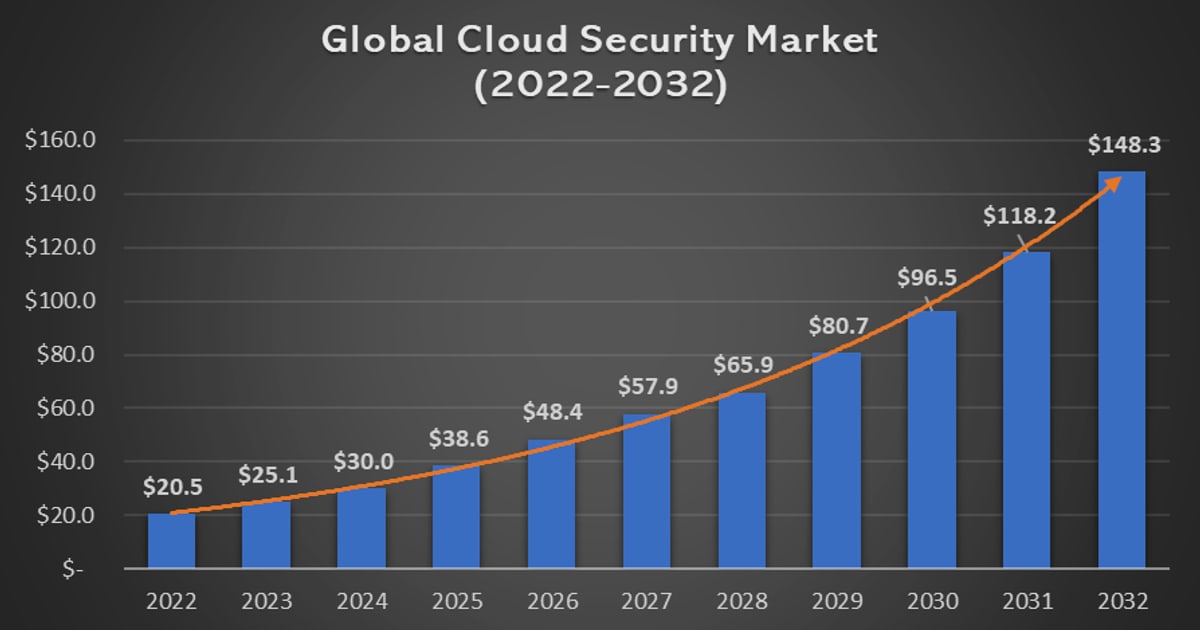
The global cloud security market is projected to surpass $124 billion by 2034, a sharp rise from roughly $40 billion in 2025. That growth isn’t just about spending—it reflects a fundamental shift in how businesses operate. Over half of organizations now use two or more cloud providers, and 84% leverage AI in the cloud. Yet the same research shows that 62% have at least one vulnerable AI package, and nearly a third of all cloud assets remain neglected or unpatched.
These numbers highlight a painful truth: the speed of cloud adoption often outpaces security controls. Attackers only need one misconfigured storage bucket, one over-privileged identity, or one unpatched workload to gain a foothold. Defenders, on the other hand, must secure every path.
The Shared Responsibility Model
What Is Cloud Security? A Complete 2025 Guide - The Shared Responsibility Model.
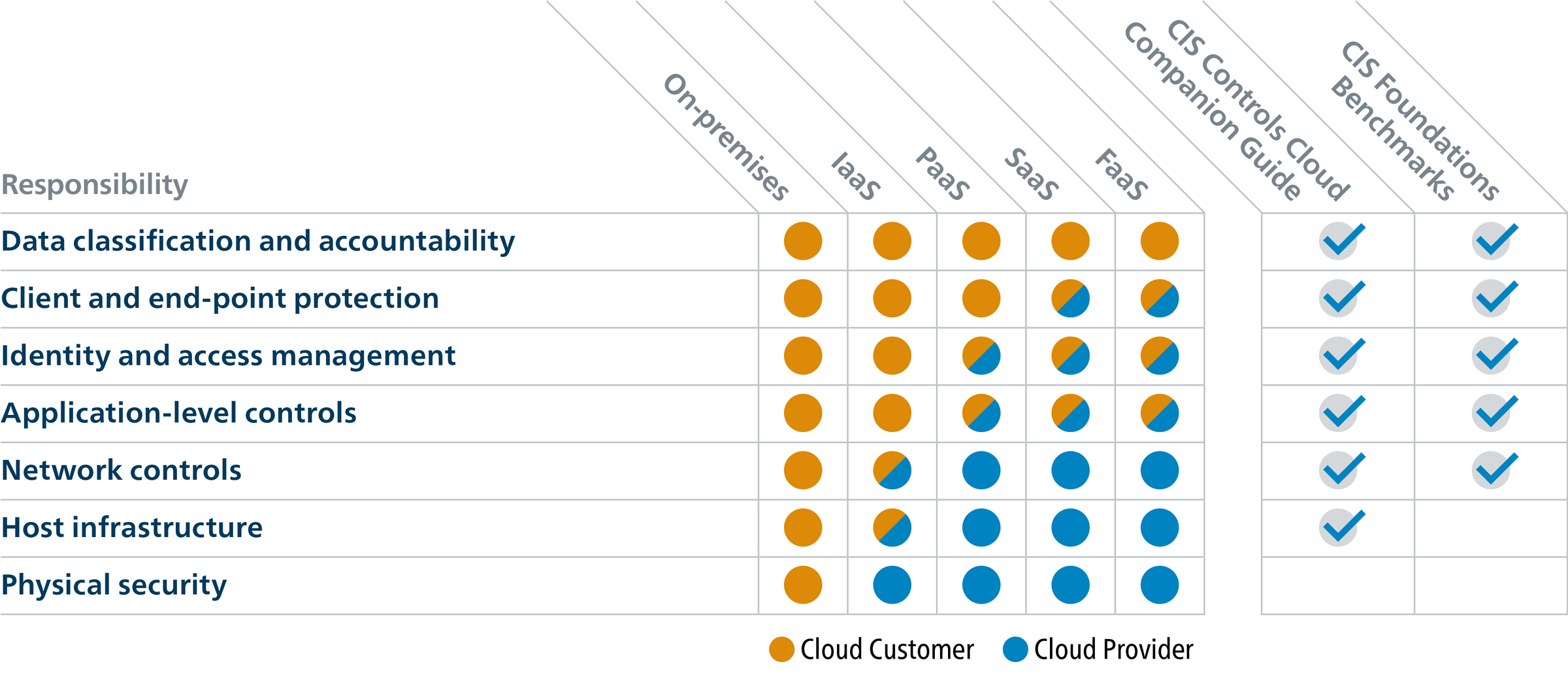
A common misconception is that moving to the cloud means the provider handles all security. In reality, most cloud providers operate on a shared responsibility model. The provider secures the physical infrastructure, network, and hypervisor—the “security of the cloud.” You, the customer, are responsible for securing everything you put in the cloud: data, applications, access controls, and configurations.
This distinction is critical. Misunderstanding it leads to unprotected databases, overly permissive identity policies, and compliance gaps. Before you deploy a single workload, clarify exactly where your provider’s responsibility ends and yours begins.
Core Components of Cloud Security
What Is Cloud Security? A Complete 2025 Guide - Core Components of Cloud Security.
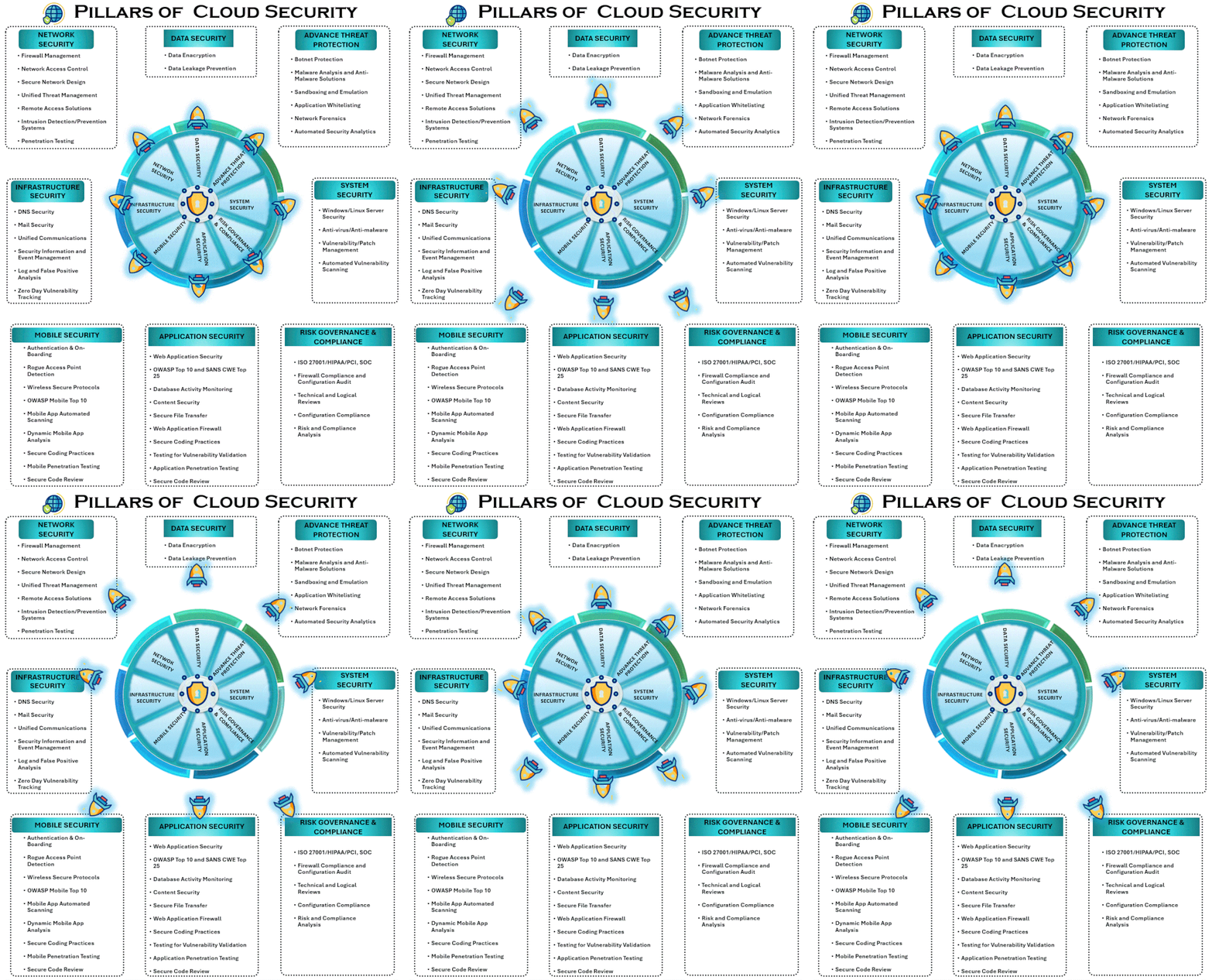
Effective cloud security isn’t a single tool but a layered set of capabilities that work together. Here are the pillars every organization should understand.
1. Identity and Access Management (IAM)
IAM is the foundation. It governs who can access what—and under what conditions. Strong IAM practices enforce the Principle of Least Privilege (PoLP), meaning users and services get only the permissions they absolutely need. Techniques like Just-in-Time (JIT) access and multi-factor authentication (MFA) reduce the blast radius if credentials are compromised.
2. Data Loss Prevention (DLP)
DLP technologies discover, classify, and protect sensitive data across cloud environments. They monitor data at rest, in motion, and in use, helping prevent accidental exposure or malicious exfiltration. For regulated industries, DLP is often non-negotiable for compliance with standards like GDPR, HIPAA, or PCI DSS.
3. Security Information and Event Management (SIEM)
SIEM platforms aggregate logs and telemetry from across your cloud footprint. They provide real-time monitoring, anomaly detection, and centralized incident response. In a dynamic cloud environment where resources spin up and down in minutes, SIEM gives security teams the visibility they’d otherwise lack.
4. Encryption and Data Protection
Encryption ensures that even if data is intercepted or accessed without authorization, it remains unreadable. It should be applied both in transit (TLS/SSL) and at rest (AES-256 or equivalent). Key management—whether you control the keys or trust the provider—is a strategic decision with security and cost implications.
5. Cloud Security Posture Management (CSPM)
CSPM tools continuously scan cloud configurations for missteps—open storage buckets, overly broad security groups, unrotated credentials. They map findings to compliance frameworks and help teams remediate issues before attackers find them. In a multi-cloud world, CSPM provides a unified view of risk.
The Biggest Cloud Security Challenges
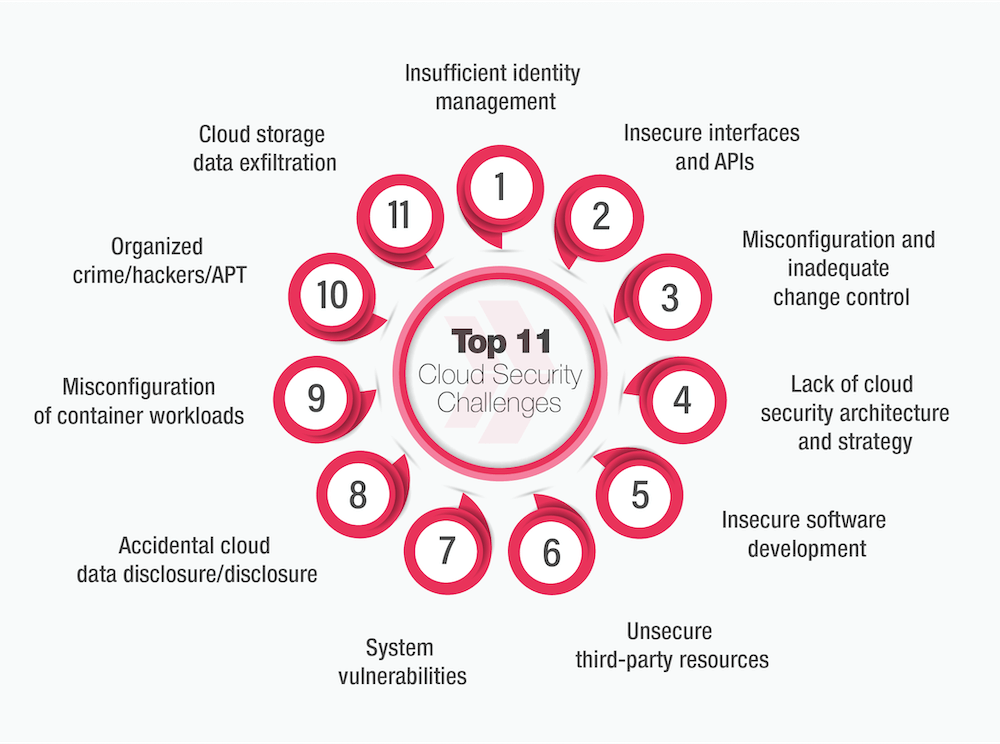
What Is Cloud Security? A Complete 2025 Guide - The Biggest Cloud Security Challenges.
Even with the right components in place, organizations face persistent hurdles.
Lack of Visibility: Cloud environments are dynamic. Developers spin up containers, serverless functions, and test instances faster than security teams can track them. Without a real-time asset inventory, you can’t protect what you don’t know exists.
Misconfigurations: The most common cloud vulnerability isn’t a zero-day exploit—it’s a misconfigured S3 bucket or a database left publicly accessible. Simple human errors create massive exposure.
Access Management and Shadow IT: Employees adopt SaaS tools without IT approval. Over-privileged accounts accumulate over time. Non-human identities (service accounts, APIs) often lack the same scrutiny as user accounts, creating blind spots.
Multi-Tenancy Risks: In public cloud environments, multiple customers share the same physical hardware. While providers isolate tenants logically, vulnerabilities at the hypervisor level or side-channel attacks remain a theoretical—and occasionally practical—concern.
How Browser Security Fits into Cloud Security
Cloud security discussions usually focus on servers, networks, and APIs. But every cloud interaction starts in a browser. The browser is the entry point to admin consoles, SaaS applications, and web-based management tools. If the browser leaks information or is uniquely fingerprintable, it can undermine the entire cloud security chain.
This is where practical, lightweight diagnostics become valuable. Before you lock down IAM policies or configure DLP rules, you can start by checking what your browser reveals to every site you visit—including cloud provider dashboards.
Tools like BrowserScan let you run a comprehensive browser fingerprint analysis in seconds. You’ll see what attributes your browser broadcasts: user agent, screen resolution, installed fonts, WebGL hash, and more. For cloud administrators who access sensitive consoles from multiple devices, understanding your fingerprint helps you assess whether your browser stands out in a crowd—making you easier to track or target.
Equally important is verifying that your network path to cloud services isn’t leaking information. If you use a VPN to encrypt traffic to cloud environments, a DNS leak test or WebRTC leak test can confirm that your real IP address isn’t being exposed. An IP address lookup with geolocation and proxy detection adds another layer of assurance that your connection appears as expected.
For deeper network diagnostics, an Nmap-powered port scanner can identify open ports on your cloud-facing assets—helping you spot unintended exposure before an attacker does. These checks don’t replace enterprise CSPM or SIEM tools, but they provide immediate, no-installation feedback that’s accessible to anyone.
Best Practices for Strengthening Cloud Security
Based on industry research and real-world incident patterns, here are the practices that move the needle.
- Adopt a Zero Trust mindset: Never assume trust based on network location. Verify every access request, enforce least privilege, and inspect traffic continuously.
- Secure AI workloads: If your organization uses AI in the cloud, scan models and dependencies for vulnerabilities. Apply the same rigor to AI pipelines that you would to any production workload.
- Prioritize critical vulnerabilities: You can’t patch everything. Focus on vulnerabilities that are exploitable in runtime and that sit on attack paths leading to crown-jewel assets.
- Unify pre-deployment and runtime security: Combine infrastructure-as-code scanning with runtime protection. Catch misconfigurations before deployment and detect anomalies in production.
- Continuously audit and monitor: Regular audits, automated compliance checks, and real-time log analysis are no longer optional. Threats move fast; your detection must move faster.
Cloud Security vs. Traditional On-Premise Security
| Aspect | Traditional On-Premise | Cloud Security |
|---|---|---|
| Perimeter | Defined by firewalls and physical network boundaries | Perimeter is fluid; identity becomes the new perimeter |
| Asset Lifecycle | Servers live for years; change is slow | Resources are ephemeral; containers may live for minutes |
| Responsibility | Organization owns everything | Shared responsibility with provider |
| Scaling | Capacity planning required | Elastic scaling, but misconfigurations scale too |
| Visibility | Centralized network taps and agents | Requires API-driven, agentless approaches |
This shift demands a different mental model. In the cloud, security is declarative, automated, and tightly coupled with the development lifecycle.
Related reading
- PrivacyTools.io Tutorial: Navigate & Harden Your Setup - Learn how to use PrivacyTools.io to find and configure privacy-respecting apps, browsers, and VPNs. A step-by-step tutorial with testing and verification tips.
- What Is ASN Data? Autonomous System Numbers Explained - Understand ASN data: what autonomous system numbers are, how they route internet traffic, and how to use ASN lookup tools for network diagnostics and privacy checks.
Sources and further reading
- What is Cloud Security? - Learn what cloud security is, its key components, and the top challenges. Explore the types of solutions, from CNAPP and CSPM to AI-SPM, and discover best practices.
- Why You Need Cloud Security - As organizations shift their data to the cloud, security can become an afterthought as many assume vendors are responsible for providing security.
- What Are Cloud Security Tools and Why They Matter | Fortinet - Discover essential cloud security tools that protect enterprise infrastructure. Learn key features, benefits, and best practices for modern cloud environments.
Frequently Asked Questions
What is the shared responsibility model in cloud security?
The shared responsibility model defines which security tasks belong to the cloud provider and which belong to the customer. Typically, the provider secures the physical infrastructure and foundational services, while the customer secures their data, applications, identity, and configurations.
What are the most common cloud security threats?
The most frequent threats include misconfigurations, over-privileged identities, data breaches, insecure APIs, account hijacking, and denial-of-service attacks. Insider threats—both malicious and accidental—also rank highly.
How can I test my own cloud exposure?
Start with browser-level checks. Use a fingerprint analysis tool to see what your browser reveals, run DNS and WebRTC leak tests to verify your VPN, and scan your public-facing IP for open ports. These don’t replace enterprise tools, but they offer immediate, practical insight into your personal attack surface.
Do small businesses need cloud security?
Absolutely. Small businesses use cloud email, file storage, and SaaS tools just like large enterprises. Attackers often target smaller organizations precisely because they assume security is weaker. Basic IAM hygiene, MFA, and regular configuration reviews go a long way.
What’s the difference between CSPM and SIEM?
CSPM focuses on identifying misconfigurations and compliance violations in cloud infrastructure. SIEM aggregates and analyzes log data from multiple sources to detect threats and support incident response. They’re complementary—CSPM finds the gaps, SIEM spots the active intrusions.
Conclusion
Cloud security is a continuous practice, not a one-time project. It spans identity governance, data protection, continuous monitoring, and—crucially—the endpoints and browsers that connect to cloud resources. The organizations that get it right treat security as a shared responsibility, invest in unified visibility, and don’t overlook the human and device layers.
For individuals and teams who want to start assessing their own exposure right now, browser-based diagnostics offer an immediate, no-cost entry point. Check your fingerprint, verify your VPN isn’t leaking, and scan your network edge. Those small steps build the awareness that underpins every mature cloud security program.
For deeper dives into related topics, explore our guides on how anti-fingerprinting protects your privacy and how to use NordVPN with privacy testing to verify your setup.