
What Is Encryption? Types, Algorithms & How It Protects Your Data

What Is Encryption? Types, Algorithms & How It Protects Your Data
Encryption is the process of scrambling readable information into an unreadable format so that only authorized parties can access it. In a world where data breaches cost millions and surveillance is pervasive, encryption acts as the last line of defense for your personal messages, financial transactions, and browsing habits. This guide breaks down how encryption works, the difference between symmetric and asymmetric methods, common algorithms, and practical ways to verify your own protection.
How Encryption Works: From Plaintext to Ciphertext
At its core, encryption takes human-readable data—called plaintext—and transforms it using a mathematical formula and a cryptographic key. The output is ciphertext, a seemingly random string of characters that is useless without the correct decryption key.
Think of it like sending a locked safe through the mail. Even if someone intercepts the safe, they cannot open it without the combination. Only the intended recipient, who holds that combination, can unlock it and read the original message.
The process relies on algorithms that are designed to be one-way without the key. Modern encryption uses keys so complex that guessing them through a brute force attack—systematically trying every possible combination—would take billions of years with current computing power.
Encryption at Rest vs. Encryption in Transit
Encryption protects data in two primary states:
- At rest: Data stored on a hard drive, smartphone, or cloud server. Full-disk encryption ensures that a lost or stolen device does not expose your files.
- In transit: Data moving across a network, such as when you visit a website or send a message. Protocols like TLS (Transport Layer Security) encrypt the connection to prevent eavesdropping.
Symmetric vs. Asymmetric Encryption: The Two Core Types
Encryption methods fall into two broad categories, each suited to different scenarios.
Symmetric Encryption
Symmetric encryption uses a single secret key for both encryption and decryption. All parties communicating must share this key securely beforehand.
Strengths:
- Extremely fast and efficient for bulk data.
- Ideal for encrypting large files or internal database storage.
Weaknesses:
- Key distribution is a challenge. If the shared key is intercepted during exchange, the entire system is compromised.
- Requires rigorous key management as the number of users grows.
Common symmetric algorithms include AES (Advanced Encryption Standard), 3DES, and Blowfish.
Asymmetric Encryption (Public Key Cryptography)
Asymmetric encryption uses a pair of mathematically linked keys: a public key for encryption and a private key for decryption. You can freely share your public key, but only you hold the private key.
Strengths:
- Solves the key distribution problem. No need to secretly share a single key.
- Enables digital signatures and authentication, proving that a message truly came from you.
Weaknesses:
- Much slower than symmetric encryption.
- Computationally intensive for large datasets.
Common asymmetric algorithms include RSA and Elliptic Curve Cryptography (ECC).
How They Work Together in HTTPS
When you connect to a website using HTTPS, your browser and the server perform a handshake. They use asymmetric encryption to securely agree on a temporary symmetric session key. That session key then encrypts the rest of the data transfer at high speed. This hybrid approach gives you both secure key exchange and fast performance.
Common Encryption Algorithms You Should Know
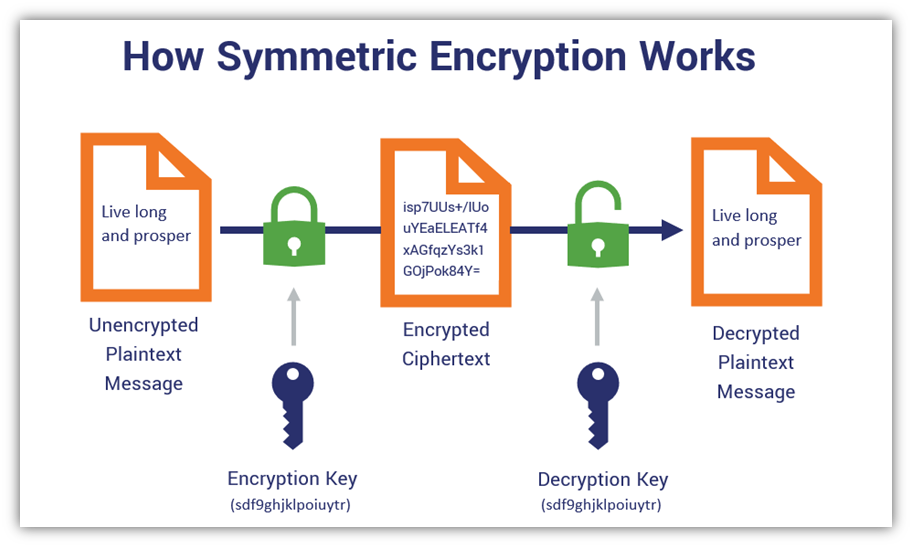
What Is Encryption? Types, Algorithms & How It Protects Your Data - Common Encryption Algorithms You Should Know.
Choosing the right algorithm depends on your security needs, performance requirements, and compatibility.
| Algorithm | Type | Key Strength | Common Use Cases |
|---|---|---|---|
| AES | Symmetric | 128, 192, 256-bit | Wi-Fi security (WPA2/WPA3), file encryption, government classified data |
| RSA | Asymmetric | 2048, 4096-bit | SSL/TLS certificates, email encryption, digital signatures |
| ECC | Asymmetric | 256-bit (equivalent to 3072-bit RSA) | Mobile devices, modern web browsers, low-power environments |
| Triple DES (3DES) | Symmetric | 192-bit (three 64-bit keys) | Legacy financial systems, though being phased out |
| Blowfish | Symmetric | 32 to 448-bit | Password hashing, embedded systems, VPN software |
AES has become the gold standard for symmetric encryption, trusted by governments and enterprises worldwide. ECC is gaining traction for asymmetric needs because it offers strong security with smaller, more efficient keys—a critical advantage for mobile devices and IoT.
Why Encryption Matters for Privacy and Security
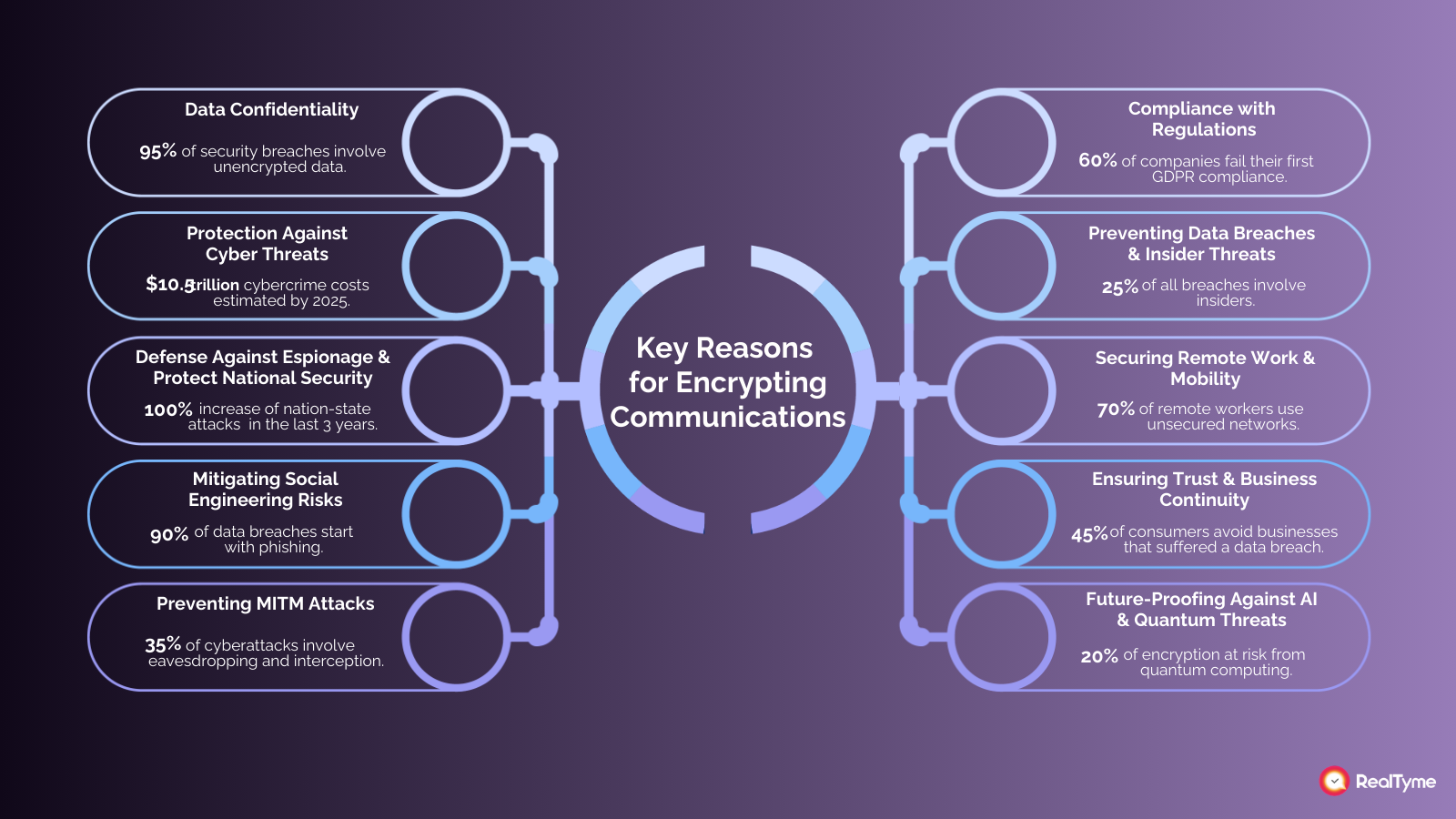
What Is Encryption? Types, Algorithms & How It Protects Your Data - Why Encryption Matters for Privacy and Security.
Encryption is not just a technical concept; it is a practical shield against real threats.
Privacy: Encryption prevents ISPs, ad networks, and malicious actors from reading your communications. Even if data is intercepted on public Wi-Fi, it remains gibberish without the key.
Data Integrity: Encryption helps detect tampering. If an attacker modifies encrypted data in transit, decryption will fail or produce garbled results, alerting you to the interference.
Regulatory Compliance: Standards like HIPAA for healthcare, PCI DSS for payment cards, and GDPR for personal data mandate encryption to protect sensitive information. Non-compliance can result in severe fines.
Breach Mitigation: According to IBM’s 2025 Cost of a Data Breach report, organizations using encryption reduce the financial impact of a breach by over $200,000. Stolen encrypted data is worthless to attackers without the keys.
How to Verify Your Encryption Is Working
BrowserScan product interface.
Encryption is only effective if it is implemented correctly. Misconfigurations, expired certificates, or VPN leaks can silently expose your data. You can proactively check your own security posture with free diagnostic tools.
For example, after setting up a VPN or configuring your browser’s privacy settings, you should verify that your real IP address is not leaking. A WebRTC leak test can reveal whether your browser is exposing your true location even when you think you are protected. Similarly, a DNS leak test confirms that your queries are routed through the encrypted VPN tunnel rather than your ISP’s default servers.
Platforms like BrowserScan offer a suite of these tests without requiring any software installation. You can run a browser fingerprint analysis to see how identifiable your device is, perform DNS and WebRTC leak tests to validate your VPN, and use the IP address lookup to check for proxy detection and geolocation accuracy. These checks help you confirm that the encryption you rely on—whether from HTTPS, a VPN, or your browser’s anti-fingerprinting features—is actually holding up in practice.
Threats to Encryption and How to Defend Against Them
Encryption is powerful, but it is not invincible. Understanding its limitations helps you avoid a false sense of security.
Brute Force Attacks
Attackers try every possible key combination until they find the correct one. The defense is simple: use algorithms with sufficiently long key lengths. AES-256 and RSA-4096 are currently considered resistant to brute force attacks for the foreseeable future.
Side-Channel Attacks
Instead of attacking the math, side-channel attacks exploit the physical implementation—such as monitoring power consumption, electromagnetic leaks, or timing information during encryption operations. Mitigation requires careful hardware and software design.
Inadequate Key Management
Even the strongest encryption fails if keys are stored in plaintext, hardcoded in applications, or shared carelessly. Use hardware security modules (HSMs) or dedicated key management services to generate, rotate, and store keys securely.
Quantum Computing Threat
Large-scale quantum computers could theoretically break RSA and ECC by solving the underlying mathematical problems much faster. The industry is already developing post-quantum cryptography standards to address this future risk. For now, current encryption remains safe, but the transition is being planned.
Related reading
- ASN Lookup: Find IP Ranges, Owners & ISP Info Fast - Learn what an ASN lookup reveals about IP ownership, routing, and network blocks. Use free tools and APIs to check any IP or AS number instantly.
- Pixelscan Login: How to Access & Use Your Privacy Scans - Learn how Pixelscan login works, why there is no traditional account, and how to save, interpret, and share your browser fingerprint and IP leak scan results securely.
- What Is an IP API? A Complete Guide to IP Geolocation Services - Learn how IP APIs work, compare free and paid geolocation services, and discover how to verify your IP data accuracy with privacy tools.
Sources and further reading
- What is Encryption? | Types of Encryption - What is encryption? Learn about how data encryption works, why it's important, the different types of encryption, and how encryption is used in HTTPS.
- Encryption - Encryption is the process of transforming readable plaintext into unreadable ciphertext to mask sensitive information from unauthorized users.
Frequently Asked Questions
What is the difference between encryption and hashing?
Encryption is reversible with the correct key. Hashing is a one-way function that produces a fixed-size output and cannot be reversed. Hashing is used for verifying data integrity and storing passwords, not for confidentiality.
Is end-to-end encryption the same as encryption in transit?
End-to-end encryption (E2EE) means data is encrypted on the sender’s device and only decrypted on the recipient’s device. No intermediary server can read the content. Encryption in transit protects data between a client and a server, but the server itself can still access the plaintext.
Can encrypted data be hacked?
Encryption can be defeated by stealing keys, exploiting software vulnerabilities, or using brute force against weak algorithms. The encryption itself is rarely broken mathematically; the implementation or key management is usually the weak point.
What is a TLS/SSL certificate?
A TLS certificate is a digital file that authenticates a website’s identity and enables an encrypted connection. It contains the site’s public key and is issued by a trusted certificate authority. You can view a site’s certificate by clicking the lock icon in your browser’s address bar.
How do I check if my browser traffic is encrypted?
Look for https:// at the beginning of the URL and a lock icon in the address bar. For deeper verification, use an online tool to check your browser’s fingerprint and run leak tests to ensure your VPN or proxy is not exposing data through WebRTC or DNS leaks.
Conclusion
Encryption is the invisible engine behind digital trust. It secures your online purchases, protects your private conversations, and keeps your stored data safe from prying eyes. By understanding the difference between symmetric and asymmetric encryption, recognizing the algorithms that power modern security, and actively verifying your own protections, you move from being a passive user to an informed defender of your own privacy. Regular testing with tools like BrowserScan ensures that the encryption you depend on is configured correctly and actually working when it matters most.