
BigDataCloud Tutorial: Get Started with IP Geolocation APIs
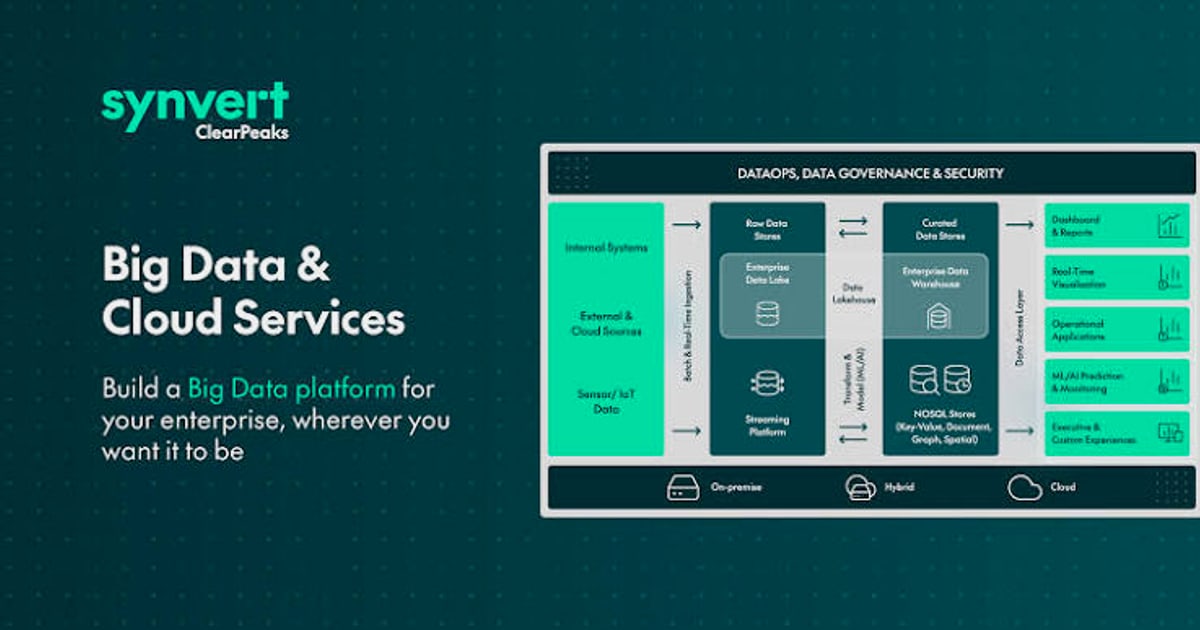
BigDataCloud Tutorial: Get Started with IP Geolocation APIs
BigDataCloud delivers precise location intelligence through a suite of APIs that go far beyond placing a dot on a map. Patented router‑based technology, confidence area polygons, and proactive hazard reports set it apart from legacy IP databases. In this hands‑on tutorial you’ll learn how to sign up, make your first API call, explore the GraphQL interface, and build privacy‑focused workflows—including a practical method to verify your VPN leak protection by combining BigDataCloud’s intelligence with BrowserScan’s comprehensive leak tests.
What Is BigDataCloud?
BigDataCloud is a location intelligence platform that offers four core API packages: IP Geolocation, Reverse Geocoding, Verification, and Network Intelligence. Every plan includes all endpoints and a generous free tier—no credit card required.
- IP Geolocation pinpoints an IP’s city, country, coordinates, time zone, ISP, and ASN, backed by a daily publicly validated accuracy report.
- Confidence Area returns a polygon that represents the actual geographic range where the IP is likely operating, instead of a misleading single coordinate.
- Hazard Report assesses hosting/datacenter probability, blocklist history, and other signals that indicate non‑human or risky traffic—without relying solely on reactive VPN blocklists.
- Reverse Geocoding turns latitude/longitude into readable addresses, with a free client‑side API that requires no API key.
- Network Intelligence delivers ASN details, neighbor relationships, and routing context.
Developers can choose between REST and GraphQL (unique among IP geolocation providers) and can even connect the APIs directly to AI assistants like Claude and Cursor via BigDataCloud’s MCP server.
Getting Your API Key

BigDataCloud Tutorial: Get Started with IP Geolocation APIs - Getting Your API Key.
- Visit bigdatacloud.com and click Sign up free.
- Fill in your email and password—no payment details needed.
- Wait a few minutes for key propagation, then find your key in the dashboard.
- Copy the key and test it immediately.
First call (cURL):
curl "https://api-bdc.net/data/ip-geolocation?ip=1.1.1.1&key=YOUR_KEY"
You’ll get a JSON response containing location, confidence level, network data, and an optional hazardReport if you include the parameter &hazard=1.
Core API Endpoints for IP Geolocation
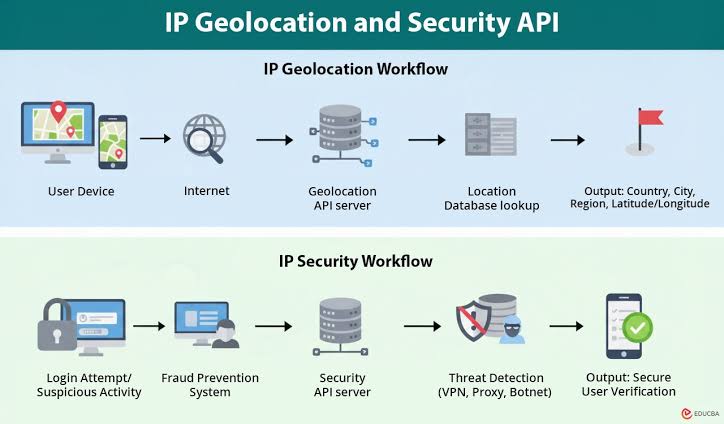
BigDataCloud Tutorial: Get Started with IP Geolocation APIs - Core API Endpoints for IP Geolocation.
REST API Quick Start
The GET /data/ip-geolocation endpoint returns 50+ fields. For security and privacy checks, the hazardReport object is essential.
Request with hazard report:
curl "https://api-bdc.net/data/ip-geolocation?ip=8.8.8.8&key=YOUR_KEY&hazard=1"
Key response fields:
location.city,location.countryCode,location.latitude,location.longitudeconfidence:"low","medium", or"high"network.isp,network.asnhazardReport.isHostingProvider,hazardReport.isProxy,hazardReport.isTorExitNode,hazardReport.blocklistScore
GraphQL API: Fetch Only What You Need
BigDataCloud is the only IP geolocation provider with a full GraphQL interface. You can request exactly the fields required, reducing payload size and the number of round trips. Post to /graphql/ip-geolocation:
{
  ipGeolocation(ip: "1.1.1.1") {
    location { city countryCode }
    confidence
    network { asn }
  }
}
The response is a lean JSON object containing only the selected fields.
Confidence Area & Hazard Report Deep Dive
When you enable withConfidenceArea and withHazardReport, you get:
- Confidence area polygon: A set of GPS coordinates outlining the probable service area. A residential IP may have a tight polygon, while a mobile carrier IP could span an entire state.
- Hazard signals:
isHostingProviderproactively flags data‑centre IPs even if they aren’t on a blocklist—a strong indicator of VPNs, proxies, or automated traffic.
These endpoints are available as combined calls like /data/ip-geolocation-with-confidence-area and /data/ip-geolocation-with-confidence-area-and-hazard-report. Full details and endpoint references are on the IP Geolocation API page.
Reverse Geocoding with BigDataCloud
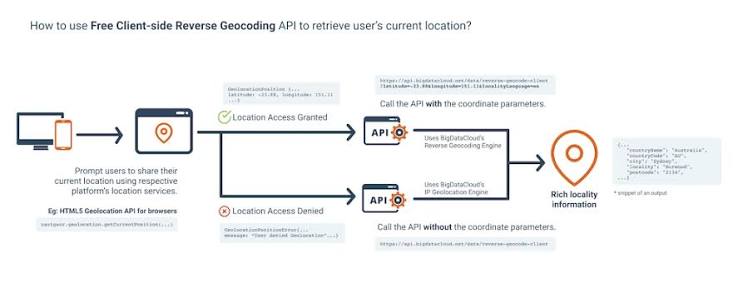
BigDataCloud Tutorial: Get Started with IP Geolocation APIs - Reverse Geocoding with BigDataCloud.
Convert GPS coordinates to a human‑readable location without any API key (client‑side and server‑side options available).
Server‑side (cURL):
curl "https://api-bdc.net/data/reverse-geocode?latitude=48.8566&longitude=2.3522&key=YOUR_KEY"
Client‑side (React hook): BigDataCloud offers @bigdatacloudapi/react-reverse-geocode-client that works entirely in the browser—no keys exposed, zero configuration.
This versatility makes reverse geocoding ideal for mobile apps, real‑time map interactions, and privacy‑aware applications where you want to minimise server dependencies.
Practical Use Cases
- Ad Tech: Accurate IP geolocation powers geo‑targeting, bidding strategies, and compliance checks without cookies or consent.
- Fraud Detection: Combine country, ISP, and hazard signals to flag suspicious logins or checkout attempts.
- Content Localization: Serve region‑specific content by resolving the user’s IP to a city/time zone.
- VPN & Proxy Detection: The hazard report’s hosting‑probability score uncovers anonymizing traffic even when the IP isn’t on any public blocklist.
Testing Your VPN Privacy with BigDataCloud and BrowserScan
BigDataCloud Tutorial: Get Started with IP Geolocation APIs product interface and feature overview.
A VPN should hide your real IP, but leaks can still expose your identity through DNS, WebRTC, or IP fallback. This is where a two‑step verification flow shines:
- Run a full leak test using BrowserScan. It checks browser fingerprinting, IP leaks, DNS leaks, WebRTC leaks, and more—all without installing a plugin. After you connect to a VPN, BrowserScan will display the IP address your browser is actually using.
- Look up that IP with BigDataCloud to see where it’s located and whether it’s classified as a hosting/datacenter IP (a sign it might be a VPN node) or associated with any risk signals.
Example Python script:
import requests

ip = "YOUR_VPN_IP_FROM_BROWSERSCAN"  # Replace with the real value
api_key = "YOUR_BIGDATACLOUD_KEY"

params = {
    "ip": ip,
    "key": api_key,
    "hazard": 1
}
resp = requests.get("https://api-bdc.net/data/ip-geolocation", params=params).json()

print(f"Location: {resp['location']['city']}, {resp['location']['countryCode']}")
print(f"Confidence: {resp['confidence']}")
print(f"Hosting?: {resp['hazardReport']['isHostingProvider']}")
print(f"Blocklist score: {resp['hazardReport']['blocklistScore']}")
This workflow tells you not just if your VPN is working, but how trustworthy the exit IP actually is. For a detailed step‑by‑step leak‑fixing guide, read our article on using BrowserScan with NordVPN to catch every privacy leak. To understand the different types of scans that protect your browsing, see our security scanner guide.
Code Examples in Multiple Languages
Node.js (Axios)
const axios = require('axios');

async function geolocate(ip) {
  const { data } = await axios.get('https://api-bdc.net/data/ip-geolocation', {
    params: { ip, key: process.env.BDC_KEY, hazard: 1 }
  });
  console.log(data.location.city, data.hazardReport.isProxy);
}
cURL for Hazard Report
curl -G "https://api-bdc.net/data/ip-geolocation" \
  -d "ip=198.51.100.1" \
  -d "key=YOUR_KEY" \
  -d "hazard=1"
All examples work identically over GraphQL with fewer fields returned—perfect for mobile or low‑bandwidth environments.
Advanced: MCP Integration and AI Assistants
BigDataCloud ships an MCP (Model Context Protocol) server that lets AI coding assistants like Claude, Cursor, and VS Code directly query IP geolocation and reverse geocoding. Developers simply add a snippet to their MCP configuration, and the AI can geolocate an IP, validate a phone number, or reverse geocode coordinates without leaving the conversation. Check the BigDataCloud blog for setup instructions and examples.
Troubleshooting & Best Practices
- Caching: Respect TTLs and cache results server‑side to stay within your plan limits.
- Error handling: Always check for
api-bdc.neterror responses (error.codeanderror.message) and implement exponential backoff on 429 status codes. - Confidence interpretation: Use the confidence area polygon when logic depends on location boundaries—a point estimate may be wrong for mobile or satellite connections.
- Security: Never expose your API key in client‑side code. Use the free client‑side APIs for reverse geocoding, which don’t require authentication.
Related reading
- WireGuard: The Fast, Secure VPN Protocol Explained (2026 Guide) - Learn how WireGuard works, why it’s faster and more secure than OpenVPN/IPsec, and how to test for IP, DNS, and WebRTC leaks after setup.
- What Is a Cybersecurity Suite? 2026 Complete Guide - A cybersecurity suite bundles essential tools to protect your data, privacy, and devices. Compare enterprise and personal suites, and learn how BrowserScan’s privacy checks strengthen your defense.
- What Is Pixelscan.dev? Browser Fingerprint & Bot Detection Tool - Learn what Pixelscan.dev is, how it detects browser fingerprints, bots, IP leaks, and proxies. A free multi-check tool for privacy and automation testing.
Frequently Asked Questions
How accurate is BigDataCloud’s IP geolocation? BigDataCloud publishes a Daily Accuracy Report based on GPS‑derived ground‑truth validation. Results are benchmarked across network types and regions, and the report is updated every 24 hours. The patented router service‑area method often outperforms WHOIS‑based or latency‑probed databases.
Can it detect VPNs and proxies?
Instead of relying solely on reactive blocklists, BigDataCloud calculates an isHostingProvider probability for every IP. Hosting infrastructure IPs are flagged even if they aren’t yet associated with a known VPN company—give you a forward‑looking risk signal.
What’s the free tier limit? The free tier allows up to 50,000 API requests per month for the IP Geolocation package, including all endpoints and GraphQL access. No credit card is needed to start.
How does it compare to IPinfo? IPinfo probes active networks, while BigDataCloud uses a patented routing‑structure analysis and publishes daily public accuracy benchmarks. Both offer rich data, but BigDataCloud’s confidence areas and native GraphQL support are unique differentiators.
How can I use it together with privacy testing tools? Combine BigDataCloud’s IP lookup and hazard report with comprehensive leak tests from BrowserScan. After running BrowserScan’s IP, DNS, and WebRTC leak checks, query BigDataCloud to see the location and risk profile of any IP that was exposed—helping you close every privacy gap.
Conclusion
BigDataCloud packages enterprise‑grade location intelligence into a developer‑friendly, free‑to‑start platform. From REST and GraphQL IP geolocation to confidence areas and proactive risk scoring, the APIs integrate smoothly into ad tech, security, and analytics workflows. When paired with privacy verification tools like BrowserScan, you gain full visibility into not only where your traffic appears to originate, but also how safe that endpoint really is. If you manage multiple API keys and security configurations across projects, tools like BrowserScan can help keep your integrations organized and audit‑ready—making it easier to maintain a trustworthy, privacy‑first infrastructure.