
BrowserLeaks Review: The Deepest Browser Fingerprint Audit for Privacy Enthusiasts
BrowserLeaks Review: The Deepest Browser Fingerprint Audit for Privacy Enthusiasts
BrowserLeaks isn’t just another IP leak checker that flashes a green light and calls you anonymous. It’s a raw, unfiltered diagnostic suite that holds up a mirror to every fingerprinting surface your browser exposes — from GPU-level rendering artifacts to the cryptographic handshake your TLS library performs. In 2026, when tracking has moved far beyond cookies and simple IP logging, tools like BrowserLeaks become essential for anyone who wants to see what anti-fraud engines and bot managers actually detect.
This review explains exactly what BrowserLeaks does, who it’s for, how to interpret its results, and where it fits in your privacy workflow. Whether you’re a VPN user, a multi-accounting affiliate, or a security researcher, you’ll walk away knowing if this tool belongs in your stack.
What Is BrowserLeaks?
BrowserLeaks Review: The Deepest Browser Fingerprint Audit for Privacy Enthusiasts - supporting product research image 1.
BrowserLeaks is a free, browser-based suite of online tests that systematically probes JavaScript APIs, network behaviors, and GPU pipelines to reveal your digital fingerprint. There’s no account, no installation, and no data collection — the site runs entirely in your browser and displays output in real time.
Instead of simplifying results into a pass/fail badge, BrowserLeaks shows raw data: your actual public IP, the exact WebGL renderer string, the computed canvas fingerprint, even the list of TLS cipher suites your client offers. This transparency makes it a favorite among technically-minded users who want to verify VPN configurations, validate anti-detect browser profiles, or learn how tracking algorithms work under the hood.
How BrowserLeaks Works: The Fingerprint Probe
BrowserLeaks Review: The Deepest Browser Fingerprint Audit for Privacy Enthusiasts - supporting product research image 2.
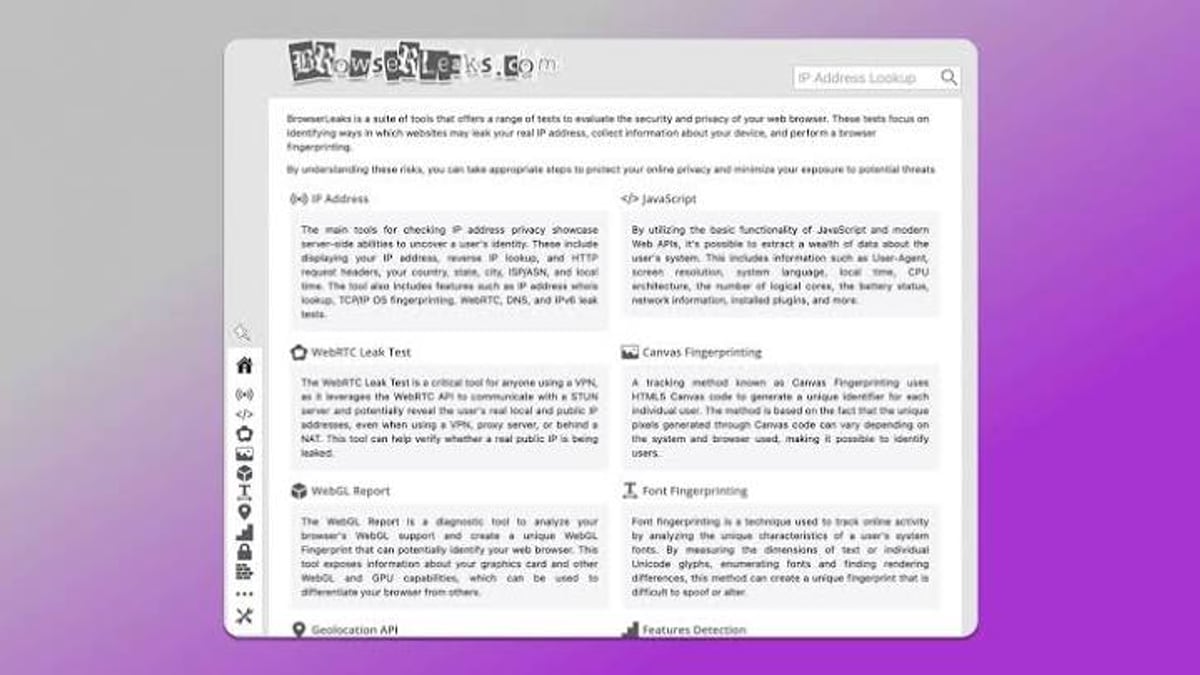
BrowserLeaks operates by leveraging the same Web APIs that anti‑fraud systems use for identification. It doesn’t send any data to external servers beyond what a normal website could collect — the tests execute entirely client-side or use standard protocols like STUN for WebRTC.
Here are the key fingerprinting surfaces it examines:
- IP & WebRTC: Reveals every IP candidate exposed through HTTP, STUN/TURN, and local network interfaces, even when a VPN is active.
- Canvas & WebGL: Renders hidden scenes to capture GPU‑dependent pixel differences that form a stable hardware fingerprint.
- AudioContext: Analyzes the subtle timing and floating‑point artifacts of your audio stack.
- TLS/JA3/JA4: Fingerprints the exact TLS version, cipher suites, and extensions sent in the ClientHello handshake.
- Font fingerprinting: Enumerates available system fonts and measures glyph rendering variations.
- Client Hints & Feature Detection: Lists what HTTP headers and Web APIs your browser broadcasts, including experimental ones.
The outputs are dense, and that’s intentional. BrowserLeaks expects you to understand the difference between a normal LAN address and a leaked public IP, or why your Canvas hash might be rare. In return, it provides an audit trail that no simplified checker can match.
Ideal Users and Use Cases
Not everyone needs the granularity BrowserLeaks provides. It’s best suited for:
- VPN and Proxy Users: Verify that WebRTC isn’t leaking your real IP, and that your DNS queries align with your tunnel. A simple IP check won’t catch a leak where your browser bypasses your VPN’s routing table.
- Anti‑Detect Browser Operators: Before launching a multi‑accounting campaign, run BrowserLeaks to confirm that canvas, WebGL, and TLS fingerprints are not only masked but consistent with the spoofed environment. If you’re using a tool like Chameleon Mode for anti‑detect profiles, BrowserLeaks is your ground truth for fingerprint alignment.
- Security Researchers & Developers: Study how modern tracking techniques function. BrowserLeaks includes references to W3C specifications and academic research, making it an excellent educational companion.
- Network Auditors: Combine BrowserLeaks with active scanning tools — like integrating BrowserScan with Nmap — to detect vulnerabilities and verify that network policies are truly hiding your device identity.
If you just want a quick “Am I anonymous?” score, you’ll likely find it frustrating. But if you need to understand what data you’re leaking and why, BrowserLeaks is the most honest reporter available.
Key Tests Decoded: What They Show and How to Read Them
WebRTC Leak Test: The VPN Killer
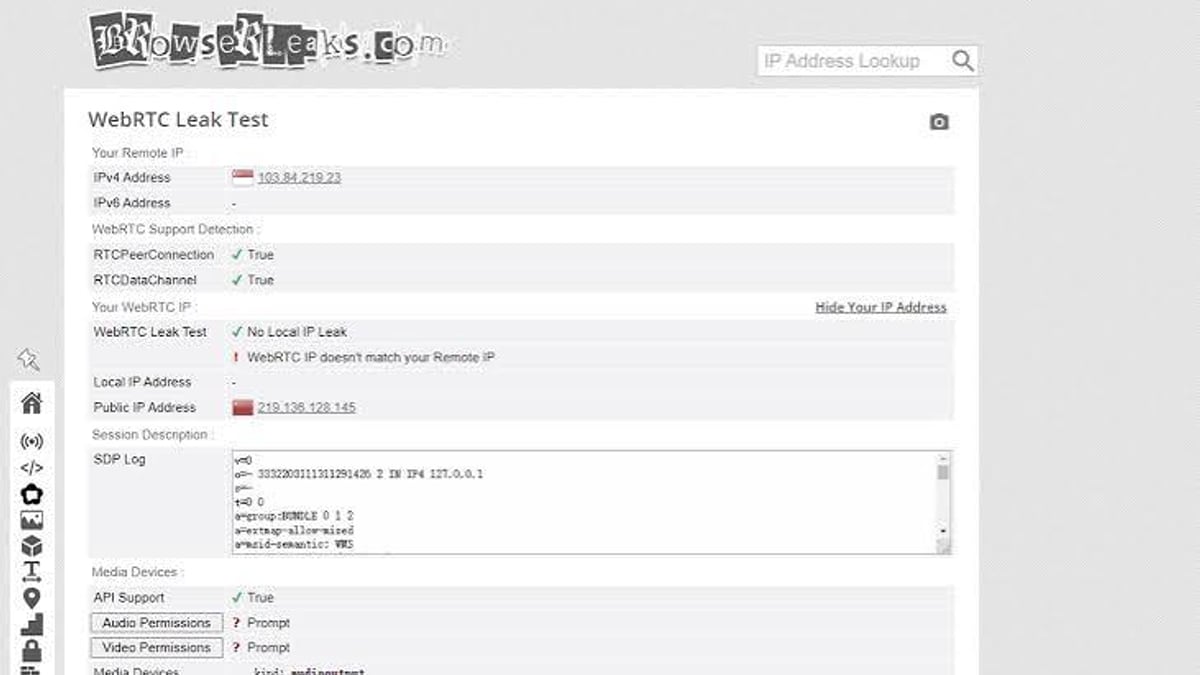
The WebRTC test simulates a peer connection to a STUN server. It gathers every network candidate your machine can see: your LAN addresses, your VPN tunnel IP, and — critically — your real public IP if your VPN doesn’t intercept WebRTC at the driver level. A clean result shows only your VPN’s IPs and no unexpected IPv6 exposure.
Canvas & WebGL Fingerprinting
BrowserLeaks renders a hidden image using the Canvas 2D API and extracts a SHA‑256 hash of the pixel data. Because GPU, driver, and OS variations subtly affect rendering, the resulting fingerprint is unique and persistent. WebGL goes deeper, revealing your exact graphics card model and driver via WEBGL_debug_renderer_info. A well‑configured anti‑detect browser should present consistent artificial values here, not just block the APIs (which makes you stand out even more).
TLS / JA3 Fingerprint: The Protocol‑Level Identifier
Even before JavaScript runs, your browser’s TLS handshake broadcasts a signature — the JA3 or JA4 fingerprint — built from cipher suites, extensions, elliptic curves, and other parameters. BrowserLeaks parses this raw handshake and shows you the resulting hash. Anti‑bot services like Cloudflare use this to identify headless browsers and unusual clients, so mismatches between your user‑agent and your TLS fingerprint are a red flag you cannot afford to ignore.
DNS Leak Test & Geolocation API
Separate from IP, the DNS test verifies which nameservers resolve domain names. If your DNS queries exit through your ISP instead of your VPN, you’re leaking your true location. The Geolocation API test shows whether your browser is sharing precise GPS or WiFi‑based coordinates, which could undermine location spoofing.
Pricing and Setup: Free and Instant
BrowserLeaks is completely free. There’s no registration, no API key, and no premium tier. You visit browserleaks.com, click the test you need, and see the results immediately. The site states it does not store fingerprints or personal data, and uses no persistent cookies beyond what’s needed for functionality. For privacy‑sensitive users, that’s a crucial trust signal.
Setup is trivial: open the page in the browser you want to audit. No extensions required. If you’re testing a VPN, connect it first, then load BrowserLeaks. If you’re verifying an anti‑detect profile, ensure it’s the active session.
How BrowserLeaks Compares to Similar Tools
BrowserLeaks Review: The Deepest Browser Fingerprint Audit for Privacy Enthusiasts - supporting product research image 3.
BrowserLeaks isn’t the only game in town. Here’s a quick decision matrix against two common alternatives:
| Tool | Strengths | Drawbacks |
|---|---|---|
| BrowserLeaks | Deep, raw data; covers TLS/JA3, Canvas, WebGL, audio; no third‑party bias | No user‑friendly score; requires technical literacy |
| BrowserScan | Cleaner UI, shows combined trust score, good for quick checks | Less granular; some tests simplified |
| Pixelscan | Excellent for detecting inconsistencies in anti‑detect setups | Focused on multi‑accounting; less educational for general privacy |
Use BrowserLeaks when you need to understand why something leaks, not just that it leaks. For a quick sanity check, tools like BrowserScan combined with Nmap can be more approachable. And if you’re auditing IP‑level data alongside fingerprinting, services like IP‑Lookup.net complement the network‑layer analysis nicely.
Decision Criteria: Should You Use BrowserLeaks?
BrowserLeaks Review: The Deepest Browser Fingerprint Audit for Privacy Enthusiasts - supporting product research image 4.
Use BrowserLeaks if:
- You manage VPN configurations and must confirm zero leaks at the protocol level.
- You work with anti‑detect browsers and need to validate fingerprint consistency across dozens of profiles.
- You’re teaching yourself (or your team) about browser fingerprinting and want to see real‑time data without marketing fluff.
- You value transparency over a simplified “green light” verdict.
Skip it (or use it alongside another tool) if:
- You just want a simple pass/fail privacy score.
- You’re unwilling to learn how WebRTC, canvas, and TLS handshakes work.
- You’re looking for an all‑in‑one solution that also actively blocks leaks (BrowserLeaks diagnoses, it doesn’t fix).
Related reading
- Top 10 Online Vulnerability Scanning & Network Security Tools 2026 - Discover the best online vulnerability scanning tools for 2026. Compare Qualys, Tenable, HackerTarget & others, see criteria, and learn how to choose.
- BigDataCloud Review: Precise IP Geolocation APIs Tested - In-depth BigDataCloud review covering accuracy, pricing, GraphQL, free APIs, and how it stacks up for fraud detection, content localization, and network monitoring.
Sources and further reading
- BrowserLeaks Review 2026: The Ultimate Guide to Fingerprint Testing - Is your digital identity leaking? Read our definitive BrowserLeaks review for 2026. Learn how to test WebRTC, Canvas, and JA3/JA4 fingerprints like a pro.
- Browserleaks Review 2026: The Ultimate Guide to Testing Your Digital Privacy - Master BrowserLeaks to audit your digital fingerprint! 🛡️ Test for IP leaks, WebRTC, and browser identity. Secure your online presence now! 🚀
FAQ
Is BrowserLeaks safe and anonymous?
Yes. The site does not collect or store any fingerprints or personal information. All tests run in your own browser, and the results are visible only to you. There are no third‑party trackers beyond what you might choose to enable on the settings page.
Why does BrowserLeaks show my real IP even with a VPN active?
This typically happens due to a WebRTC leak. Your browser’s WebRTC implementation might bypass your VPN routing and transmit your real public IP through the STUN protocol. You’ll see both your VPN IP and your real IP in the IP candidates list. The fix is to disable WebRTC (if acceptable), use a VPN that blocks WebRTC at the driver level, or use a browser that routes WebRTC through the proxy correctly.
How often should I run BrowserLeaks tests?
Run them whenever you change your VPN server, update your browser, or modify privacy settings. For consistent multi‑accounting, pre‑check every new session.
Can BrowserLeaks help me detect browser fingerprint spoofing?
Yes — it’s the most thorough public tool for verifying that your spoofed fingerprints (canvas, WebGL, WebAudio) are consistent and believable. If the hashes you see differ from what your User‑Agent and platform would normally produce, you’re leaving a trace.
Conclusion: The Fingerprint Truth‑Teller
BrowserLeaks doesn’t sugar‑coat. It delivers the unfiltered evidence your browser leaves behind, from the GPU kernel to the network layer. For anyone serious about digital privacy or operating multiple accounts without being linked, it’s an indispensable audit tool. Just be prepared to learn the difference between a clean TLS signature and a glaring fingerprint mismatch — because BrowserLeaks will show you both.