
What Is a Virtual Private Network (VPN)? How It Works & Types
What Is a Virtual Private Network (VPN)? How It Works, Types, and How to Test Yours
A virtual private network, or VPN, is one of the most widely used privacy and security tools on the internet today. Yet many people use one without fully understanding what it does, what it does not do, and how to verify that it is actually working. This guide explains the core mechanics of a VPN, the main types, common use cases, and practical steps you can take to confirm your connection is not leaking identifiable data.
What Is a Virtual Private Network?
What Is a Virtual Private Network (VPN)? How It Works & Types - What Is a Virtual Private Network?.
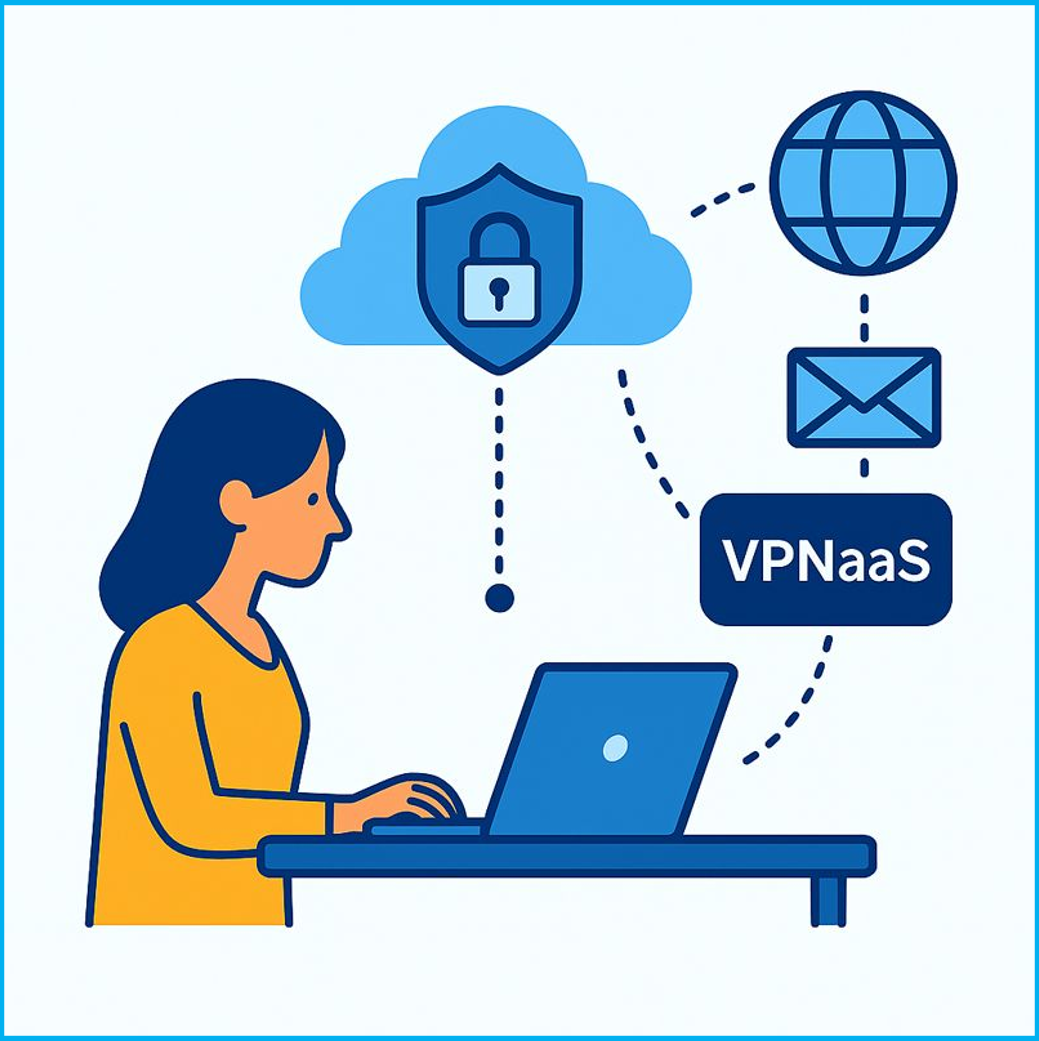
A virtual private network is an encrypted connection that extends a private network across a public one, usually the internet. Instead of sending traffic directly from your device to a website or service, a VPN routes it through an intermediary server operated by the VPN provider or your organization.
Think of it as a protected tunnel. Your data enters the tunnel on your device, travels in encrypted form across the public internet, and exits at the VPN server before continuing to its final destination. Anyone intercepting the traffic between your device and the VPN server sees only ciphertext, not the actual content.
The name breaks down into three parts:
- Virtual because no dedicated physical cable connects your device to the remote network.
- Private because encryption prevents outside parties from reading the traffic in transit.
- Networked because your device and the VPN server work together to maintain the connection.
A VPN can also mask your public IP address. The websites you visit see the VPN server's IP address rather than the one assigned by your internet service provider. This is why VPNs are often described as privacy tools, though the privacy they provide has important limits.
How a VPN Works: Encryption, Tunneling, and Authentication

What Is a Virtual Private Network (VPN)? How It Works & Types - How a VPN Works: Encryption, Tunneling, and Authentication.
A functional VPN depends on three technologies working together.
Encryption
Encryption converts readable data into ciphertext using cryptographic algorithms. When your device sends a request through a VPN, the payload is encrypted before it leaves your machine. Even if someone captures the packets on a public Wi-Fi network, they cannot read the contents without the decryption keys.
Modern VPNs typically use protocols such as WireGuard, OpenVPN, or IPsec, each with different cryptographic primitives and performance characteristics. If you want a deeper look at one of the most established options, see this explanation of how IPsec VPNs secure your traffic.
Tunneling
Tunneling is the process of encapsulating encrypted data inside another packet so it can travel across the internet. The outer packet contains routing information that gets it to the VPN server; the inner packet contains the actual encrypted payload. This layered structure is what creates the "tunnel" between your device and the remote network.
Authentication
Before a tunnel is established, the VPN must verify that the connecting user or device is authorized. Authentication methods include passwords, pre-shared keys, digital certificates, biometrics, and two-factor authentication. Without this step, an attacker could potentially establish a tunnel and gain access to internal resources.
Together, these three mechanisms provide confidentiality, integrity, and access control. They do not, however, guarantee anonymity.
What a VPN Does and Does Not Do
What Is a Virtual Private Network (VPN)? How It Works & Types - What a VPN Does and Does Not Do.
A common misconception is that a VPN makes you completely anonymous online. That is not accurate.
A VPN can:
- Encrypt traffic between your device and the VPN server, protecting it from snooping on local networks.
- Hide your real IP address from the websites and services you visit.
- Help you access resources that are restricted by geographic location or network policy.
- Add a layer of protection when using public Wi-Fi.
A VPN cannot:
- Make you invisible to the VPN provider itself, which can see your traffic after it exits the tunnel.
- Prevent the websites you visit from identifying you through browser fingerprinting, cookies, or account logins.
- Protect you from malware, phishing, or social engineering attacks.
- Stop every form of IP leakage if the VPN client or browser is misconfigured.
This last point is critical. A VPN is only as private as its configuration. DNS leaks, WebRTC leaks, and IPv6 leaks can all expose your real IP address even when the VPN appears to be connected.
Types of VPNs
What Is a Virtual Private Network (VPN)? How It Works & Types - Types of VPNs.
VPNs are generally classified by the topology they create.
Remote Access VPN
A remote access VPN connects a single device to a private network. This is the model used by employees working from home or traveling, and by consumers using commercial VPN services. The device establishes an encrypted tunnel to a VPN gateway, which then grants access to internal resources or routes traffic to the public internet.
Remote access VPNs often include endpoint posture checks, meaning the VPN gateway verifies that the device meets security requirements before allowing the connection.
Site-to-Site VPN
A site-to-site VPN connects two networks, such as a corporate headquarters and a branch office. Dedicated hardware at each location maintains the tunnel, and users on either network can access resources on the other as if they were on the same local network. This approach is common when offices are too far apart for direct physical connections.
Host-to-Host VPN
Less common in everyday use, a host-to-host VPN creates an encrypted tunnel directly between two individual machines. This can be useful for server administration, secure file transfer, or connecting two systems that need to communicate privately.
Split Tunneling
Split tunneling is a configuration option rather than a separate VPN type. It lets you route some traffic through the VPN tunnel while other traffic goes directly to the internet. This can reduce bandwidth usage and improve performance, but it also introduces risks. Traffic that bypasses the tunnel is not protected, and misconfigured split tunneling can lead to DNS leaks.
Common VPN Protocols
Different VPN protocols balance speed, security, and compatibility in different ways.
| Protocol | Strengths | Considerations |
|---|---|---|
| WireGuard | Fast, modern cryptography, small codebase | Newer, fewer legacy integrations |
| OpenVPN | Mature, highly configurable, widely supported | Requires third-party client software |
| IPsec/IKEv2 | Strong security, good mobile support | More complex to configure |
| L2TP/IPsec | Broad compatibility | Older, slower than modern options |
| PPTP | Simple, fast | Deprecated, insecure, avoid |
For most new deployments, WireGuard or OpenVPN are solid defaults. IPsec remains important in enterprise and site-to-site scenarios. If you are evaluating IPsec specifically, this guide to what IPsec is and how it secures traffic covers tunnel versus transport mode, AH versus ESP, and key exchange.
How to Test Whether Your VPN Is Actually Working
Connecting to a VPN is not enough. You should verify that your real IP address is not leaking and that your traffic is actually being routed through the tunnel. Here is a practical testing sequence.
Step 1: Check Your Visible IP Address
Before connecting to the VPN, note your real public IP address. After connecting, check it again. The IP address should change to one associated with the VPN server. If it does not, the tunnel is not active.
An IP address lookup tool can show you the IP address, geolocation, ISP, and whether the address is associated with a known proxy or VPN exit node.
Step 2: Run a DNS Leak Test
A DNS leak occurs when your device sends domain name resolution requests outside the VPN tunnel, often to your ISP's DNS servers. This reveals which websites you are visiting even if your traffic is otherwise encrypted.
A DNS leak test checks whether the DNS resolver responding to your queries belongs to your ISP or to the VPN provider. If you see your ISP's servers, you have a leak.
Step 3: Run a WebRTC Leak Test
WebRTC is a browser technology that enables real-time communication, but it can also expose your real IP address even when a VPN is active. This is especially common in Chrome, Firefox, and Edge if WebRTC is not disabled or properly routed.
A WebRTC leak test checks whether browser APIs are revealing your local or public IP address outside the VPN tunnel.
Step 4: Check Your Browser Fingerprint
Even with a working VPN, websites can identify you through browser fingerprinting. Your browser reveals details such as the user agent, installed fonts, screen resolution, timezone, language settings, and canvas rendering behavior. Combined, these signals can create a unique identifier that persists across IP address changes.
A browser fingerprint analysis tool shows what your browser is revealing and whether your fingerprint looks authentic or suspicious. This matters because a VPN that changes your IP address but leaves an unusual fingerprint can actually make you more identifiable, not less.
Step 5: Verify TLS Behavior
If you are using a VPN for automation, scraping, or accessing services that scrutinize connection patterns, your TLS fingerprint can also leak information about your setup. Tools that analyze JA3 and JA4 fingerprints can show whether your TLS handshake matches a typical browser or reveals an automated client. Learn more about TLS fingerprint preservation and why it matters.
Why VPN Leaks Happen
VPN leaks usually stem from configuration issues rather than fundamental protocol flaws. Common causes include:
- DNS settings not forced through the tunnel. If the VPN client does not override system DNS settings, queries may go to the local resolver.
- IPv6 not disabled or routed. Many VPNs only tunnel IPv4 traffic. If your network has IPv6 connectivity, traffic may bypass the tunnel entirely.
- WebRTC enabled in the browser. WebRTC can query local network interfaces directly.
- Split tunneling misconfiguration. Traffic excluded from the tunnel by policy may leak identifying information.
- Kill switch not enabled. If the VPN connection drops and no kill switch is active, traffic resumes over the unprotected connection.
Regular testing helps you catch these issues before they expose your activity.
VPNs in a Broader Security Context
A VPN is one layer in a broader security strategy, not a complete solution. Organizations often combine VPNs with firewalls, intrusion detection systems, endpoint protection, and network monitoring. If you are responsible for securing a network, understanding how VPNs fit alongside other tools is essential. This overview of 15 essential network security tools explains how VPNs complement monitoring, scanning, and defense systems.
For security professionals who need to validate their own infrastructure, penetration testing tools such as Nmap can help identify open ports and vulnerabilities on VPN gateways and other exposed services.
Sources and further reading
- Virtual private network - A virtual private network (VPN) is an overlay network that uses network virtualization to extend a private network across a public network, such as the Internet, via the use of encryption and tunneling protocols.[1] In a VPN, a tunneling protocol is used to transfer network messages from one network host to another.
- What Is a Virtual Private Network (VPN)? - A virtual private network, or VPN, is an encrypted connection over the Internet from a device to a network. It is useful for corporate traffic over the Internet.
- What is a VPN? | Microsoft Azure - A VPN (virtual private network) is a networking and security technology that connects on-premises infrastructure with public cloud services. Learn how it works.
Frequently Asked Questions
Is a VPN the same as a proxy?
No. A proxy forwards traffic for specific applications or protocols, often without encryption. A VPN encrypts all traffic at the network level and routes it through a tunnel. Proxies are generally faster but less secure and less comprehensive.
Does a VPN hide my browsing from my ISP?
It hides the content of your traffic from your ISP, but not the fact that you are using a VPN. Your ISP can see that you are connected to a VPN server and how much data you are transferring, but not which websites you visit or what data you send.
Can a VPN provider see my traffic?
Yes, in most cases. The VPN provider can see your traffic after it exits the tunnel and before it reaches its destination. This is why the provider's logging policy and jurisdiction matter. Some providers claim no-log policies, but these claims are difficult to verify independently.
Will a VPN protect me on public Wi-Fi?
Yes, this is one of the strongest use cases for a VPN. On an unsecured public network, a VPN encrypts your traffic so that other users on the same network cannot intercept it.
How do I know if my VPN is leaking my IP address?
Run a DNS leak test and a WebRTC leak test while connected to the VPN. If either test reveals an IP address that belongs to your ISP rather than the VPN provider, you have a leak. You can also use an IP lookup tool to confirm that the visible address matches the VPN server location.
Do all VPNs support split tunneling?
No. Split tunneling is a feature that must be supported by both the VPN protocol and the client software. Some VPNs offer it as an option, while others route all traffic through the tunnel by design.
Conclusion
A virtual private network is a powerful tool for encrypting traffic, masking your IP address, and securely extending private networks across the public internet. Its core mechanisms—encryption, tunneling, and authentication—are well understood and widely deployed. But a VPN is not a magic privacy switch. It has real limitations, and its effectiveness depends on correct configuration and regular verification.
The most practical habit you can develop is testing. After connecting to any VPN, verify your IP address, run DNS and WebRTC leak tests, and check what your browser fingerprint reveals. These steps take only a few minutes and can uncover leaks that would otherwise silently undermine the privacy you expect. A VPN works best when you treat it as one verified layer in a broader security posture, not as a set-and-forget solution.